Blog Article
Learn how Vanguard-MAS transforms vendor risk assessments from manual questionnaires into intelligent, automated investigations powered by specialized AI agents.
Overview
Vanguard-MAS transforms user-defined risk criteria into a structured investigation using specialized AI agents that work in parallel and sequence to produce a vetted, multi-perspective vendor recommendation.
The repository's CAVEATS.md is a self-critical assessment of the system's weaknesses — public-evidence limits, entity-confusion risk, LLM-judgment layers, and verdict semantics. Human review remains indispensable.
What's New — August 2026
- Entity gate and URL filters: a dedicated identity check rejects findings about same-named products or companies (e.g. a WordPress theme sharing the vendor's name), and deterministic filters drop content merely hosted on the vendor's platform and lookalike domains. Applied to findings, adversarial counter-arguments, references, and the Reference Audit in every mode.
- Smarter URL validation: sources blocked by bot protection (HTTP 403) are no longer discarded — the claim is verified against the page's latest Internet Archive snapshot, and the audit row says exactly what was established.
- Verdict at a Glance: VRM reports open with the recommendation, its full derivation trail (VC score with borderline warnings, PVE level and provenance, any downgrade and its trigger), and what the verdict means in practice.
- Vendor Follow-Up Questions: every criterion that couldn't be verified from public evidence compiles into a ready-to-send due-diligence questionnaire (report section 8).
- PVE hardening: the data question now asks what the vendor can access (not what you intend to send), a capability-containment question prices in unrestricted unused features, and each classification carries a validity statement bound to the assessed use.
- AI supply-chain flag: AI/LLM providers found among the vendor's subprocessors surface as an explicit monitoring condition in the conclusion.
- Search controls in Settings: Perplexity search depth and recency filter, and Claude "max searches per query" (the agentic search loop) are configurable per browser, with explanations inline. DeepSeek deployments on Azure Foundry now perform real web searches.
- Cost transparency: per-search fees are itemized in the cost table, and the Summary provider line is mode-aware ("n/a" for template-generated VRM/PVE reports).
Key Features
| Parallel Investigation | Multiple agents research different risk domains simultaneously |
| Hybrid Search Strategy | Combines site-scoped searches with general searches for comprehensive vendor intelligence |
| Context-Aware Search v2 | Each subdomain uses optimal search strategy (GENERAL, SITE_SCOPED, HYBRID, CONFIRMATION) based on signal type |
| URL Validation | All findings validated for accessibility (HTTP 200) before inclusion |
| Adversarial Analysis | Devil's Advocate challenges findings to identify hidden risks |
| Lawsuit Detection | Searches for active litigation with case details and sources |
| Breach Mitigation | Analyzes control adequacy when breaches found and affects final recommendation |
| Provider-Agnostic | Independent provider choices per role — research & analysis LLM (Anthropic, OpenAI, DeepSeek, Azure OpenAI, Azure Anthropic), web search (Perplexity, OpenAI, Anthropic, Azure OpenAI, Azure Anthropic), and report summary (same choices as the LLM role) |
| VRM Framework v2 | 7 maturity domain groups with 33 subdomains, vendor service type classification, and context-aware search strategies |
| Web Interface | React-based web UI with real-time progress tracking and interactive assessments |
| Run Speed Controls | Fast / Standard / Deep depth presets plus per-run phase toggles — skipped phases are always labeled in the report, never rendered as “no risks found” |
| Progressive Search (A/B) | Optional evidence-reuse mode that answers subdomains from already-collected evidence before expanding searches; per-run search-call counters make comparing against comprehensive search trivial |
| Skip-Neutral Scoring | Deselected subdomains are excluded from both numerator and denominator — they never lower a score; every score is annotated with its coverage basis (“based on N of M subdomains assessed”) |
| Polarity-Aware Criteria | A scoring criterion verifies only on favorable evidence — vendor-admitted weaknesses (e.g. training models on customer data without an opt-out) count against the score |
| CourtListener Litigation Search | Federal court-record lookups via the CourtListener API with automatic LLM search fallback |
| History Management | Rename, delete, re-run, and clone past runs with at-a-glance stats (duration, providers, search type, search calls) |
| Per-Run Cost Estimation | Every report includes a token-usage and estimated-cost table (per model: calls, input/output tokens, USD) computed from an editable pricing table (src/vagent/model_pricing.json); unpriced models are named, never guessed |
| Evidence-Blackout Detection | If every search call fails, the report opens with an explicit EVIDENCE BLACKOUT banner — “insufficient information” is attributed to the broken search configuration, never misread as vendor risk |
| PVE Standalone | Product Vulnerability Exposure analysis available in both CLI and web app modes |
Standalone PVE Assessment
The PVE (Product Vulnerability Exposure) mode provides a standalone business impact assessment without the full VRM framework. Available in both CLI and web interface.
What is PVE?
Product Vulnerability Exposure (PVE) measures the potential impact on your organization if an ICT product fails or is compromised—whether due to technical weaknesses in the product itself or the vendor's inability to manage security or operational risks.
PVE focuses on the consequences of failure or security incidents, not the likelihood. It assesses how severe the impact would be on operations, data, recovery capability, and resilience if an incident were to occur.
PVE Classification Levels
| Level | Impact Characteristics |
|---|---|
| Low Impact | Little to no impact on operations; can be handled using existing incident response and recovery capabilities. |
| Medium Impact | May disrupt services or expose data, but the organization can fully recover within established restoration timeframes. |
| High Impact | May exceed recovery thresholds or be partially/fully irrecoverable, leading to significant operational, financial, legal, or reputational harm. |
- PVE is product-centric: It evaluates the ICT product's exposure, not the vendor's maturity (assessed separately under Vendor Capability).
- Cost and size are irrelevant: Even low-cost or widely used tools can have high PVE if their failure would significantly impact the organization.
- PVE feeds into overall risk: Combined with Vendor Capability to determine final risk exposure and required mitigation measures.
Business Case for PVE Standalone
PVE standalone mode provides a calibrated assessment approach that helps organizations focus their due diligence efforts proportionally to the actual business risk. Instead of applying a one-size-fits-all security questionnaire to every vendor, PVE helps you determine the appropriate depth of assessment based on business impact severity.
Traditional VRM assessments ask the same detailed security questions regardless of whether the vendor processes public marketing materials or stores customer PHI. PVE classification helps you calibrate the depth of your vendor assessment — not eliminate it entirely.
The result: Faster onboarding for low-risk vendors while maintaining rigorous scrutiny for high-risk relationships.
Choosing the Right Assessment Mode
Vanguard-MAS uses PVE classification to determine the appropriate depth of vendor assessment. After PVE classification, choose the assessment mode that matches your vendor relationship:
| Scenario | Recommended Mode | Rationale |
|---|---|---|
| SaaS with sensitive data Vendor stores/processes PII, credentials, or PHI |
VRM Mode PVE integrated as Phase I |
Full framework with PVE classification (Phase I), vendor capability maturity scoring, and risk matrix analysis. PVE determines inherent risk before controls. |
| SaaS with limited data exposure Read-only access, no credential storage, public/internal data only |
PVE → Assess Mode Run PVE for classification, then targeted Assess |
PVE classifies business impact (Low/Medium); Assess mode focuses on specific capabilities relevant to that impact level (reliability, support, SLAs) |
| Infrastructure/Platform vendor AWS, GCP, Cloudflare, CDN providers |
PVE → Assess Mode Optional PVE for scope, then Assess |
Run PVE first (optional) to determine assessment scope, then Assess mode focuses on specific capabilities: compliance certifications, incident response, financial stability, geographic presence. |
| Quick vendor triage Evaluate business impact before committing to full assessment |
PVE Standalone Classification only, no full assessment |
Rapid PVE classification to determine risk level before deciding on Assess or VRM mode. Use when you need to triage multiple vendors quickly. |
Data Handling Scenarios: Why Some VRM Questions May Not Apply
VRM assessment questions are designed for comprehensive SaaS evaluations, but not all questions apply depending on your data relationship with the vendor:
| Data Relationship | Applies | May Not Apply |
|---|---|---|
| Data Transfer Only API calls, data pipelines, outbound integrations |
• API security • Rate limiting • Authentication methods |
• Data retention policies • Data residency • Right to deletion (GDPR) |
| Data Storage Vendor hosts your data |
• Encryption at rest • Data retention • Backup/recovery • Data residency |
• API integration security • Rate limiting |
| Both Transfer & Storage Full SaaS platform with integrations |
✓ All VRM questions apply | |
| Read-Only / Public Data Marketing tools, analytics, public content |
• Service availability • Financial stability • Support SLA |
• Data encryption • PI data handling • Compliance certifications (for data) |
Practical Approach: PVE-Calibrated Assessment Scope
Use your PVE classification to determine the appropriate depth of vendor capability assessment:
| PVE Level | Data Sensitivity | Vendor Capability Assessment Scope |
|---|---|---|
| LOW Score: 1.0-2.0 |
Public / Internal data | Light check: Security documentation, basic certifications, financial stability |
|
Focus: Can they deliver reliably?
|
||
| MEDIUM Score: 2.1-3.5 |
Some PII (names, emails, phone) | Standard check: SOC 2, incident response, SLA review |
|
Focus: Balance reliability and data protection
|
||
| HIGH Score: 3.6-5.0 |
Credentials / PHI / Financial data | Deep dive: Full security assessment, penetration testing results, data residency |
|
Focus: Can they protect our most sensitive data?
|
||
What PVE Analyzes
PVE measures business impact through two dimensions:
Data Sensitivity Impact
Confidentiality - Blast radius if vendor is breached
- Data type handled (Public → Internal → PII → Residential → Sensitive PII → Financial → Credentials/PHI)
- NEW: Residential/Location Data (0.65) - Addresses, geolocation, mapping data
- Multi-tenant architecture risk (data commingling increases impact by 1.05x)
- Regulatory consequences (GDPR, HIPAA, PCI DSS, breach notification)
Service Interruption Impact
Availability - Impact if vendor goes down
- Service criticality (Peripheral → Core)
- Fallback availability (Easy switch → No alternative)
- Cascade effects (whether failure affects other systems)
CLI Usage
# Basic PVE assessment (interactive questions only)
vanguard pve --product "Slack" --domain "slack.com" --intended-use "Team communication"

# With background vendor research (more accurate data sensitivity)
vanguard pve --product "Slack" --domain "slack.com" --intended-use "Team communication" --research

# With custom output path
vanguard pve --product "Zoom" --domain "zoom.us" --intended-use "Video conferencing" --output reports/zoom-pve.mdWithout --research: System asks direct questions about data sharing
With --research: System researches vendor to determine data sensitivity automatically (detects PII, residential data, credentials, API keys, multi-tenant architecture, compliance)
PVE Output
- Classification: Low / Medium / High
- Impact Score: 1.0 - 5.0
- Detailed explanation: Score breakdown with reasoning
When to Use PVE
PVE classification informs your assessment strategy — use it to determine mode and scope before committing resources to a full evaluation.
PVE → Assess Workflow (Recommended for Most Vendors)
This two-step approach maximizes efficiency while maintaining appropriate due diligence:
- Step 1: Run PVE Standalone — Classify business impact (Low/Medium/High)
- Step 2: Run Targeted Assess Mode — Focus on specific vendor capabilities based on PVE level
Low PVE Assess Focus
When data sensitivity is low, focus assessments on:
- Service reliability and uptime
- Financial stability and viability
- Customer support quality
- Contract terms and SLAs
Sample Assess domains: "Business Continuity", "Financial Stability", "Customer Support"
High PVE Assess Focus
When data sensitivity is high, focus assessments on:
- Security controls and certifications
- Data encryption and protection
- Incident response and breach notification
- Regulatory compliance (GDPR, HIPAA, PCI)
Sample Assess domains: "Cybersecurity", "Data Privacy", "Compliance"
When to Use Each Mode
| Use Case | Recommended Mode(s) | Example |
|---|---|---|
| Quick vendor triage | PVE Standalone | Evaluate business impact before committing resources |
| Most vendor assessments | PVE → Assess | Classify risk first, then targeted capability review |
| High-risk SaaS evaluation | VRM Mode | Full framework with PVE, VC scoring, and risk matrix |
| Regulatory requirement | VRM Mode | SOC 2, ISO 27001, HIPAA assessments need full framework |
Assess Mode
Assess Mode uses a custom risk criteria approach with a dedicated verification phase. Vanguard-MAS has two assessment modes with different agent pipelines:
Agent Roles
| Agent | Role | Modes | Phases |
|---|---|---|---|
| Orchestrator | Manages assess mode workflow | Assess | All |
| VRMOrchestrator | Manages VRM framework workflow | VRM | All |
| InvestigatorAgent | Executes web searches, gathers findings | Both | Research |
| AuditorAgent | URL validation, fact-checking, confidence filtering | Assess | Verify |
| RiskAnalystAgent | Maps findings against requirements | Assess | Analyze |
| DevilsAdvocateAgent | Finds counter-arguments and weak signals | Both | Challenge |
| URLValidator | Validates URL accessibility (HTTP 200) | Both | Integrated |
Assess Mode Pipeline
┌─────────────────────────────────────────────────────────────────┐
│                   Vanguard Orchestrator                         │
│  - Decomposes criteria into tasks                               │
│  - Manages parallel/sequential execution                        │
└─────────────────────────────────────────────────────────────────┘
                    │
        ┌───────────┴───────────┐
        │   Phase II: Research  │ (Parallel)
        │   InvestigatorAgent   │ → Web searches for each domain
        └───────────┬───────────┘
                    │
        ┌───────────┴───────────┐
        │  Phase III: Verify    │ (Sequential)
        │    AuditorAgent       │ → URL validation & fact-checking
        └───────────┬───────────┘
                    │
        ┌───────────┴───────────┐
        │   Phase IV: Analyze   │ (Sequential)
        │  RiskAnalystAgent     │ → Maps findings to requirements
        └───────────┬───────────┘
                    │
        ┌───────────┴───────────┐
        │    Phase V: Challenge │ (Sequential)
        │ DevilsAdvocateAgent   │ → Finds counter-arguments
        └───────────┬───────────┘
                    │
        ┌───────────┴───────────┐
        │  Phase VI: Synthesize │
        │   FinalReport         │ → Go/No-Go/Conditional
        └───────────────────────┘
Key Differences Between Modes
| Feature | Assess Mode | VRM Mode |
|---|---|---|
| Framework | Custom risk criteria | Structured VRM framework |
| URL Validation | AuditorAgent phase | Integrated into each phase |
| Output | Go/No-Go/Conditional | Engage/Conditional/Do Not Engage |
| Report Sections | 8 (Executive Summary → Recommendation) | 9 (Background → Conclusion) |
| Lawsuit Section | Weak Signals section | Dedicated Lawsuits & Litigation with case details |
| Breach Analysis | Included in findings | Dedicated section with mitigation adequacy |
| Risk Matrix | Confidence-based | VC × PVE matrix |
VRM Mode
The VRM (Vendor Risk Management) mode provides a structured framework assessment with PVE classification and risk matrix analysis.
VRM Mode Pipeline
┌─────────────────────────────────────────────────────────────────┐
│                     VRM Orchestrator                            │
│  - Manages VRM framework workflow                               │
│  - Maps findings to VRM schema                                  │
└─────────────────────────────────────────────────────────────────┘
                    │
        ┌───────────┴───────────┐
        │  Step 0: Research     │ (Pre-assessment)
        │  Vendor Background    │ → Research vendor capabilities
        │  + Present to User    │ → Show findings before questions
        └───────────┬───────────┘
                    │
        ┌───────────┴───────────┐
        │  Step 1: Business     │ (Interactive)
        │  Impact Assessment    │ → User answers org-specific questions
        │  - Research detected  │ → Data type, multi-tenant, API keys
        │  - User input         │ → Criticality, fallback, cascade
        └───────────┬───────────┘
                    │
        ┌───────────┴───────────┐
        │ Phase I: PVE Class    │
        │  Generate PVE Score   │ → Based on business impact
        └───────────┬───────────┘
                    │
        ┌───────────┴───────────┐
        │  Phase II: Capability │ (Parallel)
        │  InvestigatorAgent    │ → Research 7 maturity domain groups (33 subdomains)
        │  + URL Validation     │ → Mapping to VRM schema
        │  + Confidence Filter  │ → Authoritative source check
        └───────────┬───────────┘
                    │
        ┌───────────┴───────────┐
        │ Phase III: Risk Matrix│
        │   VC × PVE → Risk     │ → Initial inherent risk
        └───────────┬───────────┘
                    │
        ┌───────────┴───────────┐
        │ Phase IV: Controls    │
        │  InvestigatorAgent    │ → Identify mitigating controls
        │  + URL Validation     │
        └───────────┬───────────┘
                    │
        ┌───────────┴───────────┐
        │  Phase V: Challenge   │
        │ DevilsAdvocateAgent   │ → Adversarial analysis
        └───────────┬───────────┘
                    │
        ┌───────────┴───────────┐
        │ Phase VI: Residual    │
        │  Risk + Breach        │ → Final risk + breach analysis
        │  Mitigation Impact    │
        └───────────┬───────────┘
                    │
        ┌───────────┴───────────┐
        │ Phase VII: Conclusion │
        │  VRMConclusion        │ → Engage/Conditional/Do Not Engage
        └───────────────────────┘
Processing Pipeline
- Step 0 - Vendor Background Research: Research vendor capabilities (data types, multi-tenant, API keys, regulatory)
- Step 1 - Business Impact Assessment: Interactive assessment using hybrid approach:
- Research-detected factors (automatic): Data type, multi-tenant architecture, regulatory compliance, API keys/OAuth tokens
- User input factors (organization-specific): Service criticality, fallback availability, cascade effects
- Phase I - PVE Classification: Generate PVE score based on business impact analysis
- Phase II - Vendor Capability: Parallel investigation across maturity domains with URL validation
- Phase III - Initial Risk Matrix: Calculate inherent risk from VC × PVE
- Phase IV - Mitigating Controls: Identify security controls with URL validation
- Phase V - Adversarial Analysis: Devil's Advocate challenges findings
- Phase VI - Residual Risk: Final risk after controls and adversarial findings
- Phase VII - Conclusion: Final recommendation with breach mitigation impact
Business Impact-Driven PVE Classification
The PVE (Product Vulnerability Exposure) classification uses a two-dimensional impact model:
Dimension 1: Data Sensitivity Impact (Confidentiality)
- What type of data does the vendor handle? (Public → PII → Financial → Credentials/PHI)
- Multi-tenant architecture? (Standard SaaS - minimal risk adjustment)
- What regulatory consequences apply? (GDPR, HIPAA, PCI DSS)
- CRITICAL: API Keys/OAuth Tokens - Does the vendor store credentials that grant access to other systems?
- Access rights: Read-only vs Read/Write vs Admin/Delegated
- Validity period: Short-lived (<24h) vs Medium (1-30 days) vs Long-lived (30+ days)
- Example: Buffer stores OAuth tokens for social media posting (60-day validity = HIGH risk)
Dimension 2: Service Interruption Impact (Availability)
- How critical is this service to your operations? (Peripheral → Core)
- Do you have a fallback or workaround? (Easy switch → No alternative)
- Would failure cause cascade effects? (Affects other systems)
Impact Score = (Data Sensitivity × 50%) + (Service Interruption × 50%)
PVE Level: Low (<0.40) | Medium (0.40-0.74) | High (≥0.75)
Assessment Domains (v2)
The VRM framework now features 7 maturity domain groups with 33 subdomains, each optimized with context-aware search strategies based on signal type analysis.
Domain Categories
| Category | Domains | Subdomains |
|---|---|---|
| Core |
Operational Maturity Technical Security Maturity Engineering & Development Maturity Risk Management & Supply Chain Maturity |
Data Retention & Disposal, Data Residency & Classification, Incident Response & Breach Notification, Business Continuity & DR, Change & Patch Management, Physical & Environmental Security Encryption & Data Security, Access Management & Identity, Network & Infrastructure Security, Data Integrity & Audit Logging, Endpoint & Device Security Secure SDLC, Code Vulnerability Management, Dependency & Open Source, API & Integration Security, Secure Configuration Supply Chain Risk (the vendor's own suppliers), Subprocessor Management, Contractual & Legal Protections, Exit & Portability Controls |
| Extended (Service-specific) |
Governance & Organizational Maturity Assurance & Risk Maturity |
Privacy & Data Governance, Regulatory & Certification Compliance, Personnel Security & Insider Risk, Security Awareness & Training Independent Security Assurance, Penetration Testing Cadence, Continuous Monitoring & Threat Intelligence, Cyber Insurance & Liability |
| Specialized (AI/ML vendors) |
AI & Emerging Technology | Ethical AI & Fairness, Model Governance & Explainability, Training Data Provenance & Quality, AI-Specific Incident Response, Automated Decision-Making Oversight |
A few subdomains report their score under a different scoring section than the group they are listed under (e.g. API & Integration Security feeds Technical Maturity; Regulatory & Certification Compliance feeds Risk Management Maturity). The web UI marks each of these with a “→ scores under …” hint so the Vendor Capability math is never a surprise.
Vendor Service Type Classification
Selecting a vendor service type automatically recommends appropriate domains and subdomains:
| Service Type | Description | Recommended Domains |
|---|---|---|
| AI/ML | Artificial Intelligence and Machine Learning services | Core + Governance + Assurance + AI & Emerging Technology |
| SaaS | Software as a Service applications | Core + Governance + Assurance |
| PaaS | Platform as a Service | Core + Governance + Assurance |
| IaaS | Infrastructure as a Service | Core + Governance + Assurance |
| Payment | Payment processing services | Core + Governance + Assurance |
| Storage | Storage and backup services | Core + Governance + Assurance |
| Security | Security and protection services | Core + Governance + Assurance |
| Data Processing | Data analytics and processing | Core + Governance + Assurance |
| Communication | Communication and collaboration tools | Core + Governance + Assurance |
Context-Aware Search Strategies (v2)
Each subdomain uses an optimal search strategy based on signal type analysis:
| Strategy | Description | Example Subdomains |
|---|---|---|
| GENERAL | Third-party sources only — breach history, news, analyst reports | Incident Response, Personnel Security, Dependency Management, Training Data Provenance |
| SITE_SCOPED | Official vendor docs only — policies, whitepapers, documentation | Data Retention, Encryption, Access Management, API Security, Subprocessor Management |
| HYBRID | Both general and site-scoped searches for comprehensive coverage | Privacy Governance, Regulatory Compliance, Code Vulnerability Management, Ethical AI |
| CONFIRMATION | General discovery first, site-scoped for confirmation | Physical Security, Network Security, Penetration Testing, Automated Decision Oversight |
Each subdomain is assigned a strategy based on where the most reliable signals are found:
- Policy documents (data retention, encryption) → SITE_SCOPED (vendor's official docs)
- Breach history (incident response, lawsuits) → GENERAL (news, regulatory databases)
- Compliance claims (SOC2, ISO 27001) → HYBRID (cert registries + vendor trust center)
- Infrastructure (physical security, data centers) → CONFIRMATION (cloud provider checks + vendor details)
Flexible Domain Selection
The v2 framework provides fine-grained control over assessment scope:
- Domain-level: Enable/disable entire maturity domains
- Subdomain-level: Enable/disable individual subdomains within each domain
- Auto-population: Vendor service type automatically recommends domains/subdomains
- User override: Full control to override recommendations
- Default: All domains and subdomains enabled
- Instant validation: An enabled domain must keep at least one subdomain selected — violations are flagged inline and block submission
- Skip-neutral scoring: Deselected subdomains are excluded from both numerator and denominator and reported as “Skipped by configuration” — they never lower a score
Assessment Pipeline (Updated)
- Vendor Background: Product description and core services
- PVE Classification: Business impact-driven classification with detailed justification
- Vendor Capability (v2): Assessment across 7 maturity domain groups with 33 subdomains using context-aware search strategies — AI & Emerging Technology scores as its own section
- Initial Risk Matrix: VC × PVE → Inherent Risk
- Mitigating Controls: Security controls that reduce risk
- Adversarial Analysis: Devil's Advocate challenges findings and identifies hidden risks
- Residual Risk: Final risk after accounting for controls AND adversarial findings
- Breach Mitigation Analysis: When breaches are found, analyzes control adequacy and affects recommendation
- Conclusion: Recommendation with security requirements and complete reference list
How the Vendor Capability (VC) Score Is Computed
All scores are on a 0–5 scale. The same explanation is shown in the web UI's “VRM Framework Overview” card so results are interpretable at a glance.
- Subdomain score: each selected subdomain is researched via web searches, its evidence validated, and checked against 2–3 scoring criteria. Score = verified criteria ÷ its criteria × 5.
- Polarity-aware criteria: a criterion verifies only on favorable evidence. Every criterion carries veto keywords, so a vendor admitting a weakness (“systems remain unpatched”, “customers cannot opt out of model training”) counts against the criterion rather than for it. Customer-data model training without an opt-out is both a High-severity counter-risk and a direct scoring penalty.
- Scoring section score: a criteria-weighted average of its assessed subdomains — a subdomain with 3 criteria weighs more than one with 2. Cross-routed subdomains (“→ scores under …”) contribute to their target section.
- Skipped ≠ failed: deselected subdomains are excluded from both numerator and denominator — they never lower a score, and 5.0/5.0 stays reachable from a partial selection. The report labels them “Skipped by configuration”, and a fully-deselected group renders as “Skipped by configuration” rather than 0.0/5.0.
- Overall VC: criteria-weighted mean across the sections that assessed anything, always annotated with its basis (“based on N of M subdomains assessed”) — a thin-coverage score is visibly different from a comprehensive one.
- VC level: <2.5 → Low, 2.5–3.9 → Medium, ≥4.0 → High. This level enters the VC × PVE risk matrix, so score quality directly drives the recommendation.
Breach Mitigation Impact
When breaches are found, mitigation adequacy affects the final recommendation:
| Mitigation Level | Effect on Recommendation |
|---|---|
| ADEQUATE | No negative effect on vendor posture |
| PARTIALLY ADEQUATE | Downgrades recommendation by one level |
| INADEQUATE | Downgrades to at least Conditional, or to Do Not Engage |
Parallel Search Strategy
VRM Phase II uses a hybrid search strategy that combines site-specific and general web searches for comprehensive vendor intelligence:
Vanguard-MAS uses both site-scoped and general searches to capture:
- Site-scoped searches (
site:vendor.com) — Official vendor documentation, security policies, trust centers - General searches — Third-party assessments, blog articles, security news, reviews, breach reports
Query Generation Per Maturity Domain (v2)
Each of the 7 maturity domain groups is researched in parallel using context-aware search strategies based on signal type:
| Domain | Search Strategy | Example Subdomains | Example Queries |
|---|---|---|---|
| Operational | MIXED |
Data Retention (SITE_SCOPED) Incident Response (GENERAL) Business Continuity (SITE_SCOPED) |
site:slack.com "data retention policy"Slack (slack.com) security breaches latestsite:slack.com status page sla
|
| Technical | MIXED |
Encryption (SITE_SCOPED) Network Security (CONFIRMATION) Access Management (SITE_SCOPED) |
site:slack.com "encryption at rest"Slack (slack.com) vulnerabilities exploitssite:slack.com "single sign-on" sso
|
| Engineering | MIXED |
Secure SDLC (SITE_SCOPED) Vulnerability Management (HYBRID) API Security (SITE_SCOPED) |
site:slack.com engineering security sdlcSlack (slack.com) bug bounty hackeronesite:slack.com "api security" authentication
|
| Risk Management | MIXED |
Personnel Security (GENERAL) Continuous Monitoring (GENERAL) Independent Assurance (HYBRID) |
Slack (slack.com) background checks securitySlack (slack.com) security monitoringSlack (slack.com) SOC 2 Type II
|
| Governance | MIXED |
Privacy Governance (HYBRID) Regulatory Compliance (HYBRID) Contractual Protections (SITE_SCOPED) |
Slack (slack.com) GDPR complianceSlack (slack.com) SOC 2 ISO 27001site:slack.com "data processing agreement"
|
| Third-Party | MIXED |
Supply Chain Risk (HYBRID) Subprocessor Management (SITE_SCOPED) |
Slack (slack.com) AWS incidentsite:slack.com "subprocessor" GDPR
|
| Assurance | MIXED |
Independent Assurance (HYBRID) Penetration Testing (CONFIRMATION) |
Slack (slack.com) SOC 2 certificationSlack (slack.com) penetration testing firm
|
| AI & Emerging | MIXED |
Ethical AI (HYBRID) Model Governance (HYBRID) Training Data (GENERAL) |
Slack (slack.com) AI ethics biasSlack (slack.com) model transparency explainabilitySlack (slack.com) training data lawsuit
|
Standard Mode Query Generation
For each requirement, the system generates 4 queries (when primary_domain is provided):
# General Searches (third-party sources)
"{vendor_name} ({primary_domain}) {requirement}"
"{vendor_name} ({primary_domain})" "{requirement}" latest

# Site-Scoped Searches (official vendor documentation)
site:{primary_domain} {requirement}
site:{primary_domain} "{requirement}"
Example: Technical Maturity - Data Encryption
For a requirement like "Data encryption in transit and at rest" for Slack:
| Type | Query | Purpose |
|---|---|---|
| General | Slack (slack.com) Data encryption in transit and at rest |
Third-party assessments, reviews, articles |
| General | "Slack (slack.com)" "Data encryption in transit and at rest" latest |
Recent content from tech blogs, news |
| Site-Scoped | site:slack.com Data encryption in transit and at rest |
Official documentation, trust center |
| Site-Scoped | site:slack.com "Data encryption in transit and at rest" |
Exact policy matches, security pages |
Parallel Execution Across Domains
All selected maturity domain groups are researched simultaneously using async concurrency with context-aware search strategies:
┌─────────────────────────────────────────────────────────────┐
│  Phase II: Vendor Capability (Parallel Execution)           │
├─────────────────────────────────────────────────────────────┤
│                                                             │
│  ┌──────────────┐  ┌──────────────┐  ┌──────────────┐       │
│  │ Operational  │  │  Technical   │  │ Engineering  │  ...  │
│  │  Maturity    │  │  Maturity    │  │  Maturity    │       │
│  │              │  │              │  │              │       │
│  │ • Data       │  │ • API        │  │ • Bug bounty │       │
│  │   Retention  │  │   Security   │  │ • Pen test   │       │
│  │ • Data       │  │ • Encryption │  │ • CVE        │       │
│  │   Residency  │  │ • Access     │  │   assessment │       │
│  │   ...        │  │   Control    │  │ • Ethical AI │       │
│  │              │  │   ...        │  │   ...        │       │
│  └──────┬───────┘  └──────┬───────┘  └──────┬───────┘       │
│         │                 │                 │               │
│         └─────────────────┴─────────────────┘               │
│                           │                                 │
│                    ▼ Vendor Capability Score                │
│              (Operational + Technical +                     │
│               Engineering + Risk Management)                │
└─────────────────────────────────────────────────────────────┘
Efficient Mode (Background Research)
For vendor background research (Step 0), the system uses efficient mode with only 2 queries per requirement:
# Efficient Mode: Reduced query count for faster background research
"{vendor_name} ({primary_domain}) {requirement}"
site:{primary_domain} "{requirement}"
Quality Confidence Adjustment
After search results return, findings are scored and adjusted based on source quality:
| Source Type | Adjustment | Example |
|---|---|---|
| Vendor's own domain | +0.2 | slack.com → definitive source |
| Authoritative compliance sources | +0.15 | AICPA, NIST, GDPR.eu |
| Security news sources | +0.1 | infosecurity-magazine.com, bleepingcomputer.com |
| Claim doesn't mention vendor name | -0.3 | "SaaS companies..." vs "Slack..." |
| Similarly-named company | -0.5 | buffergroup.com when assessing buffer.com |
Why Both Search Types Are Essential
Using both site-scoped and general searches for the same domain/requirement is critical because each type reveals different aspects of a vendor's security posture:
🏢 Site-Scoped Search Captures:
- ✓ Official security policies and documentation
- ✓ Trust center claims (SOC 2, ISO 27001, etc.)
- ✓ Vendor's self-reported security features
- ✓ Compliance certifications posted on vendor site
- ✓ Product documentation and help articles
🌐 General Search Captures:
- ✓ Independent security research and assessments
- ✓ Breach reports and security incidents
- ✓ Customer reviews and forum discussions
- ✓ Third-party audit reports and attestations
- ✓ Security news and vulnerability disclosures
⚠️ Why One Type Alone Is Insufficient
Site-scoped only: Creates blind spots. Vendors may not disclose security incidents, vulnerabilities, or negative findings on their own sites. You miss independent verification and real-world incident data.
General search only: May miss current official documentation. Search results might reference outdated policies or obsolete versions. You lack the vendor's authoritative stance on security practices.
💡 The Hybrid Advantage
By combining both search types, Vanguard-MAS achieves:
- Validation: Cross-reference vendor claims against independent sources
- Completeness: Find both official documentation and real-world incident data
- Accuracy: Identify discrepancies between marketing claims and actual security posture
- Timeliness: Capture recent incidents that may not appear on vendor sites
- Site-scoped searches ensure official vendor policies and certifications are found (trust centers, security pages, compliance docs)
- General searches capture third-party perspectives, breach reports, security incidents, and independent assessments
- Parallel execution across all 4 domains reduces total assessment time while maintaining comprehensive coverage
Run Controls & Performance
Every run — CLI or web — can be tuned for speed and scope without editing config files. All controls are recorded in the report's Settings Audit Trail, and anything skipped is reported as skipped, never silently.
Assessment Depth
| Depth | Behavior | Typical Use |
|---|---|---|
| Fast | 1 search query per requirement, tighter adversarial budget | Triage / first pass |
| Standard (default) | Per-strategy query counts, full adversarial budget | Normal assessments |
| Deep | Up to 3 queries per requirement, widest weak-signal sweep | Final due diligence |
Per-Run Phase Toggles
Each phase can be switched off for a single run (defaults persist per browser via localStorage):
- Adversarial analysis (Devil's Advocate) — includes the two sub-toggles below
- Weak signals (news, litigation, leadership, CVE searches)
- Residual risks (post-decision risk profiling)
- Breach mitigation (control-adequacy analysis when breaches are found)
A skipped phase produces an explicit “skipped by configuration” note in the report — it is never rendered as “no risks found”.
Progressive vs Comprehensive Search (A/B)
One vendor page (e.g. a trust center) often answers several subdomains at once. Progressive search exploits this: it builds an evidence pool first, marks every subdomain whose scoring criteria are all already covered by pooled evidence, and launches investigators only for the rest.
- Comprehensive (default): every selected subdomain gets its own full investigation — maximum coverage, most search calls.
- Progressive: evidence is reused before expanding. VRM seeds the pool from vendor background research (fast-track runs execute a small seed round); Quick/Assess run a first wave, then only search requirements the first wave did not satisfy.
- Conservative by design: a subdomain is only short-circuited when all of its criteria are covered, so skipping never trades away evidence a criterion needed.
- Built for comparison: every run counts its actual search-provider calls, and both the search type (progressive / comprehensive) and call count appear in the report's audit trail and the History page — re-run or clone the same assessment with the other mode to A/B cost vs. coverage.
Criterion-Gap Retry (automatic)
Search results vary run to run — a subdomain's searches can return pages that answer the question without containing the exact evidence a scoring criterion needs. After the first scoring pass, every run automatically performs one bounded round of targeted follow-up searches:
- VRM: each still-unverified criterion on an assessed subdomain gets one targeted query; new validated findings join the evidence pool and the capability is re-scored once.
- Assess/Quick: each requirement with no verified findings after the audit gets one targeted follow-up search; results pass the same Auditor verification bar before merging.
- Bounded by design: the retry runs at Fast depth (one query per gap) and is capped per run — 4 gaps at Fast, 12 at Standard, 20 at Deep. One round only, no convergence loop. Skipped subdomains never trigger retries.
- Fully accounted: retry searches are included in the search-call counters, and the audit trail reports exactly what the round did.
Evidence Review (LLM judge)
After scoring and gap retry, every VRM run makes one batched LLM call that reviews each verified criterion together with the exact quoted sentence and source that verified it: does this evidence genuinely support this criterion for this vendor? Criteria whose evidence is about a different subject (an external standard, another company, a document the vendor merely hosts), states an absence, or is unrelated get demoted — the criterion flips to unverified with the judge's reason in the report, and the capability is re-scored once. The judge fails open: if the LLM call errors, the lexically-scored result stands. Subdomains where nothing could be verified state it plainly: “Insufficient public evidence — an absence of published documentation, not verified weakness.”
The audit trail records all of this per run:
**Run options:** depth=standard | progressive search: on (9/21 subdomains from seed) | search calls: 87 | gap retry: 6 targeted searches for 6 unverified criteria, 4 newly verified | evidence review: 14 criteria reviewed, 3 demoted | skipped phases: weak signalsHow Search Results Are Processed and Used
The hybrid search results from both site-scoped and general searches flow through a multi-stage pipeline that transforms raw search data into actionable vendor risk intelligence:
┌─────────────────────────────────────────────────────────────────┐
│              Search Results Processing Pipeline                 │
├─────────────────────────────────────────────────────────────────┤
│                                                                 │
│  1. PARALLEL SEARCH EXECUTION                                   │
│     ┌──────────────────┐    ┌────────────────┐                  │
│     │ General Search   │    │ Site-Scoped    │                  │
│     │ (4 queries)      │    │ Search (4)     │                  │
│     │ • Third-party    │    │ • Vendor docs  │                  │
│     │ • Breach reports │    │ • Trust center │                  │
│     └────────┬─────────┘    └────────┬───────┘                  │
│              └───────────────────────┘                          │
│                            ▼                                    │
│  2. FINDING EXTRACTION (LLM)                                    │
│     • Search snippet → Structured claim                         │
│     • Extract quotable text for verification                    │
│     • Initial confidence score (0.0-1.0)                        │
│                            ▼                                    │
│  3. QUALITY CONFIDENCE ADJUSTMENT                               │
│     • Vendor domain: +0.2 (definitive source)                   │
│     • Security news: +0.1 (credible incidents)                  │
│     • No vendor mention: -0.3 (irrelevant)                      │
│     • Similarly-named: -0.5 (wrong company)                     │
│     • Consulting firms: -0.3 (compliance searches only)         │
│                            ▼                                    │
│  4. URL VALIDATION                                              │
│     • HTTP 200 → Include                                        │
│     • 404/410/Timeout → Reject                                  │
│     • Follow redirects (max 5 hops)                             │
│                            ▼                                    │
│  5. CROSS-REFERENCE & MAPPING                                   │
│     ├── VRM Mode: Findings → Maturity Domain Scores (1-5)       │
│     ├── Assess Mode: Findings → Requirements                    │
│     └── Both: Vendor claims vs third-party verification         │
│                            ▼                                    │
│  6. ADVERSARIAL CHALLENGE                                       │
│     • Devil's Advocate generates counter-queries                │
│     • SOC2 claims → Search for breaches/compliance exceptions   │
│     • Encryption claims → Search for vulnerabilities            │
│     └── High-severity counter-arguments → Risk adjustment       │
│                            ▼                                    │
│  7. FINAL OUTPUT                                                │
│     ├── VRM: VC × PVE → Risk Matrix → Recommendation            │
│     ├── Assess: Confidence-based → Go/No-Go/Conditional         │
│     └── Reference audit table with all sources                  │
└─────────────────────────────────────────────────────────────────┘
Processing Stages Explained
Stage 1: Parallel Search Execution
The InvestigatorAgent ([investigator.py:200-280](src/vagent/agents/investigator.py)) generates 4 queries per requirement:
- Query 1:
"{vendor_name} ({primary_domain}) {requirement}"— General search for third-party assessments - Query 2:
"{vendor_name} ({primary_domain})" "{requirement}" latest— Recent content from tech blogs/news - Query 3:
site:{primary_domain} {requirement}— Official vendor documentation - Query 4:
site:{primary_domain} "{requirement}"— Exact policy matches
Stage 2: Finding Extraction
Raw search results are processed by an LLM to extract structured findings:
- Claim: Clear summary of the finding (e.g., "Slack uses AES-256 encryption for data at rest...")
- Quotable Text: Direct quote from source (for verification)
- Confidence Score: Initial score based on source quality
- Tags: Category labels (domain, requirement)
Stage 3: Quality Confidence Adjustment
The _apply_quality_confidence_adjustment() method ([investigator.py:573-850](src/vagent/agents/investigator.py)) adjusts confidence based on multiple factors:
| Factor | Boost | Penalty |
|---|---|---|
| Vendor's own domain | +0.2 | — |
| Security news sources | +0.1 | — |
| Authoritative compliance | +0.15 | — |
| Claim doesn't mention vendor | — | -0.3 |
| Similarly-named company | — | -0.5 |
| Consulting firm content (compliance searches) | — | -0.3 |
Stage 4: URL Validation
Before inclusion, all URLs are validated:
- HTTP 200: URL accessible → proceeds to content verification
- 404/410: URL not found → finding rejected
- Timeout: URL unreachable → finding rejected
- Redirects: Followed (max 5 hops) to reach final destination
Stage 5: Cross-Reference & Mapping
Findings are mapped to the appropriate framework:
- VRM Mode: Findings map to 7 maturity domain groups (Operational, Technical, Engineering, Risk Management & Supply Chain, Governance, Assurance, AI & Emerging Technology)
- Each domain receives a score (1-5) based on finding quality and quantity
- Scores combine into overall Vendor Capability (VC) score
- Assess Mode: Findings map to user-defined requirements
- Each requirement is assessed against findings
- Confidence-based filtering determines inclusion
- Cross-Validation: Vendor claims (site-scoped) are validated against third-party sources (general search)
- Example: If vendor claims "SOC 2 certified" but general search finds no independent verification → flag for review
- Discrepancies between marketing claims and actual security posture are highlighted
Stage 6: Adversarial Challenge
The DevilsAdvocateAgent ([advocate.py](src/vagent/agents/advocate.py)) challenges findings:
- Topic-specific negative queries: Each finding type generates targeted counter-queries
- SOC2 →
"vendor" security breach,"vendor" compliance exception - Data retention →
"vendor" data retention issues,"vendor" privacy violation - Financial →
"vendor" layoffs,"vendor" debt
- SOC2 →
- Weak signal search: Separate searches for emerging risks
- Lawsuits & litigation (court cases, regulatory actions)
- News & controversies (negative press, service outages)
- CVEs & breaches (published vulnerabilities)
- Risk adjustment: 3+ high-severity counter-arguments increase residual risk
Stage 7: Final Output
Processed findings produce the final recommendation:
| Mode | Output | How Search Data Is Used |
|---|---|---|
| VRM | Engage/Conditional/Do Not Engage | VC × PVE Matrix → Risk Level → Recommendation |
| Assess | Go/No-Go/Conditional | Confidence-based analysis → Final decision |
- VRM Phase II: Parallel search feeds all selected maturity domain groups simultaneously using context-aware search strategies
- Quality Filter: Each finding is scored (+0.2 for vendor domain, +0.1 for security news, -0.3 for irrelevant)
- URL Validation: Only HTTP 200 URLs proceed; 404s are rejected automatically
- Cross-Validation: Site-scoped claims (vendor says) are validated against general search (third-party verifies)
- Adversarial: Every finding is challenged with topic-specific negative queries before final approval
How Verification and Audit Works
The AuditorAgent validates findings through a multi-stage verification process:
URL Accessibility Validation
Each source URL is fetched and checked:
- HTTP 200: URL is accessible → proceeds to content validation
- 404/410: URL not found → finding rejected
- Timeout/Network Error: URL unreachable → finding rejected
- Redirects: Followed (max 5 hops) to reach final destination
Authoritative Source Assessment
Determines if the source is authoritative for the claim:
| Source Type | Authoritative | Examples |
|---|---|---|
| Vendor's own domain | ✓ | vendor.com, docs.vendor.com, blog.vendor.com |
| Official certification databases | ✓ | acfe.com, socra.org |
| Regulatory bodies | ✓ | gdpr.eu, ec.europa.eu, fedramp.gov |
| Court databases / legal resources | ✓ | trellis.law, courtlistener.com, justia.com, pacer.gov |
| Well-known tech news | ✓ | techcrunch.com, arstechnica.com, wired.com |
| Third-party compliance vendors | ✗ | drata.com, vanta.com, secureframe.com |
| Legal aggregators | ◐ | classaction.org (ok for lawsuits, not for product claims) |
Content Verification
The page content is checked against the claim:
- Extracts page text and metadata
- Verifies the claim is supported by page content
- Checks for dates/recency of information
- Flags stale or outdated information
Confidence Scoring
Each finding receives a confidence score (0.0-1.0) with adjustments:
| Factor | Adjustment | Example |
|---|---|---|
| Vendor's own domain | +0.2 | vendor.com → definitive source |
| Well-known tech news | +0.1 | techcrunch.com → credible |
| Claim doesn't mention vendor name | -0.3 | "SaaS companies..." vs "Buffer..." |
| Similarly-named company | -0.5 | buffergroup.com when assessing buffer.com |
| Legal aggregators | -0.2 | Generic content, less specific |
Threshold Filtering (Assess Mode Only)
The validation_threshold setting controls how strictly findings are validated during the Auditor phase. This setting only applies to Assess mode — VRM mode uses hardcoded validation logic.
| Threshold | URL Accessible | Claim Found in Content | Compliance Claims |
|---|---|---|---|
| Strict | Required → Fail if 404 | Warning if not verified | Requires authoritative source |
| Moderate (default) | Required → Fail if 404 | Pass if URL has relevant content | Requires authoritative source |
| Relaxed | Required → Fail if 404 | Skipped (pass if accessible) | Requires authoritative source |
When to use each:
- Strict: Final due diligence — only accept fully verified claims
- Moderate: Standard assessment — balance thoroughness with inclusiveness
- Relaxed: Initial discovery — include all accessible URLs for review
| Status | Meaning | VRM Mode | Assess Mode |
|---|---|---|---|
| Validated | URL accessible + claim found in content | ✓ Included | ✓ Included |
| Warning | URL accessible but claim not explicitly verified | ✓ Included | Depends on threshold |
| Failed | URL returns 404, timeout, or network error | ✗ Skipped | ✗ Skipped |
Why VRM mode includes Warning findings: VRM mode maximizes information for maturity domain scoring. Even if a claim isn't perfectly verified (e.g., "SOC2" searched on `vendor.com/security` but page doesn't explicitly mention it), the accessible URL is still valuable context for the analyst reviewing the 7 maturity domain groups with 33 subdomains.
Compliance Claims: Claims about SOC2, ISO 27001, GDPR, etc. ALWAYS require authoritative sources (vendor domain or official certification databases) regardless of threshold.
Reference Audit Table
All processed URLs are documented in the final report, including the verification basis (what the validation actually established: accessible / content-verified / authoritative) and when the page was fetched — pages change, so a claim is only checkable against what the page said at retrieval time:
| URL | Status | Basis | Claim | Retrieved | Notes |
|---|---|---|---|---|---|
https://vendor.com/security |
Validated | authoritative | SOC 2 certified | 2026-08-01 14:02 | Validated: claim found |
https://vendor.com/blog/soc2 |
Validated | content-verified | SOC 2 certified | 2026-08-01 14:02 | Validated: claim found |
https://vendor.com/docs |
Validated | accessible | Data encrypted at rest | 2026-08-01 14:03 | URL accessible with relevant content |
https://drata.com/vendor |
Rejected | - | SOC 2 certified | 2026-08-01 14:03 | Non-authoritative source |
Per-Criterion Evidence Attribution (VRM)
Every scoring criterion in the Vendor Capability assessment cites its receipts. Verified criteria name the exact source (and verbatim quote) that carried them — including pooled background-research evidence. Unverified criteria distinguish two very different cases: no supporting evidence found vs. contradicted (a polarity veto matched, with the phrase and its source):
- ✅ Certification & Infrastructure Validations — https://vendor.com/security ("Vendor holds ISO 27001 and SOC 2 Type 2...")
- ❌ Patching & Remediation — no supporting evidence found
- ❌ Customer-Data Training Safeguards — contradicted: "cannot opt out" (https://example.com/review)
Integration with Workflow
- Assess Mode: Separate AuditorAgent phase after Research
- VRM Mode: Integrated into each research phase (continuous validation)
Settings Audit Trail
All reports include a Settings Audit Trail section at the beginning that documents the exact configuration used for the assessment. This provides full transparency and reproducibility.
What's Included
| Field | Description |
|---|---|
| Assessment Mode | Which mode was used (ASSESS, QUICK, VRM, or PVE) |
| LLM Provider | Provider and model used for agent analysis (investigator, analyst, auditor, advocate) |
| Search Provider | Provider and model used for web search (with reasoning effort if applicable) |
| Summary Provider | Provider/model that wrote the report analysis (Assess/Quick only; VRM and PVE reports are template-generated and show "n/a") |
| Agent Configuration | Parallel investigators, concurrent searches, and validation threshold |
| Run Options | Depth preset, progressive vs comprehensive search (with seed-coverage stats when progressive), actual search-call count, and any phases skipped for this run |
| Estimated Run Cost | Per-model token usage (calls, input/output tokens) with estimated USD cost |
| Timestamp | When the assessment was generated (server local time) |
Example Audit Trail
## Assessment Settings

**Mode:** ASSESS | **LLM:** anthropic/claude-sonnet-4-6 | **Search:** perplexity/sonar-pro | **Summary:** openai

**Agents:** parallel=4, searches=3, validation=Moderate

**Run options:** depth=standard | progressive search: off | search calls: 42 | skipped phases: all phases enabled

**Estimated run cost:** $0.1710

| Model | Calls | Input tokens | Output tokens | Est. cost (USD) |
|-------|-------|--------------|---------------|-----------------|
| gpt-4o | 8 | 57,176 | 2,803 | $0.1710 |
| **Total** | **8** | **57,176** | **2,803** | **$0.1710** |

*Generated: 2025-03-08T15:30:45+09:00*
Per-Run Token Usage & Cost Estimation
Every token-consuming call in a run is metered — agent LLM calls (all providers, including streaming Anthropic), web-search calls (Perplexity, OpenAI, Claude, Azure variants), background research, criterion-gap retries, and the evidence-review judge. At completion the run renders a per-model cost table into the report and stores the summary on the assessment record.
- Editable pricing table: rates live in
src/vagent/model_pricing.jsonas USD per 1 million tokens (input/output), matched case-insensitively — exact model name first, then longest prefix (dated Azure deployments likegpt-5.4-pro-2026-03-05matchgpt-5.4-pro) - Per-request fees: an optional
per_callfield adds a flat fee per API call (e.g. Perplexity's $5/1k searches) - Unpriced models are never guessed: entries with
nullrates appear with cost “n/a” and are named in the headline — paste your negotiated/Azure contract rates into the JSON to price them (takes effect on the next run, no restart needed) - Non-invasive by design: recording failures never break a run, and concurrent runs track independently
Why This Matters
- Reproducibility: Know exactly which providers and models were used
- Cost Tracking: Every run reports its actual token usage and estimated spend, so comparing provider/model combinations is data, not guesswork
- Quality Assurance: Verify settings match your intended configuration
- Audit Compliance: Demonstrate compliance with verification standards
The audit trail is displayed as a compact, single-line format that includes all essential configuration without cluttering the report. All timestamps use the server's local timezone for consistency.
Context-Aware Filtering Strategy
Vanguard-MAS uses a two-tier filtering approach that adapts based on the search context to ensure high-quality, relevant sources for each type of investigation.
Compliance/Capability Searches (Stricter Filtering)
For searches about certifications, security capabilities, and compliance requirements, the system applies stricter filtering to prioritize authoritative sources:
Filtered Out Sources
- Consulting firms and partners: Third parties discussing vendor products (e.g.,
geo-jobe.comfor ArcGIS, ESRI partners) - Generic educational guides: "SOC2 Checklist", "What is ISO 27001" articles not specific to the vendor
- Resellers and integrators: Non-vendor sources with commercial interests
Prioritized Sources
- Vendor's official domain: +0.2 confidence boost (definitive source)
- Authoritative compliance sources: +0.15 confidence boost
- AICPA, SOC2.us, Trust Service Criteria
- Cloud Security Alliance (CSA), NIST
- GDPR.eu, EDPB (European Data Protection Board)
Example: ArcGIS SOC2 Compliance Search
Filtered out: geo-jobe.com/resource-center/security-compliance (ESRI partner discussing ArcGIS security)
Prioritized: esri.com/trust (official vendor trust center)
Prioritized: aicpa.org (official certification database with vendor entry)
Adversarial/Security Incident Searches (Broader Filter)
For searches about breaches, hacks, litigation, and security news, the system uses broader filtering to catch weak signals from diverse sources:
Preserved Sources
- Security news magazines:
infosecurity-magazine.com,bleepingcomputer.com,krebsonsecurity.com,darkreading.com,threatpost.com - Tech news sources:
techcrunch.com,wired.com,theverge.com,zdnet.com - Security research blogs: Vulnerability disclosures, incident reports
Example: ArcGIS Security Incident Search
Preserved: infosecurity-magazine.com/news/chinese-hackers-use-trusted-arcgis/ (incident report about ArcGIS being exploited)
This ensures critical security news is not filtered out during adversarial analysis.
How Context Detection Works
The system uses _is_compliance_or_capability_search() to detect the search context:
| Factor | Triggers Compliance Mode |
|---|---|
| Domain name | Contains "cybersecurity", "compliance", "security", "legal" |
| Requirements | Contains compliance keywords:
SOC 2, SOC2, ISO 27001, PCI DSS, FedRAMP
compliance, certification, attestation, audit
data retention, privacy, GDPR, HIPAA
multi-tenant, infrastructure, API keys, OAuth
|
Why This Matters
This dual approach ensures:
- Compliance searches get authoritative, vendor-specific sources (avoiding consulting firm opinions and generic guides)
- Security incident searches cast a wide net to catch weak signals from security news sources
- No false negatives for critical incident reports while maintaining high quality for compliance verification
Confidence Score Adjustments
The following adjustments are applied during quality confidence scoring:
| Context | Factor | Adjustment |
|---|---|---|
| Compliance Searches | Consulting firm/partner content | -0.3 |
| Generic guide (non-vendor-specific) | -0.4 | |
| Authoritative compliance source | +0.15 | |
| All Searches | Security news source | +0.1 |
How Adversarial Analysis Works
The Devil's Advocate uses topic-specific negative queries to systematically challenge each verified finding and identify hidden risks that could impact the vendor relationship.
1. Counter-Argument Generation by Topic
For each verified finding, the Advocate generates targeted negative search queries:
| Finding Type | Negative Query Examples |
|---|---|
| SOC2/Compliance | "vendor" security breach, "vendor" compliance exception, "vendor" data incident |
| Data Retention | "vendor" data retention issues, "vendor" privacy violation, "vendor" data handling problems |
| Privacy/GDPR | "vendor" privacy violation, "vendor" gdpr violation, "vendor" data breach |
| Subprocessor/Third-Party | "vendor" subcontractor breach, "vendor" vendor data incident, "vendor" third party issues |
| Financial | "vendor" layoffs, "vendor" debt, "vendor" cash flow problems |
| Generic | "vendor" {category} problems, "vendor" {category} issues |
2. Weak Signal Search
Separate searches uncover emerging risks that may not directly contradict findings:
- Lawsuits & Litigation: Active court cases, legal complaints, regulatory actions
- News & Controversies: Negative press, customer complaints, service outages
- Leadership Changes: C-level turnover, founder disputes, restructuring
- CVEs & Breaches: Published vulnerabilities, security incidents, exploit attempts
Litigation signals query the CourtListener API (Free Law Project) first — real federal docket records with party-name filtering, case numbers, and direct docket links. If the API returns nothing or is unavailable (including rate limits), the system falls back to LLM web search, so lawsuit coverage never silently degrades. Results are cached for an hour to respect API limits.
3. Hallucination Prevention
To prevent the LLM from inventing risks, counter-arguments are validated:
- If counter_risk mentions lawsuits/breaches/CVEs → the search snippet must also contain these keywords
- If evidence doesn't support the claim → counter-argument is discarded
- Prevents false positives like "lawsuit found" with evidence pointing to a privacy policy page
4. Deduplication
Counter-arguments are deduplicated by:
- URL normalization: Removing
utm_*params and trailing slashes - Case number normalization: e.g.,
2:23-cv-04910→2:2023cv04910 - Tuple-based keys: (case_number + url) for lawsuits
5. Severity Assessment
Each counter-argument is assigned a severity level based on:
- Credibility of the source
- Recency of the information
- Materiality of the risk to the vendor relationship
6. Mode-Specific Behavior
The Devil's Advocate operates differently in Assess vs VRM mode:
| Aspect | Assess Mode | VRM Mode |
|---|---|---|
| Target Findings | Requirement-specific findings (e.g., "SOC2 compliant") | Maturity domain findings (e.g., "Operational Maturity: 3/5") |
| Challenge Focus | Does the vendor meet specific requirements? | Are the maturity scores justified? |
| Output Impact | Affects final recommendation (Go/No-Go/Conditional) | Affects residual risk calculation (Low/Medium/High) |
| Risk Adjustment | Manual analyst review of adversarial findings | Automatic risk increase for 3+ high-severity counter-arguments |
| Lawsuits | Included in Weak Signals section | Separate "Lawsuits & Litigation" section with case details |
VRM Mode: How Adversarial Analysis Works
In VRM mode, adversarial analysis runs in Phase V (after Vendor Capability and Mitigating Controls):
Creates Verified Findings
Converts VC scores and findings from the Vendor Capability assessment into VerifiedFinding objects. Each maturity domain finding becomes a target for the Advocate.
Runs Devil's Advocate
- Same topic-specific negative queries (SOC2 → breaches, Financial → layoffs, etc.)
- Same weak signal search (lawsuits, litigation, news, leadership changes)
Filters Counter-Arguments
- Removes empty or very short counter-risks (< 30 chars)
- Removes truncated counter-risks ending with "..."
- Only keeps substantive counter-arguments
Affects Residual Risk (Phase VI)
- 3+ high-severity counter-arguments: 1 level reduction in control effectiveness
- 6+ high-severity counter-arguments: 2 levels reduction in control effectiveness
- Active litigation: Also increases risk level
- Note is added to justification explaining the adjustment
The Devil's Advocate phase executes in both Assess and VRM modes, ensuring that every vendor assessment is stress-tested for hidden risks before final recommendations are made.
Web Interface
Vanguard-MAS includes a React-based web interface for running assessments through a browser with real-time progress tracking.
Interface Screenshots
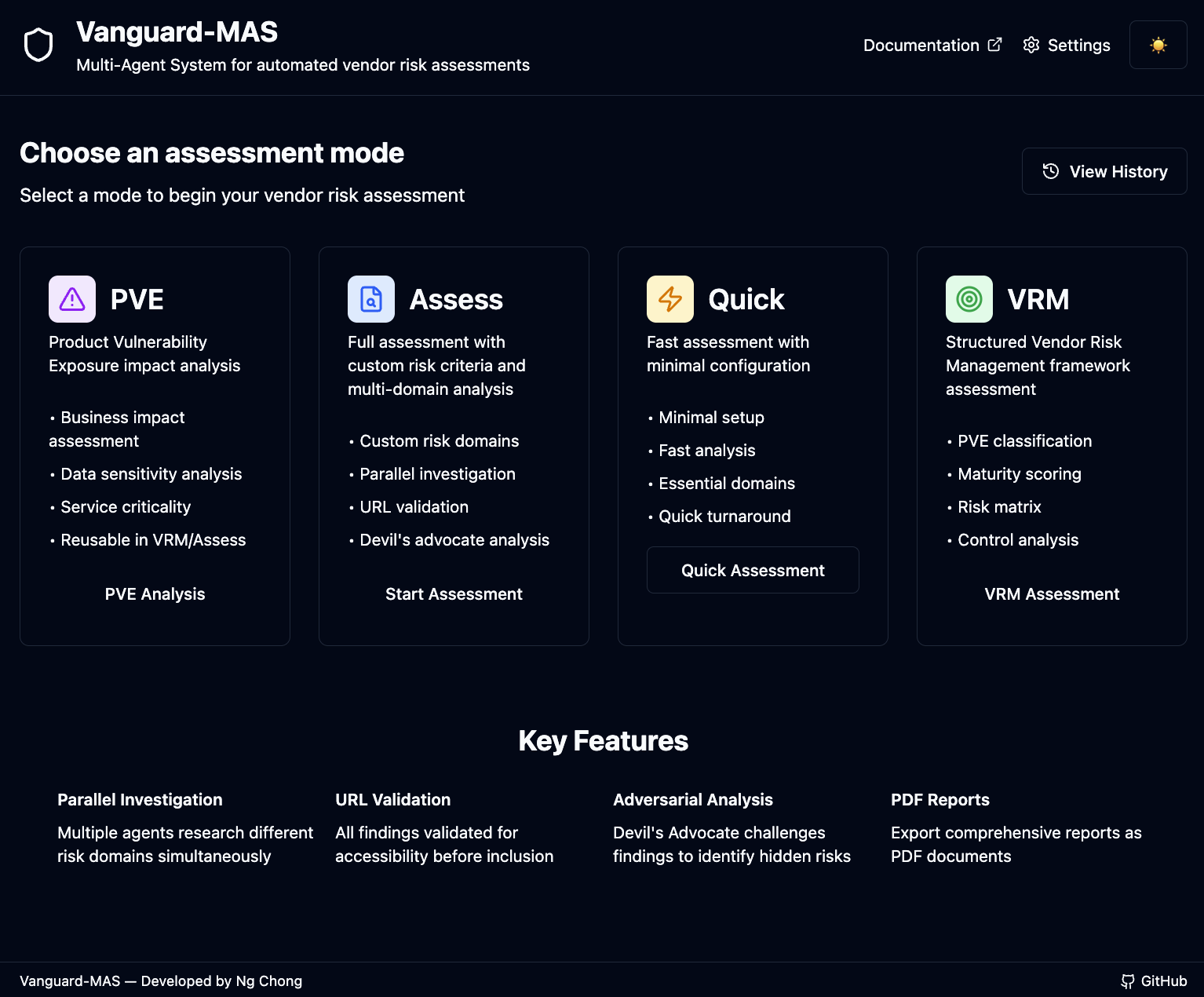
Homepage — Mode selection and quick access to all assessment types |
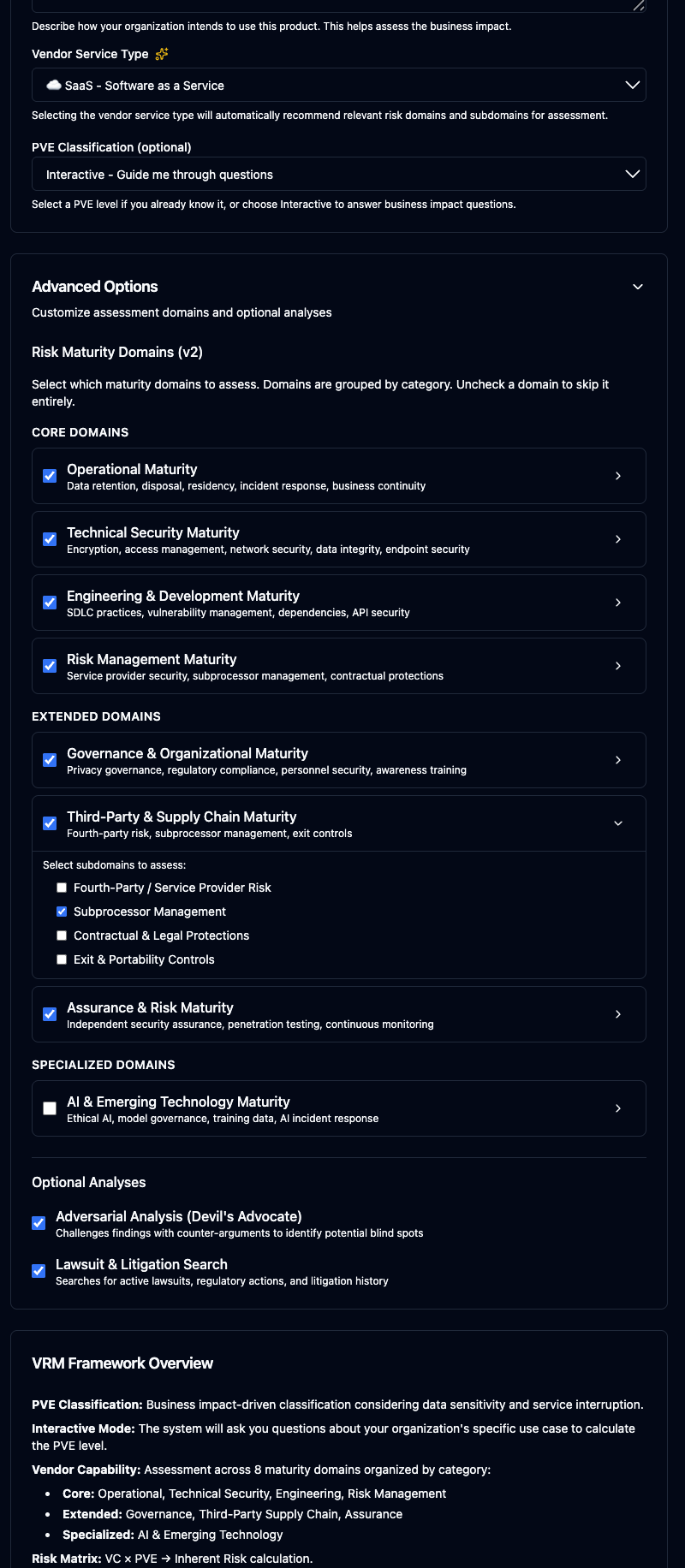
VRM Mode — Interactive business impact assessment with real-time progress tracking |
Features
Four Assessment Modes
Access all modes (PVE, Assess, Quick, VRM) through a web UI
Real-time Progress
Live status updates during assessment execution with phase-by-phase tracking
Interactive Questions
Step-by-step business impact assessment for VRM and PVE modes with vendor context
Vendor Background Research
Optional background research with detailed findings displayed before questions
PDF Export
Download reports as PDF documents with formatted output
Assessment History
Rename, delete, re-run (same settings), and clone past runs, with at-a-glance stats: duration, LLM/search/summary providers, search type, and search-call count
Phases & Speed
Depth preset (Fast/Standard/Deep), progressive-search toggle, and per-phase switches on every start form — defaults persist per browser
Dark Mode
Toggle between light and dark themes with proper markdown rendering
Running the Web Interface
1. Start the API Server
# Activate the Python environment
source env/bin/activate

# Install with API dependencies
pip install -e .

# Start the API server
uvicorn vagent.api_server:app --reload --port 8000
2. Start the Frontend (in a new terminal)
cd web-frontend
npm install
npm run dev
3. Open in Browser
Navigate to http://localhost:5173
- Assess: Fill form fields with vendor profile, custom risk domains, and requirements
- Quick: Enter vendor name and risk domains (free-text entry with common domain suggestions)
- VRM: Enter product details with optional PVE pre-configuration and domain/subdomain selection
- PVE: Standalone business impact analysis with optional background research
Domain Selection by Mode
Quick Assessment: Free-Text Risk Domains
Quick mode allows you to enter any risk domains as free text. The system provides suggestions but you can customize:
- Default domains: Cybersecurity, Financial Stability (pre-selected)
- Common suggestions: Cybersecurity, Financial Stability, Data Privacy, Compliance
- Fully customizable: Add or remove any domains (e.g., "Business Continuity", "Customer Support", "SLA Review")
Example Quick Assessment domains:
• Cybersecurity
• Financial Stability
• Data Privacy
• Compliance
• Business Continuity
• Customer Support
VRM Assessment: Structured Maturity Domains
VRM mode offers selective assessment across 7 maturity domain groups with 33 subdomains and vendor service type classification:
| Maturity Domain | Subdomains |
|---|---|
| Operational Maturity (Core) |
Data Retention & Disposal, Data Residency & Classification, Incident Response & Breach Notification, Business Continuity & DR, Change & Patch Management, Physical & Environmental Security |
| Technical Security Maturity (Core) |
Encryption & Data Security, Access Management & Identity, Network & Infrastructure Security, Data Integrity & Audit Logging, Endpoint & Device Security |
| Engineering & Development Maturity (Core) |
Secure SDLC, Code Vulnerability Management, Dependency & Open Source, API & Integration Security, Secure Configuration |
| Risk Management & Supply Chain Maturity (Core) |
Supply Chain Risk (the vendor's own suppliers), Subprocessor Management, Contractual & Legal Protections, Exit & Portability Controls |
| Governance & Organizational Maturity (Extended) |
Privacy & Data Governance, Regulatory & Certification Compliance, Personnel Security & Insider Risk, Security Awareness & Training |
| Assurance & Risk Maturity (Extended) |
Independent Security Assurance, Penetration Testing Cadence, Continuous Monitoring & Threat Intelligence, Cyber Insurance & Liability |
| AI & Emerging Technology (Specialized) |
Ethical AI & Fairness, Model Governance & Explainability, Training Data Provenance & Quality, AI-Specific Incident Response, Automated Decision-Making Oversight |
In VRM mode, you can:
- Enable/disable entire domains — Skip domains not relevant to your assessment
- Select specific subdomains — Within a domain, choose only relevant subdomains
- Vendor service type — Auto-populate recommended domains based on service type (SaaS, AI/ML, Payment, etc.)
- Default: All enabled — All domains and subdomains are enabled by default for comprehensive assessment
- Skip-neutral scoring — Deselected subdomains never lower a score: they are excluded from both numerator and denominator, and the report labels them “Skipped by configuration”
- Instant validation — An enabled domain must keep at least one subdomain selected; violations are flagged inline and block submission
Example: For an AI/ML vendor, the system automatically recommends enabling the "AI & Emerging Technology" domain with all its subdomains.
Assess Mode: Custom Risk Domains
Assess mode provides a form-based interface for fully customizable risk domains. You can add any number of risk domains with custom requirements:
- Vendor Profile: Enter vendor name, primary domain, industry sector, and tier
- Risk Domains: Add custom domains (e.g., "Cybersecurity", "Financial Stability") with priority levels
- Requirements: Add specific requirements for each domain to guide the assessment
Agent Parameters: Search provider, LLM provider, validation threshold, and parallel investigators are configured in Settings, not per assessment.
Note: For CLI usage, Assess mode can also accept a config.json file for pre-configured assessments. See the Configuration section for details.
REST API Endpoints
The FastAPI backend (vagent.api_server) exposes the full assessment lifecycle at http://localhost:8000 (interactive OpenAPI docs at /docs).
Run Assessments
| Method | Endpoint | Purpose |
|---|---|---|
POST |
/api/assess |
Start a full assessment (custom risk domains, depth, phase toggles, progressive search) |
POST |
/api/quick |
Start a quick assessment (vendor + domain list) |
POST |
/api/vrm |
Start a VRM framework assessment (domain/subdomain selection, optional PVE) |
POST |
/api/pve |
Start a standalone PVE assessment |
GET |
/api/{mode}/{id}/status |
Poll live status and phase-granular progress (mode = assess, quick, vrm, pve) |
GET |
/api/{mode}/{id}/report |
Fetch the finished markdown report |
POST |
/api/vrm/{id}/answer, /api/pve/{id}/answer |
Answer interactive business-impact questions |
Manage Assessment History
| Method | Endpoint | Purpose |
|---|---|---|
GET |
/api/assessments/list-all |
List all runs with at-a-glance stats (duration, providers, search type, search calls) |
PATCH |
/api/assessments/{id}/title |
Rename a report |
GET |
/api/assessments/{id}/request |
Fetch a run's persisted request for cloning into a new run form |
POST |
/api/assessments/{id}/rerun |
Re-run a past assessment with its persisted settings (VRM re-runs reuse the resolved PVE fast-track) |
DELETE |
/api/assessments/{id} |
Delete a run |
Configuration & Utilities
| Method | Endpoint | Purpose |
|---|---|---|
GET |
/api/providers/options |
Available LLM/search/summary providers with defaults from .env |
POST |
/api/providers/settings |
Validate per-browser provider overrides |
POST |
/api/pdf/generate |
Render a report as PDF |
GET |
/api/server/timezone |
Server timezone (for consistent timestamps) |
Re-run and clone requests exclude provider settings by design — runs always execute with the current provider configuration, so old runs never resurrect stale models or keys.
Installation
Requirements
- Python 3.10 or higher
- API keys for your chosen LLM and search providers
Setup
- Clone the repository:
git clone <repository-url> cd vanguard-mas - Create a virtual environment:
python -m venv env source env/bin/activate # On Windows: env\Scripts\activate - Install dependencies:
pip install -e . - Configure environment variables:
cp .env.example .env
# Edit .env with your API keys
Configuration
Environment Variables
Create a .env file with the following:
# LLM Provider (for agents: Investigator, Analyst, Devil's Advocate, Auditor)
LLM_PROVIDER=anthropic  # Options: anthropic, openai, deepseek, azure_openai, azure_anthropic
ANTHROPIC_API_KEY=your_key_here
ANTHROPIC_API_BASE_URL=https://api.anthropic.com/v1
ANTHROPIC_MODEL=claude-sonnet-4-6

# OpenAI API (for LLM provider)
# Used when LLM_PROVIDER=openai for agent reasoning/analysis
OPENAI_API_KEY=your_openai_api_key_here
OPENAI_MODEL=gpt-4o
# Reasoning Effort (for OpenAI reasoning models like gpt-5-mini)
# Controls depth of reasoning for agent analysis tasks
# Options: low, medium, high
# NOTE: Only applies to reasoning models (gpt-5*, o1, o3, etc.)
OPENAI_REASONING_EFFORT=low

# DeepSeek API (for LLM provider)
DEEPSEEK_API_KEY=your_deepseek_api_key_here
DEEPSEEK_BASE_URL=https://api.deepseek.com/v1
DEEPSEEK_MODEL=deepseek-chat

# Summary/Report LLM role — powers the report-writing analyst in Assess/Quick
# mode (VRM/PVE reports are template-generated and don't use it).
# EMPTY (recommended) = same provider as LLM_PROVIDER. Per-provider models:
# SUMMARY_ANTHROPIC_MODEL, SUMMARY_OPENAI_MODEL, etc.
SUMMARY_LLM_PROVIDER=  # Options: anthropic, openai, deepseek, azure_openai, azure_anthropic

# Search Provider (for web search)
# Note: DeepSeek-direct has no web search, but DeepSeek deployments on Azure
# Foundry DO search (SEARCH_PROVIDER=azure_openai + a DeepSeek deployment name)
SEARCH_PROVIDER=perplexity  # Options: perplexity, openai, anthropic, azure_openai, azure_anthropic
PERPLEXITY_API_KEY=your_key_here
PERPLEXITY_MODEL=sonar-pro

# OpenAI Search (for web search functionality)
# Recommended: gpt-4o-mini (most economical, fast)
# Alternative: gpt-5-search-api (agentic, may include chain-of-thought)
OPENAI_SEARCH_MODEL=gpt-4o-mini
# Reasoning Effort (OpenAI reasoning models only)
# Controls depth of reasoning for supported models (gpt-5*, o1, o3, chatgpt-4, etc.)
# Options: low, medium, high
# NOTE: Only applies to reasoning models. Ignored for gpt-4o-mini
OPENAI_SEARCH_REASONING_EFFORT=low

# Anthropic Claude Web Search (requires Claude with web search tool)
# Uses ANTHROPIC_API_KEY from above
ANTHROPIC_SEARCH_MODEL=claude-sonnet-4-6

# Azure AI Foundry (for azure_openai / azure_anthropic as LLM, search, or summary provider)
AZURE_API_KEY=your_azure_key_here
AZURE_API_VERSION=2024-10-21
AZURE_ENDPOINT=https://your-resource.openai.azure.com          # Azure OpenAI endpoint
AZURE_ANTHROPIC_ENDPOINT=https://your-resource.services.ai.azure.com  # Azure Anthropic (Foundry) endpoint
AZURE_OPENAI_MODEL=gpt-5                # Deployment for agent analysis
AZURE_OPENAI_SEARCH_MODEL=gpt-5         # Deployment for web search
AZURE_ANTHROPIC_MODEL=claude-sonnet-4-6 # Deployment for agent analysis
AZURE_ANTHROPIC_SEARCH_MODEL=claude-sonnet-4-6  # Deployment for web search

# CourtListener (optional - court-record search for lawsuit detection)
# Free API key from courtlistener.com (Free Law Project); without it,
# litigation signals fall back to LLM web search automatically
COURTLISTENER_API=your_courtlistener_key_here

# Agent Configuration
MAX_PARALLEL_INVESTIGATORS=4

# Validation Threshold (Strict/Moderate/Relaxed)
# Controls how strictly findings are validated during audit (Assess mode only)
VALIDATION_THRESHOLD=Moderate| Setting | Used By | Purpose |
|---|---|---|
LLM_PROVIDER |
Investigator, Analyst, Devil's Advocate, Auditor | Research, analysis, and adversarial reasoning |
OPENAI_REASONING_EFFORT |
OpenAI LLM provider (when LLM_PROVIDER=openai) | Controls reasoning depth for agent analysis (gpt-5* models) |
SUMMARY_LLM_PROVIDER |
Report-writing analyst (Assess/Quick modes) | Empty = same as LLM_PROVIDER; per-provider models via SUMMARY_<PROVIDER>_MODEL |
SEARCH_PROVIDER |
InvestigatorAgent | Web search for vendor information |
OPENAI_SEARCH_REASONING_EFFORT |
OpenAI search provider (when SEARCH_PROVIDER=openai) | Controls reasoning depth for web search (gpt-5* models) |
Example Combinations:
- Use Anthropic for agents (better reasoning) + OpenAI for summaries (faster)
- Use Perplexity for search (better citations) + OpenAI gpt-5-mini as LLM provider (reasoning models)
- Use OpenAI gpt-4o-mini for search (economical, fast) + OpenAI gpt-4o for LLM provider
Configuration Precedence:
agent_parameters.search_providerin config.json takes precedence over.env SEARCH_PROVIDER- If not specified in config.json, falls back to
.env SEARCH_PROVIDER - Other
agent_parameters(llm_provider, max_parallel_investigators, validation_threshold) also use config.json values - Environment variables (
.env) are used for API keys and model settings
Launch Configuration
Create a config.json file:
{
  "project_metadata": {
    "report_id": "VNG-2026-0001",
    "requester": "Security Team",
    "timestamp": "2026-02-23T00:00:00Z"
  },
  "vendor_profile": {
    "entity_name": "Acme Corp",
    "primary_domain": "acme.com",
    "industry_sector": "SaaS",
    "vendor_tier": "Standard"
  },
  "risk_domains": [
    {
      "domain": "Cybersecurity",
      "priority": "High",
      "requirements": [
        "Verify SOC2 Type II compliance",
        "Check for recent data breaches"
      ]
    }
  ],
  "agent_parameters": {
    "search_provider": "anthropic",
    "llm_provider": "openai",
    "validation_threshold": "Moderate",
    "max_parallel_investigators": 4
  }
}
Validation Thresholds
The validation_threshold setting controls how strictly findings are validated during the Auditor phase:
| Threshold | URL Accessible | Claim Found in Content | Compliance Claims |
|---|---|---|---|
| Strict | Required → Fail if 404 | Warning if not verified | Requires authoritative source |
| Moderate (default) | Required → Fail if 404 | Pass if URL has relevant content | Requires authoritative source |
| Relaxed | Required → Fail if 404 | Skipped (pass if accessible) | Requires authoritative source |
When to use each:
- Strict: Final due diligence - only accept fully verified claims
- Moderate: Standard assessment - balance thoroughness with inclusiveness
- Relaxed: Initial discovery - include all accessible URLs for review
Note: Compliance claims (SOC2, ISO 27001, GDPR, etc.) ALWAYS require authoritative sources (vendor domain or official certification databases) regardless of threshold.
Usage
CLI Commands
Vanguard-MAS provides multiple CLI commands for different assessment types:
Full Assessment
Run with a configuration file:
vanguard assess config.jsonWith custom output:
vanguard assess config.json --output reports/vendor-x.mdQuick Assessment
vanguard quick --vendor "Acme Corp" --domain Cybersecurity --domain FinancialVRM Framework Assessment
The --domain parameter is required for disambiguation and enables site-scoped searches.
# Required: --domain is essential for disambiguation
vanguard vrm --product "Buffer" --domain "buffer.com" --intended-use "Social media scheduling for marketing team"

# With pre-configured PVE classification
vanguard vrm --product "Slack" --domain "slack.com" --intended-use "Team communication platform" --pve High

# With custom output path
vanguard vrm --product "Zoom" --domain "zoom.us" --intended-use "Video conferencing" --output reports/zoom-vrm.md
Standalone PVE Assessment
Run a standalone Product Vulnerability Exposure analysis:
# Basic PVE assessment (interactive questions only)
vanguard pve --product "Slack" --domain "slack.com" --intended-use "Team communication"

# With background vendor research (more accurate data sensitivity)
vanguard pve --product "Slack" --domain "slack.com" --intended-use "Team communication" --research

# With custom output path
vanguard pve --product "Zoom" --domain "zoom.us" --intended-use "Video conferencing" --output reports/zoom-pve.md
Utility Commands
- Generate example config: vanguard init-config my-config.json
- View environment template: vanguard env-example
If no output path is specified, reports are automatically saved with date-stamped filenames:
- Assessments:
reports/assess/{vendor}-{YYYYMMDD}.md - Quick assessments:
reports/quick/{vendor}-{YYYYMMDD}.md - VRM assessments:
reports/vrm/{product}-{YYYYMMDD}.md - PVE assessments:
reports/pve/{product}-{YYYYMMDD}.md
PVE Classification Options
| Option | Command | Description |
|---|---|---|
| Interactive | vrm --product "X" --domain "x.com" --intended-use "..." |
System asks business impact questions (recommended) |
| Pre-configured | vrm ... --pve Low|Medium|High |
Skip questions if PVE level is already known |
Other Commands
- Generate example config: vanguard init-config my-config.json
- View environment template: vanguard env-example
Report Structure
Standard Assessment Report
- Executive Summary: Go/No-Go/Conditional status with confidence
- Assessment by Requirement: Requirement-by-requirement findings with evidence
- Adversarial Risks: Counter-arguments from the Devil's Advocate
- Weak Signals: Lawsuits, litigation, news, leadership changes
- Residual Risk Profile: Risks regardless of decision
- Breach Mitigation Analysis: Control adequacy when breaches found
- Reference Audit: URL validation status table
- Recommendation: Final decision with reasoning
VRM Framework Report
- Vendor Background: Product description and core services
- PVE Classification: Business impact-driven classification
- Vendor Capability Assessment (v2): Evaluation across 7 maturity domain groups with 33 subdomains — AI & Emerging Technology scores as its own section, every section is coverage-annotated, and skipped subdomains render as “Skipped by configuration”
- Initial Risk Matrix: VC × PVE → Inherent Risk
- Mitigating Controls: Security controls that reduce risk
- Adversarial Analysis: Devil's Advocate findings
- Lawsuits & Litigation: Legal proceedings with case details
- Residual Risk: Final risk after controls and adversarial findings
- Conclusion: Recommendation with security requirements
Development
Project Structure
src/vagent/
├── __init__.py
├── config.py              # Configuration management
├── orchestrator.py        # Main workflow orchestration
├── main.py                # CLI interface
├── schemas/
│   └── agent_state.py     # Data models and schemas
├── agents/
│   ├── base.py            # Base agent class
│   ├── investigator.py    # Research agents
│   ├── auditor.py         # Fact-checking agent
│   ├── analyst.py         # Risk analysis agent
│   └── advocate.py        # Devil's Advocate agent
├── vrm/
│   ├── schema.py          # VRM framework data models
│   └── orchestrator.py    # VRM-specific workflow
└── tools/
    ├── search.py          # Search provider abstraction
    └── url_validator.py   # URL validation