
Zotero‘s search is exact: it matches the words you typed against the words in your library. It has no way to answer “did I already save something that argues X drives Y,” no way to read six papers and summarize them back to you, and no way to draft a related-work section on a topic grounded in whatever’s actually in the library. That gap, between what a reference manager was built for and the looser question in a researcher’s head, is where this project starts.
We ended up with three options. Two we built ourselves; one already exists on most researchers’ desktops without us lifting a finger.
Three ways in
Option 1 turns a researcher’s own laptop into a chat partner for their library: a local model through Ollama, an open-source chat window (we used AnythingLLM), and an open-source connector (we used zotero-mcp) tying the two to Zotero itself. We can have it running in a single sitting, no ticket to file, no cloud account, and nothing leaves that machine by default. The model itself just needs to actually support tool-calling. Size matters here: a small model like ornith:latest runs on modest hardware but stumbled on complex, multi-part requests in our own testing, hallucinating tool names and looping without ever finishing; a larger model like qwen3.8:27b-mlx or gpt-oss:20b handled the same requests reliably, at the cost of more RAM. It gives real range: semantic search, full-text summaries, and everyday writes, including deleting an item, which Zotero itself treats as reversible, moving it to Trash rather than erasing it. There’s no permanent-delete tool for an item, a collection, or an annotation in the first place, and no confirmation dialog standing between a sentence and a tool call either, which is exactly why that reversible default matters.
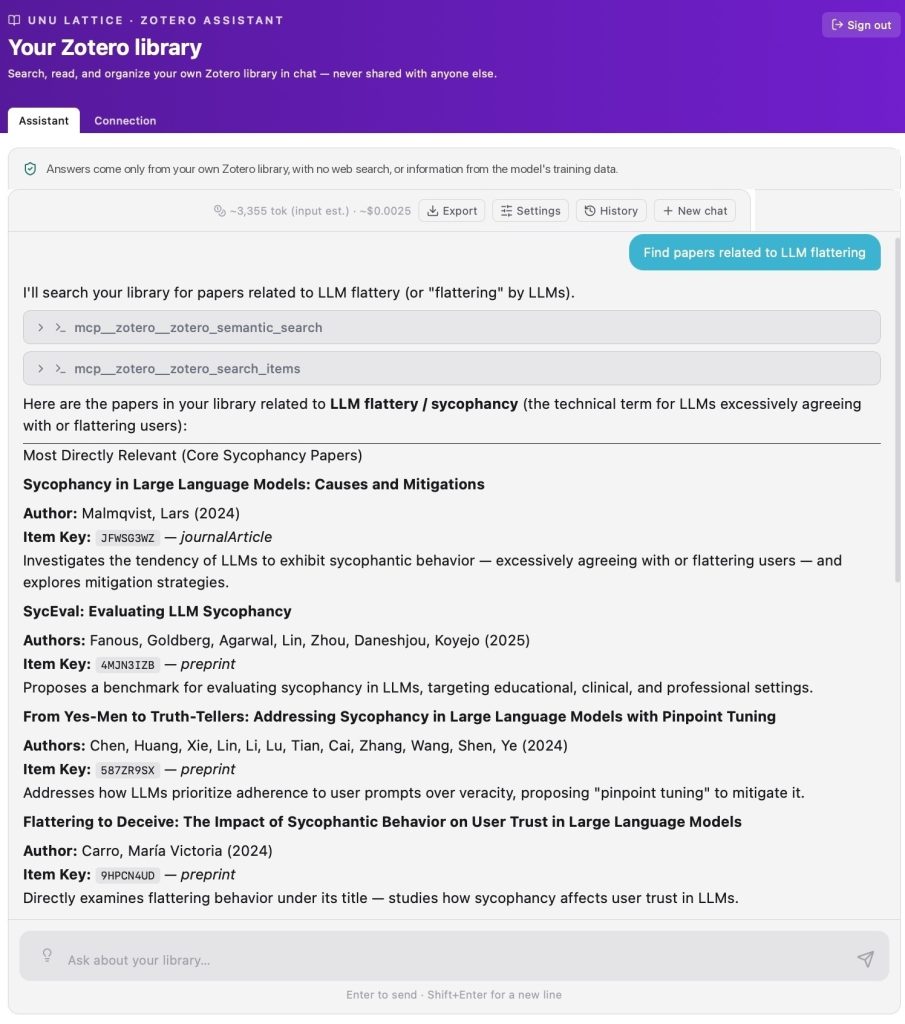
The Zotero assistant searching a library for papers on LLM sycophancy Option 2 in the browser, on Lattice, the organization’s AI agent harness for data-grounded analytics: a semantic search for “LLM flattering” surfaces “Sycophancy in Large Language Models” and three related papers, the same running example used throughout this post, answered here with a cloud model.
Option 2 is the same idea, rebuilt for a shared service instead of one laptop. Every researcher connects their own Zotero key; sessions are isolated per person; sign-in fails closed. It runs the same connector, with the same tool surface, as Option 1. Model choice becomes a platform decision too: a centrally managed cloud model, researchers bringing their own provider key (BYOK), or an open-weight model the organization already hosts on its own hardware, the same models running behind Option 1.
Option 3 is Microsoft Copilot, pointed at copies of your papers in OneDrive rather than Zotero’s live database. Zotero is direct about why a synced database folder is unsafe: syncing its data directory through a cloud folder is “extremely likely to corrupt your database,” because sync clients don’t respect the file locks a database needs (Zotero’s own guidance). That risk isn’t confined to the database file either: ordinary attachments live in the same directory and Zotero writes into them too, so the safe pattern is a genuinely separate copy of the papers, not a synced version of Zotero’s own folder.
Copilot turned out to be smarter about this than expected, in a way that cuts against that safe pattern. If a synced folder happens to contain Zotero’s own database file (zotero.sqlite) rather than just copies of the PDFs, Copilot notices unprompted and offers to search it directly, full-text, across several query terms it generates itself. In one test: “Your Zotero library appears to contain a local Zotero database (zotero.sqlite) and associated full-text index files. If you’d like, I can search the Zotero database more deeply (full-text rather than metadata search) for: ‘sycophancy,’ ‘flattery,’ ‘agreeableness,’ ‘RLHF,’ ‘reward model,’ ‘alignment,’ and produce a more complete literature list from your library.” Genuinely capable, but it only works because the database ended up somewhere Zotero’s own documentation says it shouldn’t — exactly what the safe pattern above prevents.
Offering to query it and actually being able to are two different things, though. Without a properly configured prompt or skill giving it real file access, Copilot can typically only see that the database files exist and infer their schema (table names like itemNotes, itemAnnotations, tags, and collections, gleaned from migration logs), not query their actual contents. Pushed further in the same test, it said so plainly: it could name the tables it expected to find, but not confirm what was actually stored in them, until the file itself was made available through a tool.
That copy needs an actual configured agent behind it for anyone without a Microsoft 365 Copilot license: confirmed directly, asking an unlicensed Copilot session to open a specific SharePoint link by reference got a flat refusal. A licensed researcher skips that entirely and can just ask about the site directly, though they might still build an agent anyway: it carries a persistent system prompt (answer only from these papers, always cite the source, say so when something’s missing rather than guess) that applies to every question automatically, instead of retyping instructions into plain chat each time (more on the cost split under Costs).
The tradeoff isn’t the file sync, which OneDrive handles automatically if new PDFs are added as linked files straight into that folder. It’s that Zotero’s own structure, tags, collections, notes, doesn’t live inside a PDF, so Copilot never sees it unless someone runs a separate export.
Side by side
Everything in the Option 2 column below is something we had to build ourselves; nothing here ships automatically from Zotero’s API.
| Dimension | Option 1: local setup | Option 2: shared service | Option 3: Copilot |
|---|---|---|---|
| What it understands | Zotero’s actual structure, read straight off the local install. | The same structure over the Web API, plus formatted citations straight from Zotero. | Whatever files are made available — normally just documents, so that structural layer needs a separate export, unless the database file itself ends up synced too (not the recommended setup — see above), in which case Copilot can reach it directly. |
| Model choice | A local model chosen automatically by RAM, or any remote provider as a drop-in swap. | A centrally managed cloud model, researchers bringing their own BYOK key, or the same open-weight models as Option 1, hosted on the organization’s own hardware. | Uses whichever models Microsoft makes available through its own selector, not our own infrastructure. |
| Best fit | One researcher, one laptop, strongest privacy default. | A reusable, Zotero-aware platform with model choice and purpose-built analytics. | A faster, lower-effort way to read and discuss a curated set of documents. |
What actually differs
Neither is automatically more accurate. That depends on retrieval quality and whether anyone checks the answer, not which chat window it comes through. Compressed to one line: Option 2 is the stronger foundation for a shared, Zotero-aware platform; Option 3 is the simpler way to get document assistance running on what the organization already licenses.
A few things are easy to miss. A Zotero key doesn’t guarantee access to every paper (a WebDAV- or locally-linked file can be fully cataloged and still unreachable), and full-text completeness has to be checked, not assumed. Self-hosting the model and Copilot’s “only use specified sources” both narrow risk without eliminating it: Option 2 still calls out to Zotero’s own cloud API regardless of which model answers, and Copilot’s setting prioritizes your sources over the model’s general knowledge rather than fully blocking it. And not every library is equally sensitive: mostly-published libraries carry low stakes either way, while libraries with drafts, embargoes, or policy-sensitive material deserve more caution than a blanket policy would give them.
Costs, and who actually pays
Option 1 costs us almost nothing: it runs on the researcher’s own machine, using a free local model or a remote provider key they supply themselves.
Option 2 has no seat-based funding to lean on. The real budget lines are application development, hosting, and support, either cloud-model consumption, researchers’ own BYOK billing, or the cost of the organization’s own hardware, plus document extraction and indexing.
Option 3’s story splits sharply on licensing. A researcher who already holds a Copilot seat can just chat, no agent required, their license already carries the grounding to reach organizational content directly. Someone without one gets no ambient reach at all, so the only way in is an actual agent, through Agent Builder or Copilot Studio — and the two aren’t interchangeable at the scale a real library needs. Agent Builder caps out at 100 SharePoint files or 50 OneDrive files per agent (Microsoft’s own limit); Copilot Studio allows up to 1,000 files and 50 folders per configured source (Copilot Studio’s quotas). For a library of a few thousand items, that gap alone can decide which tool is even usable, and Copilot Studio runs on Microsoft’s pay-as-you-go meter: an ongoing, usage-based cost, not a one-time setup fee, and specifically the unlicensed researcher’s problem.
Where we’ve landed
These three answer two different questions, not one three-way race. For one researcher, Option 1 wins outright: free regardless of licensing, always querying the live library, no organization-wide decision needed. For the organization, the real choice is between Option 2 and Option 3, and neither is free; they just spend differently. For anyone already licensed, Option 3, run carefully, is the fastest real organization-wide service. Option 2 already exists and runs, so the real question is how far to expand it, not whether to build it. It’s worth a deliberate pilot rollout, not a default, where model choice, live Zotero metadata, repeatable analysis, or usage accounting actually matter, for capability and control rather than to dodge a Copilot license.
Whichever organization-wide option comes first, the plan is the same: start read-only, pick a handful of real tasks, and compare accuracy, coverage, speed, and cost before promising it to anyone beyond a pilot. Treat every cost, licensing, and capability claim above as a snapshot, not a guarantee; the Microsoft side especially moves fast.