📌 Research Project: Experimental AI-Assisted Screening
This is an exploratory research prototype, intended for experimentation and learning, and does not reflect a production HR system or official UNU hiring policy.
Exploring AI-Assisted CV Screening
This research prototype explores how AI might assist with initial CV screening by reviewing job descriptions and evaluating CVs against specific requirements. It organizes and ranks applicants to help identify potential matches — with human judgment always leading the final decision.
The 3-Step Workflow
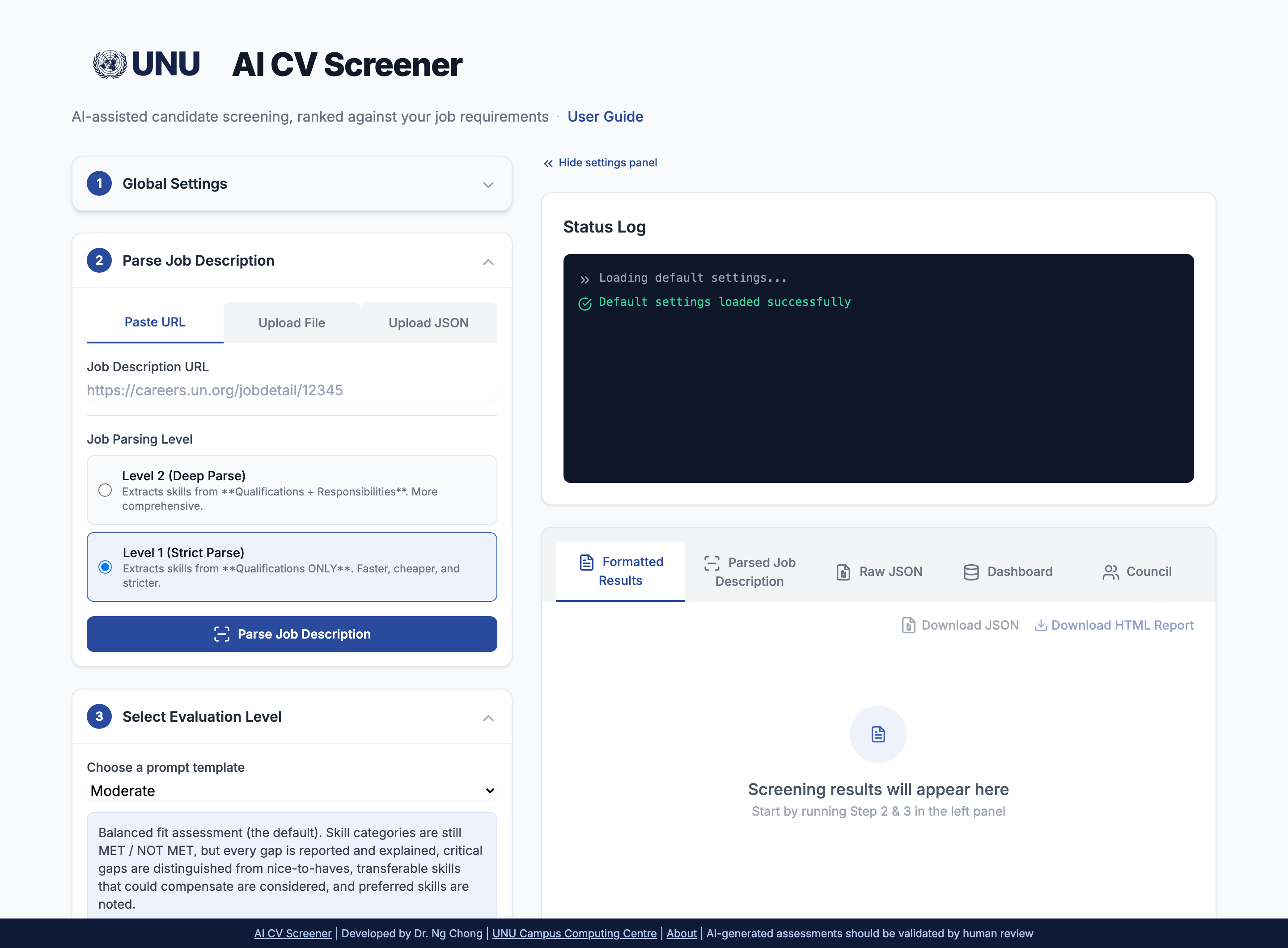
Step 1: Load Job Description
First, provide the job requirements. You have three options:
- Paste URL: The AI will crawl the live job posting.
- Upload File: Upload a PDF or HTML file of the job description.
- Upload JSON: Load a previously saved
.jsonfile to skip parsing.
Job Parsing Level
When uploading a URL or File, you must choose a level:
- Level 1 (Focused): Extracts skills from "Qualifications" ONLY.
- Level 2 (Deep): Extracts skills from "Qualifications" + "Responsibilities".
Important Note: When using Level 2 (Deep Parse), the final candidate evaluation will list "Missing Required Skills" from *both* the Qualifications and Responsibilities sections. This is more comprehensive but may result in more "gaps" being identified.
How Skill Requirements (AND/OR) are Interpreted
The AI reads skill lists to set a required_count for each group:
"React, Node, and SQL"setsrequired_count: 3(Needs all)."React or Vue"setsrequired_count: 1(Needs one)."e.g., Laravel, Symfony"setsrequired_count: 1(Needs one).
Candidates are then evaluated against this "required count" for each skill group.
Step 2: Upload Candidates
Upload your candidate files. You can drag and drop multiple files at once.
CVs (Required)
Upload the candidates' CVs or resumes (.pdf, .docx). This is the primary document for the evaluation.
Q&A (Optional, but Recommended)
Upload a corresponding text file (.txt, .md, .pdf, .docx) with pre-screening question answers for each candidate.
Why? This allows the AI to cross-reference the CV (what they *say* they did) against their answers (how they *think* and *communicate*), leading to a much deeper and more accurate analysis.
How CVs and Q&A Files Are Paired
Pairing is by filename, not upload order or file count. Name your files with a
shared stem, e.g. jane-doe-cv.docx and
jane-doe-qa.txt — the app matches them automatically
regardless of the order you selected them in either file picker.
Every match appears in an editable pair table (one row per CV, with its matched Q&A file or "no Q&A"). Use the dropdown on any row to correct a pairing or remove one; you do not need a Q&A file for every CV — a run can mix candidates with and without screening answers. Any uploaded Q&A file left unmatched is flagged in red and must be assigned or removed before processing.
If no filenames match at all, the app falls back to pairing by upload order and shows an amber warning — verify the pair table in that case before processing.
🛡️ PII Scrubbing (Enabled by Default)
Recommended: The system omits specific bias-prone fields from the structured data it extracts from each CV, helping reduce bias in evaluation.
- Date of Birth – Removed to prevent age-related bias
- Gender – Removed to prevent gender-related bias
- Nationalities – Removed to prevent nationality-related bias
This option can be toggled off if needed for your specific use case.
What this does not do: this toggle does not redact the CV document itself. Separately, email addresses, phone numbers, and LinkedIn/GitHub/GitLab profile URLs are automatically redacted from the document text before parsing, but only when using a provider without an organizational data-handling agreement (see the Providers section below). Candidate names and physical addresses are not redacted at this step by any mechanism today. The reliable safeguard is provider choice, not text scrubbing: use a compliant provider for any real candidate data.
Separately from parsing, the name, email, and phone are always excluded from what the evaluation/scoring step sends to the AI, regardless of provider, since none are relevant to a qualification assessment.
Step 3: Evaluate & Review
This is where the magic happens. This flexible workflow allows you to get multiple perspectives on your candidates.
1. Configure Your Analysis
Before processing, you have two main controls:
- Select AI Model (Accordion 1): Choose your "brain" (Gemini, OpenAI, etc.). You can change this later to get a "second opinion".
- Select Evaluation Prompt (Accordion 3): Choose your "instructions" (Basic, Moderate, Advanced). This tells the AI *how* to analyze and what to look for.
2. Execute & Review
- Process: Click the "Process Candidates" button to run the full analysis.
- Review: Analyze the ranked, color-coded candidate cards in the "Formatted Results" tab.
- Save: On the "Parsed Job Description" tab, click "Save JSON" to save your parsed JD for future use.
Iterate with the "Re-run" Feature
This is the most powerful feature. If you want a different perspective, you don't need to re-upload. Just change your settings (like the AI Model or Evaluation Prompt) and use one of the two Re-run options:
- Re-run Evaluation (Fast): Re-uses the already-parsed data for a new analysis in seconds.
- Re-parse & Evaluate (Slow): Use this *only* if you've edited the *CV parsing logic* itself. It re-reads the original files from scratch.
A Recommended Strategy: Longlist, Then Shortlist
For most hiring, don't run the full applicant pool through the deepest, most expensive settings up front. Process everyone at Basic or Moderate first, rank the results in the Dashboard tab, then use Re-run Evaluation on just your top group at Comprehensive, Extended, or Advanced (with council members if the role warrants it). See Longlist, Then Shortlist for the full walkthrough.
Job Parsing Prompt Comparison
Imagine a job description says:
- Qualifications: “Must have Python.”
- Responsibilities: “Deploy microservices using Kubernetes.”
Scenario A: Job Parsing Level 1 (Focused) + Extended Evaluation
Job Parsing (L1): The "target list" for skills is just [Python].
Evaluation (Extended):
- required_skills (40% weight): The AI checks "Does the candidate have Python?" It completely ignores "Kubernetes" in this section because it wasn't on the L1 target list.
- responsibility_alignment (35% weight): The AI separately reads the job's responsibilities and checks the candidate's CV for “Did this person ever deploy microservices?” This is where it would analyze their experience with Kubernetes.
Scenario B: Job Parsing Level 2 (Deep) + Extended Evaluation
Job Parsing (L2): The "target list" for skills is
[Python, Kubernetes].
Evaluation (Extended):
- required_skills (40% weight): The AI now checks “Does the candidate have Python?” AND “Does the candidate have Kubernetes?” If they don't, it will be listed as a missing required skill.
- responsibility_alignment (35% weight): The AI performs the same check: “Did this person ever deploy microservices?”
Conclusion
Level 2 prompt moves "Kubernetes" from a "nice-to-have" context for responsibility alignment into a "must-have" item for the required skills score, which significantly impacts the final grade.
Education & Experience: Alternative Pathways (OR Logic)
Many job descriptions offer alternative pathways for meeting education and experience requirements. The AI system is designed to interpret these as OR conditions — not AND conditions.
How Alternative Pathways Work
When a job description contains multiple experience requirements with different education levels and year requirements, these are interpreted as alternatives. A candidate needs to meet ONLY ONE of the pathways — not all of them.
Example Scenario
"experience_requirements": [
"6 years in software development with a High school diploma (required)",
"4 years in software development with a Bachelor's degree (required)"
]
Correct Interpretation (OR Logic):
| Candidate | Education | Years | Status |
|---|---|---|---|
| A | High school diploma | 6+ | ✅ Qualified |
| B | Bachelor's degree | 4+ | ✅ Qualified |
| C | Master's degree | 4+ | ✅ Qualified |
| D | High school diploma | 4 | ❌ Not qualified |
| E | No degree | 10+ | ❌ Not qualified |
Key Principle
Higher education level can substitute for lower education level with the same or fewer years. A Master's degree holder meets the Bachelor's pathway requirement, and exceeding the years requirement with a lower education level also qualifies.
How "pathway" vs. "must meet" is decided, and how to fix it
By default, each line's classification is inferred from its wording, not stated explicitly by the parser: a line naming a degree/diploma/bachelor's/master's/doctorate/PhD is treated as a pathway; a line with only years is treated as a standalone "must meet" requirement. This heuristic can be wrong. For example, "5 years of post-PhD research experience" mentions "PhD" only to say when the experience must have occurred, not as its own degree pathway, but a naive keyword match would misread it as one, incorrectly pairing it via OR against a separate "PhD in X (required)" line when both are actually required together.
Reviewers can override the classification
On the Parsed Job Description tab, click a line's pathway/must meet/desirable label to override it. It cycles: automatic to forced pathway to forced must meet to forced desirable and back to automatic. A manual override is marked with a small dot so it's visually distinct from the auto-detected default.
This override reaches the evaluator, not just the display. The AI scoring the candidate is explicitly instructed to trust a reviewer's override over its own reading of the wording. That said, this is a strong instruction to the model, not a code-computed guarantee the way the skill-category threshold check below is (see "What is enforced by code vs. what depends on the AI"): it depends on the model correctly following it, like the other AI-judgment items on that list.
The "desirable" kind: never a pathway, never a gate
A line whose wording says it is an asset, preferred, desired, desirable, advantageous, or nice-to-have (or is manually overridden to "desirable") is neither a pathway nor a must-meet requirement. It never gates qualification, whether or not it also mentions years or a degree. Instead it becomes one of the job description's desirable criteria - a differentiator among otherwise-qualified candidates, assessed separately at Comprehensive, Extended, and Advanced levels (see Outputs).
A related code-enforced check: if a desirable experience line and a Minimum Experience entry both restate the same years-and-subject requirement (a model sometimes emits both), the duplicate Minimum Experience entry is dropped automatically, so a JD that calls something desirable can't accidentally also gate qualification through an unmarked minimum-years entry.
Skill Requirements: AND vs OR — How the System Handles It
Job descriptions rarely require every listed skill. "Experience with AWS, Azure, or GCP"
means any one is enough; "Python, Django, and PostgreSQL" means
all three. The system encodes this at parse time: every skill category carries a
required_count threshold — the number of listed skills a
candidate must actually have for the category to count as met.
How the parser reads the wording
| JD wording | Interpretation | Threshold |
|---|---|---|
| "X, Y, and Z" | All required (AND) | All 3 |
| "X or Y" / "X and/or Y" | Alternatives (OR) | Any 1 |
| "(e.g., X, Y)" / "such as X, Y" | Examples, not a checklist | Any 1 |
| "including X, Y, Z" | All required — unless "but not limited to" | All 3 / Any 1 |
Verify — and correct — before you run a batch
The Parsed Job Description tab shows every category with an editable threshold selector ("Any 1 of 3", "At least 2 of 3", "All 3"). If the parser misread the JD's wording, fix it there: you can also remove a mis-grouped skill or an irrelevant category, and "Reset edits" restores the original parse. Everything downstream — evaluations, re-runs, dashboard rankings — applies the thresholds shown on that tab, so a quick review here is the highest-leverage check in the whole workflow. Edits affect future evaluations, not ones already run.
What is enforced by code vs. what depends on the AI
Knowing which parts are deterministic and which are model judgment tells you where to look when a result seems off.
Enforced by code (deterministic)
- The threshold check itself. After every evaluation, the app recounts how many of each category's skills appear in the AI's "skills met" list and compares against the threshold. This verdict (stored as
category_resultsin the saved JSON) is computed the same way every time — it does not trust the AI's own claim. - Dashboard "Skill groups" scores. A group scores matched ÷ required, capped at 100% — so "any 1 of 3" scores 100% with a single matching skill.
- Score arithmetic. Category ratios, multipliers, and the weighted overall score are recomputed in Python, not taken from the model's math.
AI judgment or heuristic (can vary)
- Whether a skill is "evidenced" at all. The met/missing lists come from the model reading the CV and Q&A — that judgment is the input to the code check, and it can differ between models and runs.
- Name matching is heuristic. The recount matches names token-wise: "AWS" matches "Amazon Web Services (AWS)" and "React" matches "React.js", but "Java" never matches "JavaScript". A skill the model phrases in completely different words won't be counted toward its category.
- Narrative text. MET/NOT MET explanations, gap descriptions, and the instruction not to list unused alternatives of a satisfied OR group are prompt-enforced — models follow them well but not perfectly.
- A reviewer's pathway/must-meet override. Once set (see Education & Experience Requirements above), the evaluator is explicitly instructed to trust it over its own reading of the wording, but that's still an instruction the model follows, not a Python-computed check like the threshold verdict on the left.
Desirable (Preferred) Skills: a separate, non-gating dimension
A JD's Desirable (Preferred) Skills categories, along with every other preferred/asset item in the JD (education, languages, experience lines, years), are never read by the threshold check above, never part of any component score, and never gate qualification. See Required vs. Desirable for the reasoning: required criteria establish eligibility, desirable criteria only distinguish among candidates who already qualify.
What is, and isn't, code-enforced for this list:
- Code builds the list, not the model. The desirable criteria (ids like D1, D2, ...) are assembled from the parsed JD in Python before the prompt is sent, so the model can only ever assess what the JD actually lists, never invent a new one - an id it invents anyway is silently dropped when the results are joined back.
- Code recounts skill-category items. Same as Required Skills: for a desirable
skill category, the app recounts how many of its own listed skills the model's matched skills
list actually names, rather than trusting the model's Met/Partially Met/Not Met claim directly
(flagged as
model_disagreeswhen they differ). - The model judges everything else: whether a non-category item (an education line, a language, an experience line, a years figure) is Met, Partially Met, or Not Met, based on the CV and Q&A - the same judgment call as for required skills, just never fed into qualified, score, or recommendation.
- Only assessed at Comprehensive, Extended, and Advanced. Basic and Moderate list the desirable criteria, so the model knows not to treat them as gaps, but do not ask for a status on them; the candidate's report shows "not assessed" rather than Met/Not Met at those two levels.
What to be aware of
- Skill groups vs. individual skills in the Dashboard. A Skill group applies the JD's own logic; an individual Skill checkbox is a raw "has this exact skill" filter. Ticking all three skills of an "any 1 of 3" group averages them like three separate requirements — a candidate who satisfies the JD via one alternative would show 33%, not 100%. Use the group checkbox when you mean the JD's requirement.
- Only Extended and Advanced produce skill-group verdicts. Basic, Moderate, and Comprehensive score the required-skills component holistically and never ask the AI for a per-category breakdown, so their rows show "not assessed" (excluded from the Selected Match average) rather than a score on any Skill group criterion. Pick Extended or Advanced when you want to rank by specific skill categories.
- Low group score but a positive narrative? That is usually the naming heuristic missing a match, not a real gap. The saved JSON records the disagreement (
model_disagrees) so it can be audited rather than silently absorbed. - Older saved runs (from before this enforcement existed) fall back to the model's own reported ratio for group scores.
- The chain is only as good as the parse. A misread "or" propagates everywhere — which is why the threshold is shown, human-editable, and worth ten seconds of review before each batch.
AI Providers: Parsing & CV Screening
The system supports multiple AI providers for both job description parsing and CV screening. Below is the tested compatibility status for each operation.
| Provider | JD Parsing (URL) | JD Parsing (PDF) | CV Screening | Notes |
|---|---|---|---|---|
| Azure OpenAI | ✅ | ✅ | ✅ | Fully tested. Compliant with our internal data-handling policy. |
| Azure Anthropic | ✅ | ✅ | ✅ | Claude on Azure AI Foundry. Compliant with our internal data-handling policy. |
| DeepSeek | ✅ | ✅ | ✅ | Fast & affordable. Not covered by our internal data-handling policy - text-level redaction applies (see PII Scrubbing above), but candidate names/addresses still reach this provider unredacted. |
| OpenAI | ✅ | ✅ | ✅ | Fully tested. Not covered by our internal data-handling policy - use Azure OpenAI instead for real candidate data. |
| Anthropic | ✅ | ✅ | ✅ | Fully tested. Not covered by our internal data-handling policy - use Azure Anthropic instead for real candidate data. |
| Google Gemini | ✅ | ✅ | ✅ | Fully tested. Not covered by our internal data-handling policy. |
| Groq | ⚠️ | ⚠️ | ⚠️ | Not tested for CV screening. Not covered by our internal data-handling policy. |
| Ollama | ✅ | ✅ | ✅ | Works! Quality varies by model - use 70B+ for best results. Local/self-hosted, so compliant with our internal data-handling policy by construction (nothing leaves the server). |
Data handling: use a compliant provider for real candidates
Azure OpenAI, Azure Anthropic, and local Ollama are the providers covered by our internal data-handling policy. For any real candidate CVs, use one of these three - not text scrubbing - as the safeguard against candidate personal data reaching an uncontrolled third party. PII redaction (see PII Scrubbing above) is a supplementary backstop for the other providers, not a substitute for provider choice, and it does not cover candidate names or physical addresses.
Quality recommendation
Among the compliant providers, Azure OpenAI and Azure Anthropic are fully tested and recommended for best quality. Ollama works for local/self-hosted deployments but quality varies by model size - use larger models (70B+) for better structured output. All providers listed above offer full compatibility with URL and PDF parsing as well as CV screening.
Core Features
Flexible AI Engine
You're in control. Choose from OpenAI, Azure OpenAI, DeepSeek, Anthropic, Gemini, Groq, or a local Ollama model. Get a 'second opinion' from a different AI to ensure a fair evaluation and mitigate model bias.
Instant Re-Evaluation
This is transparency in action. Don't like the AI's focus? Edit the evaluation instructions and click "Re-run". Get a new analysis based on your new rules in seconds, without re-uploading.
The Unbreakable Prompt Editor
Our editor is split into three parts. You only edit **Part 1 (Instructions)**. The system automatically appends **Part 2 (Data)** and **Part 3 (Format)**, making it impossible to accidentally break the prompt.
Advanced Recency Analysis
Go beyond simple skill matching. The 'Advanced' mode checks *when* skills were used, flags outdated_skills, and adds a recency_note to certifications.
Dynamic Ad-Hoc Analysis
Ask any ad-hoc question. The AI will place the answer in a special additional_findings section. Ask to "analyze publication relevance" and get a direct answer without breaking the UI.
AI-Powered Evaluation
The system performs a deep analysis by following the instructions from your selected prompt. It identifies strengths, gaps, and compensation precisely because the prompt (which you control) tells it to.
Desirable Criteria, Kept Separate
Required criteria decide qualified; the job description's own preferred/asset items never do. At Comprehensive, Extended, and Advanced they get their own Met / Partially Met / Not Met assessment and Dashboard column, so you can compare otherwise-qualified candidates on what the JD itself calls a plus, without it ever affecting eligibility or score.
Application UI
The Role of the Q&A File: From Tie-Breaker to Primary Evidence
📋 What "Q&A" Means Here
Q&A refers to written screening questionnaires sent to candidates at application time (before interviews). Candidates provide written responses that are later cross-referenced with their CV by the AI. These are not live interview questions.
Uploading Q&A files is optional, but it dramatically improves the quality of your evaluation. The CV shows **"what"** a candidate has done; the Q&A shows **"how"** they think, communicate, and solve problems.
The "weight" given to the Q&A file is not a magic number, but a set of **explicit, written instructions** in each prompt. As you select a higher level, the AI is forced to rely more heavily on the Q&A as proof.
Scenario 1: Weak Q&A *Pulls Score Down*
- CV (Source 1) claims: "Expert in AWS (EC2, S3, ECS, EKS)"
- Q&A (Source 2) reveals: "I have not used ECS/EKS professionally, but read the docs..."
- AI's Conclusion: The Q&A directly contradicts the CV. The AI flags this as a **Red Flag** (Overstatement). The scores for "Skills" and "Responsibility Alignment" are actively lowered, despite the CV claim.
Scenario 2: Strong Q&A *Pulls Score Up*
- CV (Source 1) claims: "Developed various web apps." (Vague)
- Q&A (Source 2) reveals: "I use JWTs for auth, HttpOnly cookies, and rate-limiting..."
- AI's Conclusion: The AI follows the rule "If the Candidate Profile is weak but Screening Answers are strong, give weight to the answers". The Q&A provides *expert proof* of skills that were only implied on the CV, actively pulling the "Skills" and "Responsibility Alignment" scores higher.
Scenario 3: The "Hidden Strength"
- CV (Source 1) claims: (No mention of Python)
- Q&A (Source 2) reveals: Demonstrated ability to write complex Python automation scripts.
- AI's Conclusion: The AI treats this as a **Hidden Strength**. It gives a "Partial Bonus" to compensate for gaps but adds an **Interview Flag** to verify why the skill was omitted.
| Conflict Scenario | AI Interpretation | Impact on Score |
|---|---|---|
| CV says Yes, Q&A says No | Red Flag (Overstatement) | Significant Penalty (Reduces Score) |
| CV says No, Q&A says Yes | Hidden Strength (Scenario 3) | Partial Bonus (Compensates for gaps) |
| CV is Vague, Q&A is Strong | Validation (Scenario 2) | Increases Confidence & Score |
Advanced Level Scoring Process
The scoring for the Advanced level is a two-step process that uses both sets of weights. This ensures that both the candidate’s documented experience (CV) and their demonstrated understanding (Q&A) contribute to the final evaluation outcome.
Step 1: Calculate the Four Component Scores (55% CV / 45% Q&A)
The system first determines the individual 0–1 scores for each of the four components: Education, Skills, Responsibility, and Fit.
- CV Evidence: 55% weight
- Q&A Evidence: 45% weight
This means a strong CV alone is not enough — if Q&A performance contradicts the CV, the score for that component is penalized proportionally to the inconsistency.
Example
For the Required Skills component, a candidate’s CV might show 5 years of recent experience with a technology. However, if their Q&A responses are vague or outdated, the 45% Q&A weight will reduce the component score substantially.
- Strong CV + Weak Q&A → Major concern (significant penalty)
Step 2: Calculate the Final Score (20% / 40% / 35% / 5%)
After Step 1 produces the four component scores, they are combined using the following weighted formula:
| Component | Weight |
|---|---|
| Education & Experience | 20% |
| Required Skills | 40% |
| Responsibility Alignment | 35% |
| Cultural Fit | 5% |
Final Score =
(Education & Experience × 0.20)
+ (Required Skills × 0.40)
+ (Responsibility Alignment × 0.35)
+ (Cultural Fit × 0.05)
In short, the 55%/45% split defines how each component score is derived, and the 20%/40%/35%/5% split defines how those component scores are mathematically combined into a single final score.
Step 3: Example Calculation — Required Skills Breakdown
The required_skills score (weighted at 40%) is the average of four skill-area scores.
Each skill category is analyzed as follows:
Final Category Score = (Base Ratio) × (Recency Multiplier) × (Q&A Multiplier)- Base Ratio (from CV): Candidate’s skill match ratio.
Formula: candidate_skills / required_count - Recency Multiplier (from CV): Adjusts for how current the experience is (1.0 recent (< 3 years), 0.8 dated (3-5 years), 0.5 outdated (>5 years))
- Q&A Multiplier: Reflects Q&A validation strength (1.0 strong, 0.9 adequate, 0.7 weak, 0.4 contradiction).
Example Calculation — Category 1 (Cloud Platforms)
- Base Ratio = 1.0 (3 of 3 skills listed)
- Recency Multiplier = 0.8 (last used 4 years ago)
- Q&A Multiplier = 0.4 (contradictory responses)
Category 1 Score: 1.0 × 0.8 × 0.4 = 0.32
This illustrates how the 55%/45% process operates: the CV creates a solid foundation (55%), while the Q&A response (45%) validates or penalizes it.
Step 4: Average Across Skill Categories
The four category scores are averaged to produce the final required_skills score.
| Category | Score | Notes |
|---|---|---|
| Category 1 | 0.32 | Strong CV, weak Q&A |
| Category 2 | 0.90 | Strong CV, strong Q&A |
| Category 3 | 0.70 | Adequate Q&A, slightly dated |
| Category 4 | 0.56 | Partial CV match, adequate Q&A |
Final Required Skills Score: (0.32 + 0.90 + 0.70 + 0.56) / 4 = 0.62
Interpretation
A score of 0.62 means that despite strong CV claims, the weak Q&A validation significantly reduced the final skill rating. This demonstrates how CV–Q&A discrepancies heavily impact the final score.
What Determines 'Qualified' vs. 'Unqualified'?
This is not a magic guess. The qualified flag is an objective, pass/fail test based on a set of rules that **you control** through two main levers:
1. Your Job Parsing Level (The "Input")
This defines the *list* of 'required skills' the AI will check against.
- Level 1 (Focused): The AI's list *only* includes skills from the "Qualifications" section. This is an easier bar for candidates to pass.
- Level 2 (Deep): The AI's list includes skills from *both* "Qualifications" and "Responsibilities." This is a harder, more comprehensive bar.
2. Your Evaluation Prompt (The "Rules")
This defines the *logic* for the pass/fail test. Each prompt level has stricter rules:
- Basic: Checks only minimum education and experience.
- Moderate: Checks for education, experience, *and* critical skills.
- Comprehensive: Same pass/fail bar as Moderate, but scored through the weighted framework, requiring every JD responsibility to be individually assessed first.
- Extended: Same pass/fail bar as Comprehensive, but each required-skill category must independently clear its own threshold via mandatory Q&A-validated multipliers, instead of being judged holistically.
- Advanced: Checks for education, experience, critical skills, *AND* recency of evidence.
Required vs. Desirable
The job description's criteria split into two kinds, used for two different decisions:
- Required criteria (education, experience, required skill categories,
required languages, responsibilities) establish eligibility. They are what
qualifiedis decided from - used for longlisting: is this candidate even in consideration? - Desirable criteria (the JD's preferred/asset/nice-to-have items: preferred skill categories, preferred education, preferred languages, preferred years, and experience lines worded as optional) never gate eligibility. They exist to help you compare candidates who already qualify - used for shortlisting: among the qualified, who stands out?
At Comprehensive, Extended, and Advanced levels, each candidate's report has a dedicated
Desirable Criteria section (Met / Partially Met / Not Met per item, with a
coverage percentage), and the Dashboard has a matching Desirable column and
criteria group. This never changes qualified,
score, or recommendation - see
Longlist, Then Shortlist
for the two-stage workflow this maps to.
Important: 'Qualified' vs. 'Recommendation'
These are two separate concepts. Use them together to make the best decision:
qualified: **The Objective Flag.** It asks, "Did the candidate meet my absolute minimum, non-negotiable rules?"recommendation: **The Subjective Judgment.** It asks, "Based on the *whole picture* of required criteria (Q&A, responsibility alignment, cultural fit), should we talk to this person?" Desirable/preferred criteria never feed into this value - see "Required vs. Desirable" above.
This separation is powerful. You might get a candidate who is qualified: false (missing one rule) but has a recommendation: "Interview with Reservations" (because they are exceptional everywhere else). This allows *you* to make the final, nuanced decision.
The 5 Evaluation Prompt Levels
Choose the level of detail you need. The "data-aware" UI will automatically adapt to show all available information, from a simple score to a complex, multi-part assessment.
📋 BASIC - Quick Pass/Fail Screening
Best for: High-volume initial screening, junior roles, clear-cut requirements.
What it does:
- Checks if candidate meets absolute minimum requirements (education, years of experience, critical skills).
- Simple pass/fail assessment - no nuance.
- Lists only critical gaps (deal-breakers).
Role of the Q&A File (Weight: ~5-10%)
At this level, the Q&A file is used only as a "Tie-Breaker." It is ignored unless the CV is too ambiguous to make a simple pass/fail decision.
Example JSON Output:
A minimal JSON object is returned, focusing only on the pass/fail criteria.
{
  "qualified": false,
  "score": 0.2,
  ...
  "gaps": [
    {
      "gap": "Fails to meet minimum 5 years of experience.",
      "critical_to_role": true,
      "compensated_by_other_strengths": "Not compensated"
    }
  ],
  "summary": "Candidate is unqualified...",
  "recommendation": "Reject"
}
🎯 MODERATE - Balanced Assessment (Default)
Best for: Most hiring scenarios, mid-level roles, balanced decision-making.
What it does:
- Assesses minimum requirements + overall fit quality.
- Evaluates skill alignment and depth.
- Lists ALL gaps in required criteria (critical + non-critical) with impact assessment - a desirable/preferred item is listed but never counted as a gap.
- Explains how other strengths compensate for gaps.
Role of the Q&A File (Weight: ~20%)
The Q&A is used as "Supporting Evidence." It helps the AI judge "overall fit" and communication tone, which influences the final summary and recommendation.
Example JSON Output:
The JSON now includes strengths and a more detailed gaps array.
{
  "qualified": true,
  "score": 0.78,
  "strengths": [
    "Meets 5+ years experience requirement.",
    "Strong evidence of leading teams of 3-5 engineers."
  ],
  "gaps": [
    {
      "gap": "Lacks experience with Kubernetes (required skill).",
      "critical_to_role": true,
      "compensated_by_other_strengths": "Not compensated - significant concern."
    },
    {
      "gap": "No hands-on experience with the specific ticketing system (Jira) named as required in the JD.",
      "critical_to_role": false,
      "compensated_by_other_strengths": "Extensive experience with a comparable tool (Azure DevOps Boards) suggests this is quickly learnable."
    }
  ],
  "summary": "Candidate is qualified and has strong leadership skills...",
  "recommendation": "Interview"
}
🔍 COMPREHENSIVE - Weighted Multi-Dimensional Analysis
Best for: Senior roles, leadership positions, strategic hires.
What it does:
- Everything in Moderate, PLUS:
- Weighted scoring framework: Skills (40%) + Responsibilities (35%) + Education (20%) + Fit (5%).
- Deep
responsibility_alignmentanalysis (3-5 key responsibility areas evaluated individually). - Assesses scope, scale, and complexity of past experience vs. job requirements.
Role of the Q&A File (Weight: ~35%)
The Q&A is now a "Key Influencer." It is used to validate claims for the high-weight (40%) "Skills" and (35%) "Responsibility Alignment" scores. A weak Q&A will actively pull down the final score.
Example JSON Output:
The JSON now features the critical responsibility_alignment object with individual scores.
{
  "qualified": true,
  "score": 0.82,
  ...
  "responsibility_alignment": {
    "key_areas": [
      {
        "area": "Network Security Infrastructure Management",
        "assessment": "Candidate has 5 years managing network security... but no direct experience with the required Cisco ASA platform.",
        "match_score": 0.72
      },
      {
        "area": "Vendor and Stakeholder Communication",
        "assessment": "Extensive evidence of effective communication with non-technical stakeholders...",
        "match_score": 0.93
      }
    ],
    "overall_score": 0.825
  },
  ...
  "recommendation": "Recommend with Reservations"
}
🔬 EXTENDED - Deep-Dive with Mandatory Tables
Best for: Executive roles, highly specialized positions, forensic evaluation.
What it does:
- Everything in Comprehensive, PLUS:
component_scores: A full breakdown of all 4 weighted areas.skills_assessment: Tables of required skills met, missing, and transferable.desirable_criteria_assessment: Met / Partially Met / Not Met for every desirable/preferred item from the JD - never affects qualified, score, or component_scores. See Required vs. Desirable.red_flags: Analysis of employment gaps, job hopping, etc.growth_trajectory: Analysis of the candidate's career pattern.interview_focus_areas: Specific questions to probe gaps and concerns.
Role of the Q&A File (Weight: ~40%)
The Q&A is now a "Mandatory Component." The AI is required to cross-reference the CV and Q&A and produce a structured qa_analysis_report, identifying strengths and concerns found *only* in the Q&A. It is now on equal footing with the CV.
Example JSON Output:
This is the most detailed JSON, including all analytical components for the "data-aware" UI.
{
  "qualified": true,
  "score": 0.84,
  "component_scores": { ... },
  "skills_assessment": {
    "required_skills_met": [ ... ],
    "required_skills_missing": ["Azure", "GCP"],
    ...
  },
  "qa_analysis_report": {
    "overall_assessment": "The Q&A responses are strong... (etc.)",
    "key_strengths_revealed": ["Confirmed Laravel expertise not obvious on CV."],
    "concerns_raised": ["Lacks depth on specific CI/CD tools mentioned."]
  },
  "red_flags": ["Frequent job changes (2015-2018)"],
  "growth_trajectory": "Candidate shows a clear ascending pattern...",
  "recommendation_rationale": "A strong architect with proven leadership...",
  "interview_focus_areas": [
    "Probe on multi-cloud knowledge.",
    "Discuss reasons for job changes prior to 2018."
  ]
}
🚀 ADVANCED - Forensic Analysis with Recency & Currency
Best for: Fast-evolving fields (tech, AI, cybersecurity), roles requiring cutting-edge knowledge.
What it does:
- Everything in Extended, PLUS:
- **Recency & Currency Assessment**: The AI actively searches for *when* skills were used.
- The
skills_assessmentnow includesoutdated_skills(e.g., "Hadoop, last used 2020"). - Key skills get a
recency_note(e.g., "Certification expired 2022"). - Gaps analysis will now include
recencyas a category.
Role of the Q&A File (Weight: ~45%+)
The Q&A is now the "Primary Validator" for currency. The AI is instructed to pay special attention to the *recency* of knowledge in the Q&A. A dated CV can be "saved" by a modern Q&A, and a strong CV can be "flagged" by an outdated Q&A.
Example JSON Output:
The JSON output is identical in structure to Extended, but the *content* is now focused on recency.
{
  /* ... (Same fields as Extended) ... */

  "skills_assessment": {
    "required_skills_met": [
      {
        "skill": "PyTorch",
        "proficiency_evidence": "Used extensively at DataCorp (2021-2024).",
        "years_experience": 4,
        "recency_note": "Current and active. Most recent usage within last 3 months."
      }
    ],
    "outdated_skills": [
      "Hadoop administration (last used 2020, technology declining)",
      "Cloudera CDH (certification expired 2022)"
    ]
  },
  "gaps": [
    {
      "gap": "Experience with Hadoop/Spark is dated (last used 4+ years ago).",
      "category": "recency",
      ...
    }
  ]
}
Dynamic Ad-Hoc Analysis
Use Case: You have a specific, one-off question not covered by the standard prompt.
How it works:
Simply add your question to any prompt (Basic, Moderate, etc.) in the "Advanced Editor".
Your Custom Instruction:
"Evaluate the candidate... (all other instructions) ...
Produce an assessment statement about the candidate's leadership skills."
Resulting JSON (The AI adds the additional_findings block):
{
  "qualified": true,
  "score": 0.78,
  ...
  "additional_findings": [
    {
      "title": "Leadership Skills Assessment",
      "finding": "The candidate demonstrates strong leadership potential. They managed a team of 3 developers at their previous role and led a successful microservices migration project. This aligns well with the 'team lead' responsibilities of the role."
    }
  ]
}
Quick Comparison Table
| Feature | Basic | Moderate | Comprehensive | Extended | Advanced |
|---|---|---|---|---|---|
| Review Time | 30 sec | 2-3 min | 5-7 min | 10-15 min | 15-20 min |
| Pass/Fail | ✅ | ✅ | ✅ | ✅ | ✅ |
| Gap Analysis | Critical only | All gaps | All gaps + impact | All gaps + detailed | All gaps + recency |
| Desirable Criteria (never gates qualification) | Listed, not assessed | Listed, not assessed | ✅ Met/Partial/Not Met | ✅ + evidence | ✅ + evidence |
| Responsibility Alignment | ❌ | ❌ | ✅ Detailed | ✅ + Evidence | ✅ + Recency |
| Q&A Analysis | Verify claims (factual only, no compensation) | Depth validation (affects scoring) | Multi-aspect (skills, approach, communication) | Mandatory + multipliers (1.0x/0.9x/0.7x/0.4x) | Primary validator for currency |
| Red Flags | ❌ | ❌ | ❌ | ✅ | ✅ Enhanced |
| Growth Trajectory | ❌ | ❌ | ❌ | ✅ | ✅ + Momentum |
| Recency Assessment | ❌ | ❌ | ❌ | ❌ | ✅ Multipliers |
| Interview Prep | ❌ | ❌ | ❌ | ✅ | ✅ Comprehensive |
Q&A Verification Behavior by Level
Each evaluation level treats Q&A responses differently. Understanding these differences helps you choose the right level and interpret results correctly.
📋 Basic: Verify-Only (One-Way Fact-Checking)
Direction: CV → Q&A (confirm claims only)
What Happens with Verification Outcomes
| Q&A Result | Impact |
|---|---|
| ✅ Confirms CV claim | Strengthens pass determination |
| ❌ Contradicts CV claim | Red flag + potential fail |
| ⚠️ Inconsistent with CV | Red flag (overstatement detected) |
| 🚫 CV has no claim | Ignored — cannot compensate |
Example: CV claims "Expert in Vue.js" but Q&A says "never used Vue professionally" → Red flag added, candidate may fail
Key: Binary pass/fail per category. No partial credit. Q&A cannot create new qualifying evidence.
🎯 Moderate: Depth Validation (Affects Scoring)
Direction: CV + Q&A (Q&A validates depth, influences scores)
What Happens with Verification Outcomes
| Q&A Result | Impact |
|---|---|
| ✅ Deep knowledge shown | Increases skill score |
| ❌ Weak understanding revealed | Lowers skill assessment |
| ⚠️ CV shows experience, Q&A weak | Active penalty — inconsistency flagged |
| 💡 Current knowledge demonstrated | Can validate dated CV experience |
Example: CV lists "React, Vue" but Q&A shows deep React expertise but only basic Vue knowledge → React score boosted, Vue score lowered
Key: Q&A provides current knowledge evidence and affects final scoring. Used as "supporting evidence" for overall fit.
🔍 Comprehensive: Multi-Aspect Validation
Direction: CV + Q&A (assesses skills, approach, communication, red flags)
What Happens with Verification Outcomes
| Q&A Aspect | Impact |
|---|---|
| Skill Depth | Validates beyond CV bullet points |
| Problem-Solving | Assesses approach and methodology |
| Communication | Evaluates clarity and thought process |
| Red Flags | Detects inconsistencies or concerning patterns |
Example: CV claims "led microservices migration" — Q&A reveals detailed technical approach, clear communication, and specific challenges overcome → High confidence score across multiple dimensions
Key: Q&A is a "Key Influencer" (35% weight). Actively pulls scores up or down based on multi-aspect validation.
🔬 Extended: Mandatory with Multipliers
Direction: CV ↔ Q&A (equal footing, bidirectional)
Q&A Validation Multipliers
| Validation Level | Multiplier | Meaning |
|---|---|---|
| Strong | 1.0× | Full credit — Q&A fully confirms CV |
| Adequate | 0.9× | Slight reduction — minor gaps |
| Weak | 0.7× | Significant penalty — Q&A undermines CV |
| Contradiction | 0.4× | Major penalty — direct conflict |
Example: CV claims "expert in AWS, GCP, Azure" — Q&A shows deep AWS knowledge but admits GCP/Azure only theoretical → AWS gets 1.0x, GCP/Azure get 0.7x multiplier
Hidden Strength Scenario: CV is vague but Q&A is strong → Partial bonus + interview flag to verify
Overstatement Scenario: CV strong but Q&A weak → 0.4x or 0.7x multiplier + Red Flag
Key: Mandatory structured qa_analysis_report produced. Q&A is "equal footing" with CV (40% weight).
🚀 Advanced: Primary Validator for Currency
Direction: Q&A → CV (Q&A validates recency, current knowledge is primary)
Q&A as Currency Validator
| Scenario | Q&A Impact |
|---|---|
| Dated CV + Modern Q&A | Q&A "saves" candidate — confirms currency |
| Strong CV + Outdated Q&A | Q&A "flags" candidate — knowledge decay detected |
| Skills used 3-5 years ago | 0.8x recency multiplier unless Q&A confirms current use |
| Skills used 5+ years ago | 0.5x recency multiplier unless Q&A confirms active use |
Example: CV shows "Hadoop experience (2018-2020)" — Q&A demonstrates current Spark/Kubernetes usage with no recent Hadoop → Hadoop marked as outdated (0.5x), Q&A validates shift to modern stack
Currency Rescue: Last used Python in 2019 but Q&A shows active Python projects in 2025 → Recency penalty waived, Q&A confirms currency
Currency Flag: CV claims "current with cloud-native" but Q&A reveals knowledge of deprecated patterns → Red flag: skill decay detected
Key: Q&A is "Primary Validator" for currency (45%+ weight). Special attention to recency of knowledge. outdated_skills and recency_note added to output.
🚩 Red Flag Detection by Level
Red flags identify concerning patterns that may indicate risk, dishonesty, or poor fit. Detection capability increases significantly at higher levels.
| Red Flag Type | Basic | Moderate | Comprehensive | Extended | Advanced |
|---|---|---|---|---|---|
| CV-Q&A Inconsistencies (Overstatement) |
✅ Yes | ✅ Yes | ✅ Yes | ✅ Yes | ✅ Yes |
| Employment Gaps | ❌ | ❌ | ❌ | ✅ Yes | ✅ Enhanced |
| Job Hopping Pattern | ❌ | ❌ | ❌ | ✅ Yes | ✅ Enhanced |
| Skill Decay / Outdated Knowledge | ❌ | ❌ | ❌ | ⚠️ Basic | ✅ Detailed |
| Certification Expiration | ❌ | ❌ | ❌ | ⚠️ Basic | ✅ Detailed |
| Career Trajectory Concerns | ❌ | ❌ | ❌ | ✅ Yes | ✅ With Momentum |
📋 Basic • Moderate • Comprehensive
Only detects CV-Q&A inconsistencies (overstatements). If CV says "expert" but Q&A reveals limited knowledge, this is flagged as a red flag indicating dishonesty or self-assessment issues.
🔬 Extended
Adds pattern-based red flags: employment gaps, job hopping, stagnant career. Also detects basic skill decay through CV timeline analysis. Includes structured red_flags array in output.
🚀 Advanced
All Extended flags PLUS enhanced recency analysis: explicit outdated_skills list, recency_note on certifications, and Q&A-validated currency checks. Detects when candidate's claimed current skills don't match their demonstrated knowledge.
📝 Example Red Flag Output (Extended+):
"red_flags": [
  "CV-Q&A inconsistency: Claims 'expert in Vue.js' but Q&A states 'never used Vue professionally'",
  "Employment gap: 18-month unexplained gap between 2019-2020",
  "Job hopping: 4 positions in 3 years (2017-2020) — pattern of short tenure",
  "Outdated skill: Hadoop last used 2020, technology declining; no recent evidence"
]
Summary: Q&A Weight Progression
Basic
~10%
Verify only
Moderate
~20%
Depth check
Comprehensive
~35%
Multi-aspect
Extended
~40%
Multipliers
Advanced
~45%+
Currency validator
💡 Recommendation by Role Type
Entry-level, high volume: Use Basic
Mid-level, standard hiring: Use Moderate (default)
Senior IC, team leads: Use Comprehensive
Directors, VPs, specialized experts: Use Extended
C-suite, cutting-edge tech roles: Use Advanced
⚠️ Important Notes
- All levels use the same skill logic -
required_countinterpretation is consistent. - Higher levels also tighten the pass/fail bar itself, not only add depth. See "What Determines 'Qualified' vs. 'Unqualified'" above for exactly what changes at each level.
- Q&A importance increases by level - **Basic: ~10% weight → Advanced: ~45% weight.**
- All levels can use both CV and Q&A - but they are weighted differently.
- Choose your level based on the consequence of a bad hire - higher stakes = higher level.
Cloud vs. Local LLM API Performance
When integrating large language models (LLMs) into applications, performance and scalability can vary significantly depending on whether the API is cloud-based or local:
- Cloud LLM APIs are rate limited and typically have higher latency due to network transmission times and shared resource constraints.
INFO:openai._base_client:Retrying request to /chat/completions in 0.383811 seconds

INFO:httpx:HTTP Request: POST https://.....azure.com/openai/deployments/gpt-5/chat/completions?api-version=2024-04-01-preview "HTTP/1.1 200 OK" - Local LLM APIs such as Ollama generally provide faster response times and are not rate limited, since requests stay on-device and depend solely on local compute capacity.
- Ollama offers strong single-request performance but can encounter scalability limitations when handling multiple concurrent workloads.
Customizing the Evaluation Prompt
Basic through Advanced cover the common case, but a hiring manager often has an org- or role-specific priority the standard criteria don't address. The Evaluation Prompt is fully editable text, not a fixed form, so you can add exactly that without waiting on a code change.
Where to make these edits
Open "Edit Evaluation Prompt" and type directly into Part 1 (Instructions), the only part you can change. Part 2 (Data) and Part 3 (Format) stay fixed and auto-appended, so nothing you add here can break the JSON output.
Ask a one-off question the standard criteria don't cover
In plain English: additional_findings is a side note, not
a score input. It exists for exactly one thing, a specific question you have about this
batch of candidates that isn't part of the standard assessment, phrased as its own
request rather than a change to an existing field.
Add anywhere in the prompt text:
Produce an assessment of the candidate's experience with participatory or community-based research methods, if any evidence exists in the CV or Q&A.
Resulting JSON:
"additional_findings": [
  {
    "title": "Participatory Research Methods Assessment",
    "finding": "The candidate's CV and Q&A show no direct evidence of participatory
                or community-based research methods; their fieldwork is described in
                more traditional survey/data-collection terms."
  }
]
Does this affect the score?
For Comprehensive, Extended, and Advanced: no, guaranteed by code,
not just prompt wording. The final score is recalculated in Python from four named
component scores only (education/experience, required skills, responsibility
alignment, cultural fit); additional_findings isn't
one of them and can't enter the formula.
For Basic and Moderate: there's no formula at all, the system trusts the model's own single holistic score as-is, so there's no hard code-level wall the way there is above. In practice this stays separate, since the format instructions frame it as a distinct, conditional item rather than a scoring input, but phrase your question as a neutral request for information rather than something that should weigh on qualification, and it will stay a side note rather than a verdict.
Adjust what counts as a red flag
Available at Extended and Advanced only: red flag detection with a job-hopping/tenure heuristic doesn't exist at Basic, Moderate, or Comprehensive. The heuristic itself lives in the fixed Part 3 footer, but an explicit exception in Part 1 reliably overrides it in practice. Add it as the next bullet directly under the existing "RED FLAGS:" list:
RED FLAGS:
- Employment gaps >6 months
- Frequent job changes (<18 months average tenure)
- For candidates whose CV shows short-term/project-based contracts typical of the
  development sector, treat frequent job changes as a neutral data point rather
  than a red flag.
- Unexplained scope decreases
Steer what gets asked at interview
Also Extended and Advanced only: interview_focus_areas
isn't part of Basic, Moderate, or Comprehensive's output. Add your organization's
standing question as the next bullet after the existing "Interview focus areas should
target..." line, near the end of the prompt:
- Interview focus areas should target specific gaps, weak evidence, scope
  questions, CV-Q&A discrepancies, unmet skill category thresholds, and areas
  where Q&A was weak
- Always ask about direct donor-reporting or grant-writing experience in
  interview_focus_areas, regardless of whether it was explicitly required.
Shift evaluation priorities
Every level has an opening priorities section, but the shape differs by family, and that difference decides where an edit actually has to go.
Basic and Moderate use a plain "Evaluation Focus" list, and the score is the model's own single holistic judgment, so a new bullet works anywhere in that list:
**Evaluation Focus:**
- Does candidate meet minimum requirements (education, experience, critical skills)?
- How well do candidate's skills and experience align with the role?
- What are the significant gaps, and can they be compensated?
- Give meaningful positive weight to direct field experience in developing
  countries or with international/multilateral organizations, even if it
  doesn't map to a formally listed required skill.
- You MUST provide a 'score'. ...
Comprehensive, Extended, and Advanced use a numbered "Evaluation Framework (Weighted)" instead, and the final score is recalculated in Python from those four category scores, not the model's own number. A bullet placed outside any numbered category has no path into that formula. It has to go inside whichever category it should actually influence, for example under required skills:
2. REQUIRED SKILLS (40%)
   - Technical/domain skills with demonstrated proficiency
   - Evidence from 'experience' descriptions and 'training_licenses_certifications'
   - Give meaningful positive weight to direct field experience in developing
     countries or with international/multilateral organizations, even if it
     doesn't map to a formally listed required skill.
   - Rate ONLY skills with explicit CV evidence, but provide detailed Q&A depth analysis
Do not introduce new requirements through Part 1
Part 1 is where you shape how the model weighs and reports on the job description's own stated criteria - it is not the place to invent a requirement the job description itself never listed. UNU screening guidance is explicit that hiring criteria come from the job description, not from ad hoc additions during screening. The Desirable Criteria mechanism (see Required vs. Desirable) already surfaces every preferred/asset item the JD contains; if something matters but isn't in the JD, the fix is to add it to the job description before parsing, not to the evaluation prompt afterward.
The rules for how required vs. desirable criteria are scored live in the fixed, read-only Part 3 footer, not Part 1, specifically so an editable-prompt change can shape reporting emphasis but can never accidentally turn a desirable item into a gating one, or vice versa.
Rules of thumb
- Add a bullet; don't rewrite the existing structure. The surrounding instructions are precisely tuned for the weighted scoring and required output fields; adding one new line leaves that intact, while editing or removing existing lines risks side effects that are hard to predict without re-testing the whole prompt.
- Check the field exists at your chosen level first:
red_flags's job-hopping heuristic andinterview_focus_areasonly exist from Extended up.additional_findingsexists at every level, and every level has some opening priorities section, but only Basic/Moderate use the plain "Evaluation Focus" list; Comprehensive/Extended/Advanced use the numbered weighted framework instead, so the edit has to go inside the right numbered category there, not just anywhere near the top. - An edit that modifies an existing field's guidance (red flags, interview focus, evaluation priorities) shapes that field's content directly. An edit phrased as a standalone question ("analyze X", "assess Y") is what routes to
additional_findingsinstead.
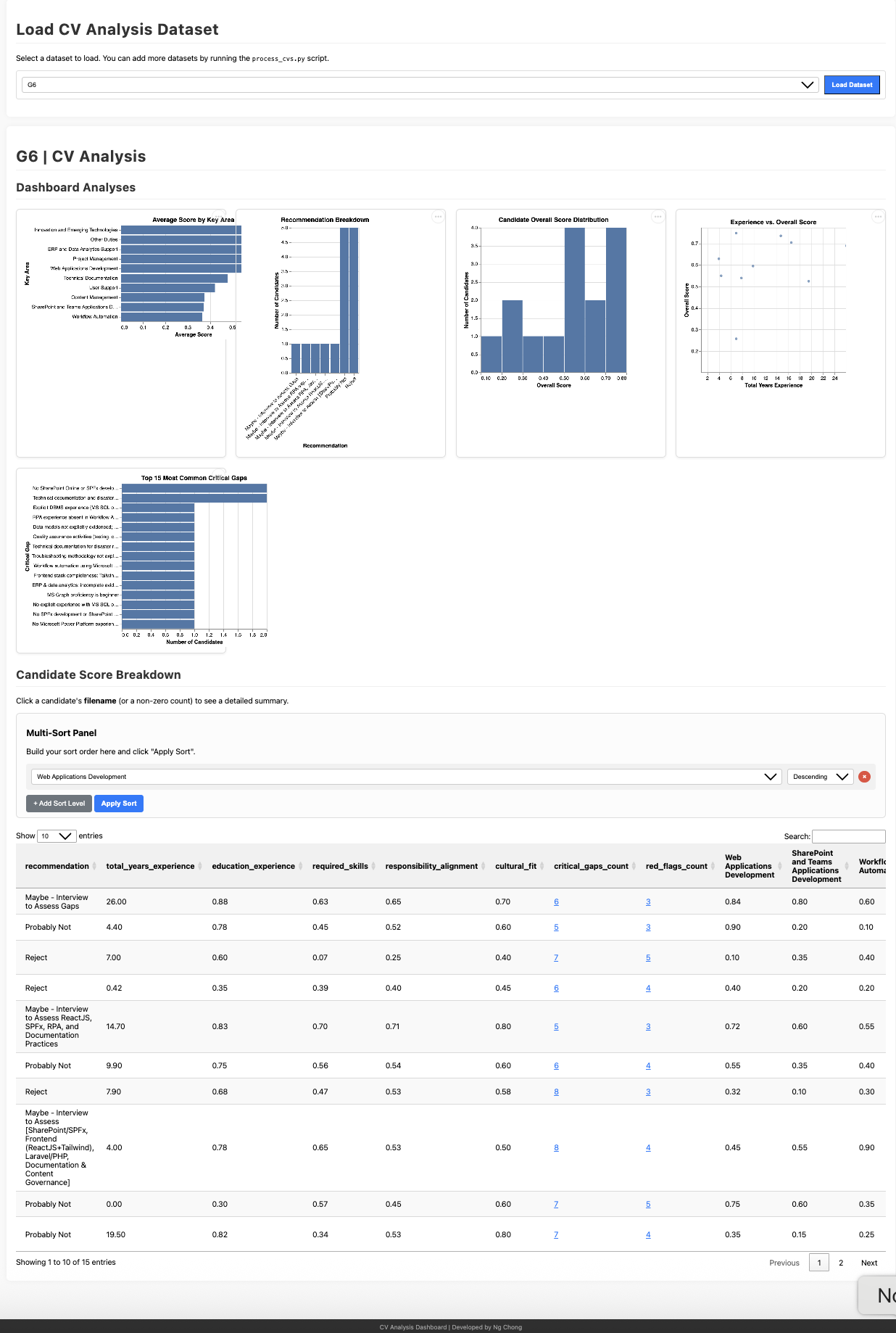
The Dashboard Tab: Criteria-Based Ranking
The Dashboard is built into the app as its own tab (no separate scripts or servers). Its centerpiece is interactive criteria-based ranking: you choose which skills, key responsibility areas, or score components should count, and every candidate is re-ranked live by a Selected Match score computed from only those criteria.
Ranking Criteria panel
Tick or untick skill groups (which apply the JD's own any-1-of-N / all-N logic — see Skill Logic), individual required skills, key areas, or the four score components (Education & Experience, Required Skills, Responsibility Alignment, Cultural Fit). The ranked table, coverage heatmap, and charts update instantly. Individual skills count 100% if met and 0% if missing — regardless of whether the JD accepted an alternative — while skill groups score the requirement as written.
A fifth group, Desirable, lists the job description's own preferred/asset items (see Required vs. Desirable) - available only where the evaluation level assessed them (Comprehensive, Extended, Advanced), and not selected by default, since these are differentiators among qualified candidates, not eligibility criteria.
Sort priority (multi-column) and how ties actually break
Click any column header for a quick sort, or build a multi-level sort where each added level only comes into play when every level above it is exactly equal, for example Selected Match, then Years of Experience, then a specific skill. You can add Selected Match, Overall Score, Name, Recommendation, Years of Experience, or any individual ranking criterion you have selected.
If two candidates are still tied after every level you've configured, there is no further automatic tiebreaker. The default view sorts by Selected Match alone, so an exact tie there falls back to whatever order the results were already in before sorting (candidate-completion order for a live batch, alphabetical by filename for a saved or restored run), not a meaningful signal either way. If an exact tie matters to your decision, add a second sort level deliberately, for example Years of Experience or the one skill you weight most, rather than reading anything into the order two tied rows happen to appear in.
A one-click Shortlist order preset sets the three sort levels to Qualified, then Desirable, then Overall Score - the two-stage Longlist/Shortlist workflow (see Longlist, Then Shortlist) in one click. The table always shows a Qualified column (checkmark, meets the required/eligibility criteria) and a Desirable column (coverage percentage of the JD's desirable criteria, or "n/a" where the evaluation level didn't assess them).
Coverage heatmap & analytics
A candidates-by-criteria heatmap makes "who covers what" scannable at a glance, with supporting charts (top candidates, score distribution, experience vs. match). Clicking any row opens the candidate's full evaluation, including the raw CV and Q&A text where available.
Saved runs
Every processed batch is auto-saved as a named run (set a Run Name in Step 4, or a timestamp is used). The Dashboard's data-source picker reopens any past run; runs containing evaluations from several models include a model filter.
Key Use Case: Rank by What Matters for This Role
- Technical-heavy role? Select only the critical technical skills and rank by Selected Match
- Leadership position? Select the leadership-related key areas plus Responsibility Alignment
- Junior role with growth potential? Select Cultural Fit and Education & Experience
- Specialized expertise needed? Select just the one skill or key area that is non-negotiable and see instantly who has it
Example: for a data-engineering role, ticking only "Python", "Data pipelines", and the "Required Skills" component surfaces the candidates who cover the core stack—even when their overall score is dragged down by unrelated gaps.
Council Mode: Multiple AI Models, One Human Decision
Different AI models can score the same CV differently. Council mode (optional, off by default) has two or more models evaluate every candidate against the same parsed CV, the same Q&A answers, and the same prompt—so the results are directly comparable, and the final call stays with a human reviewer.
Running a council
In Step 4, add one or more council members: each is a provider plus an optional model, so the same provider can join several times with different models (for example Azure OpenAI with two different deployments). Each member adds one full evaluation per candidate, so cost and time scale with the council size.
The Council tab
A comparison table shows each model's score, qualified verdict, and recommendation per candidate, plus the score delta, an agreement badge (split verdicts and gaps of 15%+ are flagged), and the consensus mean. It is sorted by disagreement, biggest first—the candidates most in need of human judgment surface at the top.
Side-by-side review & decisions
Clicking a candidate opens every model's full evaluation side by side. Reviewers record a decision (Advance / Hold / Reject) and free-text notes per candidate; decisions autosave with the run and can be exported together with the per-model scores as a council report (JSON).
Honest failure handling
A council member whose provider fails (bad key, quota, unparseable output) shows as failed for that candidate instead of polluting the comparison with a fake zero score. Note: re-running selected candidates refreshes only the primary model's evaluation—council results and recorded decisions stay unchanged.
How the numbers are computed
Every percentage here is higher-is-better: a higher score means a stronger match, a higher consensus means a stronger average match. A higher score delta is the exception, it means the models disagree more, not that anyone scored higher or lower specifically.
- Per-model score. At Comprehensive, Extended, or Advanced level, each model's own weighted score: education & experience (20%) + required skills (40%) + responsibility alignment (35%) + cultural fit (5%), each component itself scored 0-100% by that model. This is the same score a single-model evaluation would show, just computed once per council member. At Basic or Moderate, there is no component breakdown; each model instead reports one holistic score directly.
- Δ Score (score delta). The gap between the highest and lowest score among models that actually returned one. A council member that errored (bad key, an unsupported parameter, quota) is excluded from this calculation entirely, not counted as a 0.
- Consensus. The plain average (mean) of the scores from models that returned one, same exclusion rule as above. The small "mean of X/Y" caption under it tells you how many of the council actually contributed (X) versus how many were attempted (Y); a consensus of "mean of 2/4" carries less weight than "mean of 4/4".
- Agreement badge. "Agree" means every contributing model reached the same qualified/not-qualified verdict and their scores are within 15 points of each other. "Score gap" means they still agree on qualified/not-qualified, but the scores differ by 15 points or more. "Split verdict" means the models actually disagree on qualified versus not-qualified: the strongest signal that a candidate needs a human read.
Worked example (illustrative, not a real candidate):
Model A: 72% (qualified)
Model B: 65% (qualified)
Model C: error (unsupported parameter for this model)
Δ Score = 72 − 65 = 7% (only A and B produced a score; C is excluded, not treated as 0%). Consensus = (72 + 65) / 2 = 68.5%, shown as "mean of 2/3". Both are qualified and the gap is under 15 points, so Agreement shows "Agree."
Consensus is a raw average across models, not a calibrated score. A model that is systematically stricter or more lenient than the others shifts the consensus without meaning the other models are wrong; treat it as a summary signal, not a verdict on its own.
Why a council?
A single model's verdict is a weak basis for a shortlist. When two independent models agree, confidence rises; when they split, that disagreement is itself information—it tells the reviewer exactly where to spend their attention. The AI assessments inform the decision; the decision itself remains human.
Is council worth the extra cost?
Every council member is a full extra evaluation per candidate, not a lighter cross-check. A 3-member council costs roughly 3 times the API usage and wall-clock time of a single-model pass, for every candidate it runs on. That cost is easy to justify in some situations and hard to justify in others.
Worth it
- A short list of finalists, not the full applicant pool. Run a single model first to triage, then council only the candidates who made the cut.
- Senior or high-stakes roles, where the cost of a bad hire dwarfs a few extra dollars of API usage.
- Borderline candidates specifically. Models tend to agree on clear qualifies and clear rejects; disagreement concentrates in the close calls, which is exactly where a second opinion helps most.
Probably not worth it
- High-volume first-pass screening at Basic level. That step exists to cheaply cut a large pile down; multiplying its cost by the council size works against the reason to use Basic at all.
- Roles with unambiguous, binary requirements (a specific required certification or degree). Models rarely disagree on a plain factual match, so there is little disagreement signal to surface regardless of council size.
The evaluation level you run council at changes what the disagreement tells you. At Basic or Moderate, each model reports one holistic score with no breakdown, so a split only tells you the models disagree on the verdict as a whole. At Comprehensive, Extended, or Advanced, each model's score is built from four separate category judgments, so a split can show where the disagreement actually lives, for example models agreeing on skills but splitting on responsibility alignment. That is more specific, actionable information for the same extra cost, which is why council tends to pay off best paired with a shortlist round at Comprehensive level or higher, rather than with Basic-level volume screening.
A Two-Stage Workflow: Longlist, Then Shortlist
Every feature above is designed to work as one staged workflow, not a single setting you pick once. Running the full applicant pool through the deepest, most expensive level and council is rarely the right call. Running everyone through a cheap first pass, then only paying for depth on the candidates who earned it, usually is.
Stage 1: Longlist the full pool
Parse the job description once, then upload every applicant in one batch at Basic or Moderate. Both are cheap and fast, and Basic in particular is built for exactly this: a coarse pass/fail against absolute minimums, with no council. Open the Dashboard tab and use its ranking criteria and sort priority to identify your top candidates, or everyone marked qualified. This stage is about required criteria only: who meets the eligibility bar.
Stage 2: Shortlist with depth
Click Open Re-run Manager and select just that top group, not the whole pool. Switch "3. Select Evaluation Level" to Comprehensive, Extended, or Advanced, add council members if the role warrants it, then re-run. Nothing needs to be re-uploaded; the same CV and Q&A text already in memory carries over to the new level. This is also where desirable criteria earn their keep: among everyone who already qualified, the Dashboard's Desirable column and criteria group help you see who stands out on the JD's own preferred/asset items, a comparison Stage 1's Basic/Moderate levels don't make (see Required vs. Desirable).
Why the level jump matters, not just the cost saving
Re-running at a deeper level is not just "more detail" on the same verdict. Basic and Moderate report one holistic score; Comprehensive, Extended, and Advanced score four separate components and let the backend recalculate the final number from them. A candidate a coarse first pass waved through can look different once responsibility alignment, red flags, or recency of skills actually get assessed; a candidate who barely cleared Basic's minimums can turn out to have compensating strengths a holistic pass/fail was never built to see. The two stages are answering different questions, not the same question twice.
Step-by-step
- Parse the job description (Step 2).
- Set the evaluation level to Basic or Moderate (Step "3. Select Evaluation Level").
- Upload the full applicant pool and process (Step 4). No council members yet.
- Open the Dashboard tab; use the Shortlist order preset (Qualified, then Desirable, then Overall Score) or your own sort priority to identify your top group.
- Open the Re-run Manager; select only that group.
- Switch the evaluation level to Comprehensive, Extended, or Advanced; add council members if warranted.
- Re-run. Review the deeper results, including each candidate's new Desirable Criteria section, in Results, Dashboard, or the Council tab, and make the final call there.
Resilience: Recovering From an Accidental Reload
A browser tab can close or reload mid-batch: a stray click, a system update, a crashed laptop. With Auto-save JSON Results left on in Step 4 (the default), that does not mean starting a batch of many candidates over from scratch.
Every candidate saves as it finishes
Candidates are evaluated one at a time, and each result is written to the server the moment that candidate's own evaluation completes, not once the whole batch is done. If 30 of 50 CVs finished before the page closed, those 30 results already exist; only the remaining 20 need to be processed again.
Restore is one click away, wherever you land
Results (what a reload actually lands you on), Parsed Job Description, and Council each offer "Restore my most recent run" in their own empty state, plus a dropdown for any older run. The job description is saved once per run alongside the results, so restoring never forces re-parsing it from scratch.
Restoring reopens the same run
Restoring from Results brings back the actual candidate cards: names, scores, and the original CV/Q&A text ("View Files" works on a restored candidate too), not just the job description. It fills in Run Name and lists which candidates already have a result, so they are not re-uploaded by mistake. Any further CVs processed afterward join that same run and appear together with the restored ones across Results, Dashboard, and Council, just as if the batch had never been interrupted. Parsing a genuinely different job description, on the other hand, always starts a clean, separate run.
Council decisions and the Dashboard too
Council mode's review decisions (Advance / Hold / Reject, plus notes) autosave with the run as they are entered. The Dashboard's saved-run picker can reopen any past run for viewing at any time, restored or not.
What this does not cover
- The original CV files are not stored on the server. Whichever CVs had not yet been processed when the page closed must be selected again from your computer; they are simply not re-scored from scratch.
- All of this depends on Auto-save JSON Results staying on. Turning it off trades this recovery away for a run that never touches the server's disk.
- "Restore my most recent run" restores only the newest one. Reopening an older run needs its dropdown, or the Dashboard's saved-run picker.
- Restoring a council run (several models per candidate) into Results shows only each candidate's highest-scoring model, not every model; open the Council tab for the full side-by-side comparison.
Known Behavior and Design Notes
A running record of how a few less-obvious parts of the system behave today, and what changed recently.
Required languages are judged holistically, not structurally
Unlike required skill categories, which get a deterministic AND/OR recount (see
Skill Logic), a required
language (e.g. "English, fluent, required") has no equivalent code-enforced check. The full
job description, including its languages list, is visible to
the evaluator, and it is expected to factor language requirements into
qualified and the narrative through ordinary model judgment,
the same way it would read any other prose requirement. There is no dedicated "Language
Verdicts" output the way there is for skill groups.
Level 2 parsing can promote a Responsibilities-only skill to required
Level 2 (Deep Parse) reads both the Qualifications and Responsibilities sections. A skill that appears only in Responsibilities, never in Qualifications, is extracted as a required skill by design: the stated rationale is that a candidate needs to be able to perform the job's actual duties, not only what the Qualifications section spells out. This can raise the effective bar based on how much detail a responsibility happens to be described in, independent of what Qualifications alone demands - a deliberate trade-off, not an oversight (see the "Important Note" under Job Parsing Level in the Workflow section above).
Recent fixes
- Basic, Moderate, and Comprehensive no longer pay for a hidden second model call for growth trajectory. Only Extended and Advanced request that field; the other three now get a plain "not assessed" instead of silently triggering a second, unbudgeted API call on every evaluation.
- The full raw CV text is now actually sent to the model as a supplementary source, alongside the structured Candidate Profile and the Q&A - the instructions always described this "Full CV Text" source, but it was never actually included.
- A per-skill "years of experience" value like "5+" or "5-10 years" no longer breaks the whole evaluation. It previously failed strict validation and could invalidate an entire candidate's result over one loosely-worded figure; the same fix also stops a plain numeric string for total years of experience from being silently zeroed out.
- The downloadable HTML report now respects a reviewer's corrected years-of-experience figure, matching the in-app candidate card and Dashboard, instead of always showing the model's original number.
- The Comprehensive-level prompt no longer repeats its skill-category instructions twice with unrelated bullets stranded in between; consolidated to match the structure of every other level.
- Removed a request for a field the model always produced but the app silently
discarded on every run (
qa_analysis_note), fully superseded by the richerqa_analysis_reportobject.
Important Considerations: AI Limitations
While this tool significantly accelerates the initial review process by following your instructions, it is a tool designed to assist, not replace, human judgment and expertise.
📌 Research Context
This project describes an experimental, research-oriented exploration of AI-assisted screening. It is not a production HR system, nor does it represent United Nations University (UNU) hiring policy or procedures. The tool is designed for research and educational purposes to explore how AI might assist with initial CV screening processes.
- AI models can sometimes make mistakes, misinterpret nuances in resumes, or fail to capture the full context of a candidate's experience.
- AI evaluations can potentially reflect unintended biases. Using multiple models (a core feature) can help mitigate this.
- The quality of the AI's output is directly dependent on the clarity of the job description and the evaluation prompt you provide.
Therefore, always critically review the AI-generated evaluations. Use them as a starting point, but conduct thorough interviews and reference checks before making final hiring decisions.