Overview
The Concordia Simulation Builder is a full-stack web application that provides a form-based interface for creating and running agent-based social simulations. Built on top of Google DeepMind's Concordia framework , it allows researchers, educators, and developers to model complex social interactions without writing code.
What the Builder Automates
Building a simulation in raw Python requires writing code for every step: LLM initialization, prefab loading, agent configuration, memory injection, Game Master wiring, engine selection, execution, and result parsing. Even standard upstream examples — 2-to-4-agent scenarios using built-in prefabs — require 1,100 to 1,300 lines of Python across multiple files; examples with custom game masters and payoff logic reach 1,600 lines; research scenarios with large persona datasets exceed 7,000 lines.
The Builder replaces all of that with a form. Every step in the Concordia pipeline has a corresponding UI control:
| Pipeline Step | Raw Python | Builder |
|---|---|---|
| LLM initialization | Instantiate provider client, configure API keys, set temperature/max tokens, handle retries and timeouts | Provider & model dropdowns, temperature slider. Keys in .env |
| Agent configuration | Build entity params dict per agent: name, goal, memories list, prefab selection, context mapping | Agent cards with drag-to-reorder, prefab picker, persona generator, backstory button |
| Formative memories | Construct player_specific_context and player_specific_memories dicts, wire initializer prefab | Per-agent context field + Generate Backstory button |
| Game Master wiring | Select GM prefab, configure params (scenes, questionnaire, acting order, components), pass model | GM config panel with prefab picker, component checkboxes, scene/questionnaire editors |
| Engine selection | Choose and instantiate engine class, pass agents and GM, configure step count | Engine type dropdown + max steps field |
| Execution | Call sim.play(), handle timeouts, cancellation, checkpointing, hang detection | Run button with SSE progress, cancel, live logs, watchdog — all automatic |
| Result parsing | Parse HTML log, extract actions/observations, compute statistics, generate charts | 9-tab results view with auto-analytics, CSV/JSON export, AI-powered analysis |
| Data export | Write custom scripts for data extraction, format conversion, and statistical analysis | Structured CSV/JSON export, cooperation metrics, grounded variable tracking |
| Agent generation | Manually create each agent, define memories and goals individually in code | Census-based generation from demographic distributions, persona generator |
| Parameter sweeps | Write batch scripts to re-run with different parameters, collect and aggregate results | Batch runs with sweeps over temperature and step count, aggregated CSV export |
To validate this claim, 5 of Google DeepMind's own upstream Concordia examples — originally 1,000–7,000+ line CLI projects — have been adapted into Builder templates that load and run through the web interface with zero Python. See the Upstream Examples category.
Key Features
Multi-Agent Scenarios
Create simulations with multiple agents, each with unique personalities, goals, and memories.
Customizable Components
Add psychological components (personality, cognitive bias, social identity, emotions, values, TPB) to agents for theory-driven research.
Nested Simulations
PhoneGameMaster pattern for running mini-simulations within simulations, enabling complex planning and "what-if" scenarios.
Grounded Variables
Track simulation state variables (morale, budget, health, etc.) with numerical, categorical, boolean, and percentage types. Features AI-powered post-processing to extract variable history from completed simulations by analyzing unstructured HTML logs using LLM inference.
38 Templates
Pre-built templates across 7 categories: Quick Start, Prefab Demos, Research, General Scenarios, Advanced Scenarios, SDG Scenarios, and Upstream Examples (adapted from Google DeepMind). Searchable by name, agent, topic, or keyword.
8 LLM Providers
OpenAI, Azure OpenAI, DeepSeek, Gemini, Anthropic, GLM (Zhipu AI), Ollama (Local), and Ollama (Remote). Separate GM model support.
Analytics Dashboard
Statistical analysis, timeline visualization, action breakdown with extracted goals, and AI-generated natural language summaries.
LLM-Powered Simulation Analyzer
Automated deep content analysis generating executive summaries, team effectiveness assessments, key insights, and actionable recommendations via Web API or CLI.
Recent Simulations Browser
Easily view and analyze previous simulation results with checkpoint file management for incremental saves during long simulations.
Checkpointing & Recovery
Multi-layered safety system: configurable interval checkpoints, emergency saves on errors and hangs,
watchdog monitoring with LLM activity tracking, per-request timeouts, and a frontend checkpoint browser with cleanup.
Every checkpoint includes full metadata for reproducibility.
v2.4.1: mid-run resume from checkpoint — see feat/resume-from-checkpoint
Save & Load Configs
Save named configurations to the server for reuse, browse and load from "My Configs", or export/import as JSON files for sharing.
Rich HTML Logs
Beautiful, interactive simulation logs with tabbed views and styling.
Live Log Streaming
Stream all terminal output to the browser in real time via SSE. 13 color-coded message categories differentiate entity observations and actions, GM narration (including narrative resolution, payoff matrix, inventory, NPC events, and working memory), warnings, watchdog alerts, checkpoints, errors, progress, completions, and more. A toggleable legend in the log panel header provides quick reference. Separate panels for system/debug logs and LLM API call traces.
Validation
Real-time configuration validation ensures simulations are properly set up.
Step Controller
Play/pause/step/stop controls for interactive debugging. Step through simulations one action at a time with per-step entity detail.
Contrib GM Components
Add-on GM components: Death Mechanics, GM Working Memory, NPC Event Generator, Location-Based Filter, and Spaceship System.
Persona Generation
AI-powered generation of diverse agent personas with configurable diversity axes. Creates names, goals, descriptions, and memories automatically.
Formative Memory Generation
Generate rich character backstories from agent names and context. LLM-powered episodic memory creation for deeper agent characterization.
Player-Specific Context
Private information that only specific agents know, creating hidden asymmetries and secret knowledge dynamics within simulations.
Separate GM Model
Configure a separate LLM for the Game Master with independent provider, model, and temperature settings for fine-grained control.
Structured Data Export
Export agent actions and grounded variable histories as CSV or JSON. Per-step tabular data ready for pandas, R, or Excel analysis.
Census-Based Agent Generation
Generate agents from statistical distributions (independent marginals or joint profiles). Supports CSV/JSON upload, deterministic seeding, and optional LLM enrichment.
Structured Action Constraints
Define available actions that agents must choose from, replacing open-ended responses with structured categorical choices. Supports global and per-agent configuration.
Batch Runs & Parameter Sweeps
Run simulations multiple times with optional parameter variations (temperature, max steps). Live progress tracking, per-run results table, and aggregated CSV export.
Installation
Prerequisites
- Python 3.13 or higher
- Node.js 18 or higher
- API keys for at least one LLM provider (OpenAI, Azure OpenAI, DeepSeek, Gemini, Anthropic, or GLM), OR Ollama for local models
Backend Setup
# Clone the repository

git clone https://github.com/ngstcf/concordia-sim-builder.git

cd concordia-sim-builder


# Create virtual environment

python -m venv venv

source venv/bin/activate  # On Windows: venv\Scripts\activate


# Install dependencies (pins a patched Concordia 2.4.0 fork — see note)

pip install -r requirements.txt
Note — patched Concordia. requirements.txt pins a patched fork (ngstcf/concordia@5ed8813), not the stock PyPI wheel. The async social-media activity-rate parameters documented below (default_activity_rate, per_agent_activity_rates, activity_seed) depend on it; stock gdm-concordia==2.4.0 ignores them. See the repository README for details.
Frontend Setup
cd frontend

npm install
Environment Configuration
Create a .env file
in the root directory:
# LLM Provider Configuration

OPENAI_API_KEY=sk-xxx                    # For OpenAI models

AZURE_OAI_KEY=xxx                        # For Azure OpenAI

AZURE_OAI_ENDPOINT=https://your-resource.openai.azure.com

AZURE_OAI_VERSION=2024-12-01-preview     # Optional: API version for Azure OpenAI

DEEPSEEK_API_KEY=sk-xxx                  # For DeepSeek

GEMINI_API_KEY=xxx                       # For Gemini models

ANTHROPIC_API_KEY=sk-xxx                # For Claude models

GLM_API_KEY=xxx                          # For GLM/Zhipu AI models

# OLLAMA_BASE_URL=http://localhost:11434/v1  # Optional: Custom Ollama endpoint
Using Ollama (Local Models)
For completely local simulations without API costs, you can use Ollama:
Performance Requirements
Ollama works well when running on hardware with sufficient resources:
- RAM: 8GB+ for 7B models, 16GB+ recommended for larger models
- CPU: Multi-core processor recommended (local models are CPU-intensive)
- GPU: Optional but significantly improves inference speed
- For best performance, consider using a hosted Ollama service or cloud-based LLMs (DeepSeek, OpenAI)
When to use Ollama
- Privacy-sensitive simulations (data stays local)
- Testing and development without API costs
- Machines with good CPU/GPU performance
- Hosted Ollama services with sufficient server resources
- Install Ollama: Run
curl -fsSL https://ollama.com/install.sh | sh(macOS/Linux) or download from ollama.com (Windows) - Pull a model: Run
ollama pull 'model'(recommended: llama3.3, mistral, gemma4, qwen3.6) - Start Ollama: Run
ollama serve - Configure in UI: Select "Ollama (Local)" as the provider, enter model name (e.g., "llama3"), no API key needed for local Ollama!
Using Hosted Ollama Services (OpenWebUI, etc.)
If you're using a hosted Ollama service (like OpenWebUI) that requires authentication:
- Set
OLLAMA_BASE_URLto your hosted service endpoint - Set
OLLAMA_API_KEYto your API key (if required) - In the web UI, select "Ollama (Local)" and enter your API key
# Example .env configuration for hosted Ollama

OLLAMA_BASE_URL=https://your-openwebui-instance.com/v1

OLLAMA_API_KEY=your-api-key-here
Ollama Timeout Warning
Important: Local models like Ollama can experience timeout issues, especially with larger models or slower hardware.
Typical timeout symptoms: "Timeout on attempt X/3. Retrying in Y seconds..."
Solutions:
- Try a smaller/faster model
- Use a hosted provider instead
- Ensure Ollama has sufficient system resources
Hosted Ollama services (e.g., on powerful servers) work well for production use.
Frontend Configuration
The frontend supports a configurable timeout for simulations:
# Simulation timeout in milliseconds (default: 10800000 = 3 hours)

# Increase this for very long simulations (e.g., 21600000 = 6 hours)

VITE_SIMULATION_TIMEOUT=10800000
Note: After changing this value, you'll need to restart the frontend development server for the changes to take effect.
Simulation Checkpointing, Recovery, and Hang Prevention
The Simulation Builder includes a multi-layered safety system to prevent data loss from long-running simulations. Checkpoints capture partial results at regular intervals, emergency saves fire on errors and hangs, and the frontend provides a dedicated checkpoint browser for reviewing and managing recovered data.
Automatic Checkpointing
Partial results are automatically saved during simulation execution:
- Checkpoints saved at configurable intervals (default: every 5 steps) to
logs/directory - Interval configurable in Scenario Settings (range: 1–100 steps)
- Checkpoint files use the naming pattern
{timestamp}_{agents}_{premise}_checkpoint_step{N}.html - Each checkpoint is paired with a
.metadata.jsonfile containing full simulation configuration - No manual intervention required — fully automatic
Emergency Recovery Checkpoints
Three automatic emergency save mechanisms protect against different failure modes:
- Watchdog emergency save: When the watchdog detects a hang (no step progress for the configured timeout), it immediately saves all accumulated results to a
_WATCHDOG_EMERGENCY_step{N}.htmlfile before the simulation is terminated. - Post-execution emergency save: After the simulation engine completes but before final HTML processing, results are saved to an
_EMERGENCY_CHECKPOINT.htmlfile. This protects against failures during post-processing or report generation. - Exception recovery: If the simulation throws an exception mid-run, the system extracts whatever partial results exist from the engine's raw log. If extraction also fails, a minimal error report with the full traceback is generated instead.
Checkpoint Metadata
Every checkpoint (regular and emergency) is paired with a JSON metadata file recording:
- Timestamps: when the simulation started, when the checkpoint was saved, elapsed time
- Progress: current step number out of total max steps
- LLM configuration: provider, model name, and separate GM LLM if configured
- Full agent roster: IDs, names, prefab types, goals, and memory counts
- Game Master configuration: prefab, name, and any grounded variables
- Simulation premise text
Metadata enables the analytics system to provide full context for any checkpoint, even without the original simulation configuration.
Watchdog Monitoring
Detects when simulation hangs (no progress for configured timeout):
- Default: 10 minutes without step progress triggers the watchdog
- Configurable via
WATCHDOG_TIMEOUT_SECONDSenvironment variable - Can be disabled via
WATCHDOG_ENABLED=falseif warnings interfere - Tracks LLM activity (calls in flight, total calls) to distinguish "engine hung" from "waiting on slow API response"
- Logs periodic status updates every 60 seconds with step count and LLM activity
- On hang detection: saves emergency checkpoint, logs diagnostics, then terminates
Per-Request Timeout Enforcement
Each LLM API request has a configurable timeout:
- Standard models: Default 180 seconds (3 minutes) per request
- Reasoning models (O1, O3, GPT-5): Default 300 seconds (5 minutes) per request
- Configurable via
LLM_TIMEOUTandLLM_REASONING_TIMEOUTenvironment variables - System waits FULL timeout before flagging error (no premature interruption)
Checkpoint Browser & Cleanup
The frontend provides a dedicated interface for managing checkpoint files:
- Recent Simulations lists only completed runs — checkpoints are separated into their own collapsible section
- Each checkpoint shows its step number badge, file size, and modification date
- Click any checkpoint to view the partial results as rendered HTML
- Clean Up button shows total checkpoint count and disk usage, with a confirmation dialog before deletion
- Cleanup removes all checkpoint types (regular, emergency, watchdog) and their metadata files
Resume Interrupted Runs & Extend Completed Runs
v2.4.1 — feat/resume-from-checkpoint
Version 2.4.1 adds two capabilities using Concordia's native save/restore API. A .state.json sidecar is written alongside every checkpoint and every completed final log, preserving full agent/GM state, memories, and all configuration.
Resume — for interrupted runs
- When a run is stopped (server restart, network loss, manual cancel), click the green Resume button on any checkpoint row in the Checkpoints panel
- No template reload or re-entry of LLM settings required — everything is restored from the
.state.jsonsidecar - The continuation streams live via SSE; the final log contains the complete history from both halves
Extend — for completed runs
- When a simulation finishes — whether the LLM terminated early or
max_stepswas reached — a teal Extend button appears on the Recent Simulations row - Enter how many additional steps to run; the simulation picks up from the final state with all agent memories and GM state intact
- The Extend button only appears for runs completed after upgrading to v2.4.1 (older runs have no final
.state.json)
Limitations: simulations using player_specific_context (formative memory initializer) may re-initialize on resume; step-controller, interview, and survey engines are untested; .state.json sidecars store the API key in plaintext — keep the logs/ directory out of shared or publicly accessible storage.
Also fixed in v2.4.1 — Allow Early Termination now works for all GM prefabs
The Allow Early Termination toggle previously had no effect when using generic__GameMaster (the default). That prefab silently ignores the can_terminate_simulation parameter, so every run could still terminate early via an LLM "Yes" at the first termination check. The fix injects a NeverTerminate component directly into every GM after build, making the setting work regardless of which GM prefab is selected. This also applies to Extend runs — extending a completed simulation with early termination disabled now correctly runs to the requested number of additional steps.
Timeout & Logging Configuration
# Per-LLM-request timeout in seconds (default: 180 = 3 minutes)

LLM_TIMEOUT=180


# Per-LLM-request timeout for reasoning models (default: 300 = 5 minutes)

LLM_REASONING_TIMEOUT=300


# Maximum retry attempts for LLM requests (default: 2)

LLM_MAX_RETRIES=2


# Simulation watchdog timeout in seconds (default: 600 = 10 minutes)

WATCHDOG_TIMEOUT_SECONDS=600


# Enable/disable watchdog monitoring (default: true)

# Set to 'false' to disable hang prevention if it interferes with simulations

WATCHDOG_ENABLED=true


# Console & live log streaming controls (default: true for both)

# Controls both terminal output and browser Live Logs panels

DEBUG_ENABLED=true          # Control [DEBUG] configuration messages

LLM_LOGGING_ENABLED=true    # Control [LLM] API call details (enables separate LLM Log panel)


# Frontend simulation timeout in milliseconds (default: 10800000 = 3 hours)

VITE_SIMULATION_TIMEOUT=10800000
Important Notes
- The system waits the FULL timeout duration before flagging an error
- If a request completes at 179s (of 180s timeout) → SUCCESS
- If a request completes at 181s (of 180s timeout) → RETRY
- Regular checkpoints are saved automatically — no configuration needed beyond the optional interval setting
- Emergency checkpoints fire automatically on errors, hangs, and post-execution — no configuration needed
- All timeout values are configurable via environment variables
Quick Start Guide
1. Start the Backend
# Activate virtual environment

source venv/bin/activate


# Start FastAPI server

python -m uvicorn backend.main:app --reload --host 0.0.0.0 --port 8000
Backend runs at:
http://localhost:8000
2. Start the Frontend
cd frontend

npm run dev
Frontend runs at:
http://localhost:5173
3. Build Your First Simulation
- Navigate to the Builder tab
- Enter a premise (e.g., "Two friends meet at a coffee shop")
- Add agents with names, goals, and initial memories
- Configure the Game Master settings
- Click Runner and run your simulation!
4. View Results with Analytics Dashboard
After your simulation completes, you'll see the results in an embedded log viewer with comprehensive analytics:
Simulation Log
Full HTML output with all agent interactions, dialogue, and observations in tabbed views.
Statistical Dashboard
Visual analytics showing agent activity, total actions and observations, timeline visualization, and text statistics.
LLM-Powered Analysis
AI-generated natural language summary with executive summary, team effectiveness assessment, key insights, and actionable recommendations.
Actions View
Per-agent action breakdown with extracted goals, step-by-step timeline, and cooperation metrics.
The Statistical Dashboard provides:
- Total Agents: Number of agents in the simulation
- Total Actions: Deliberate choices made by agents (marked as __act__ in the simulation)
- Total Observations: What agents perceived about their environment
- Agent Activity: Visual breakdown of actions per agent with gradient progress bars
- Text Statistics: Word counts, agent mentions, and most frequent terms
The LLM-Powered Simulation Analyzer generates comprehensive reports including:
- Executive Summary - High-level overview of what happened
- Timeline Analysis - Step-by-step event breakdown
- Team Effectiveness - Agent/team performance assessment
- Key Insights - Technical findings, human factors, decision quality
- Recommendations - Actionable suggestions organized by timeframe
Building Simulations
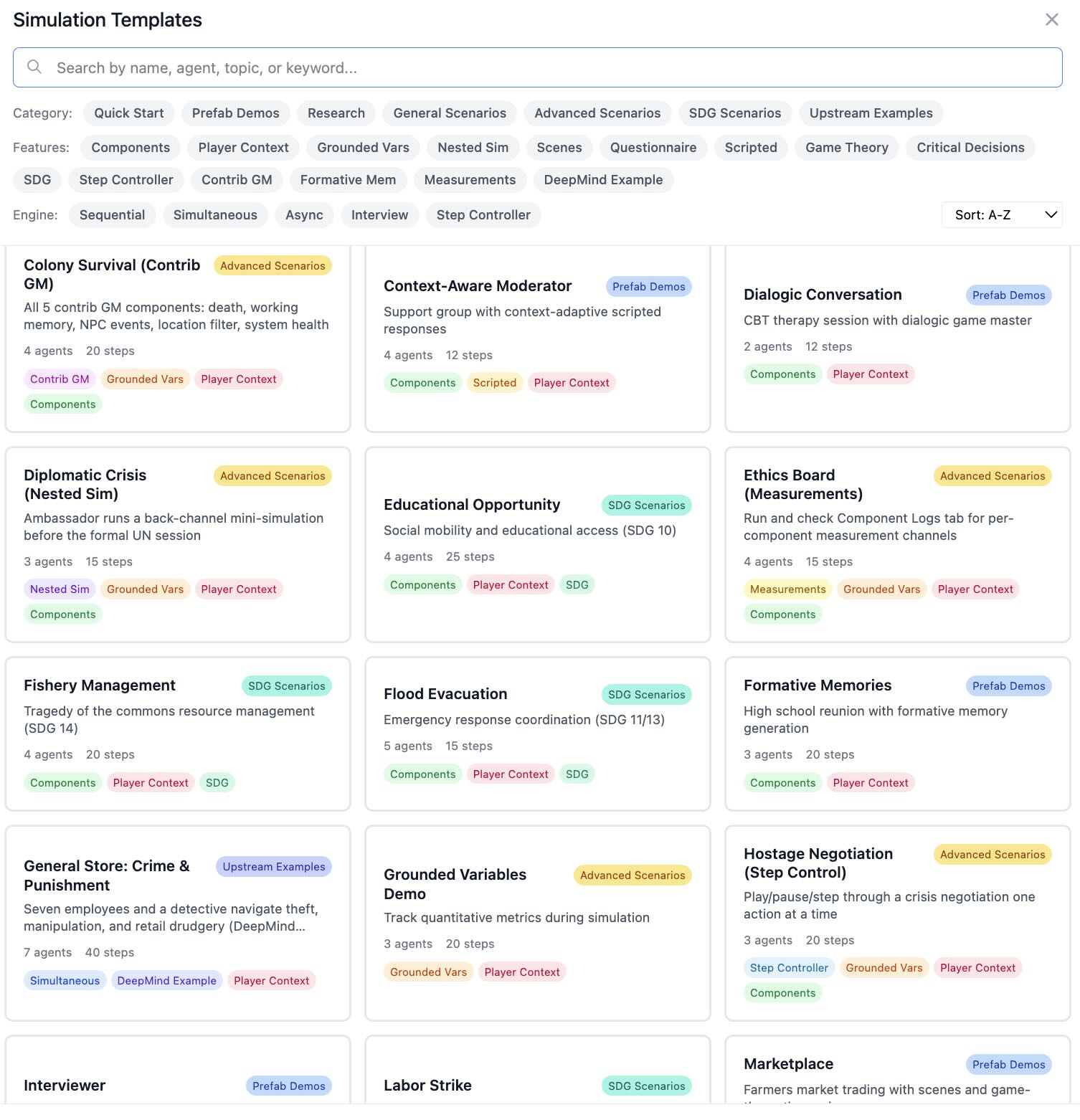
Figure 1: Searchable template picker showing simulation templates with category, feature, and engine filters.
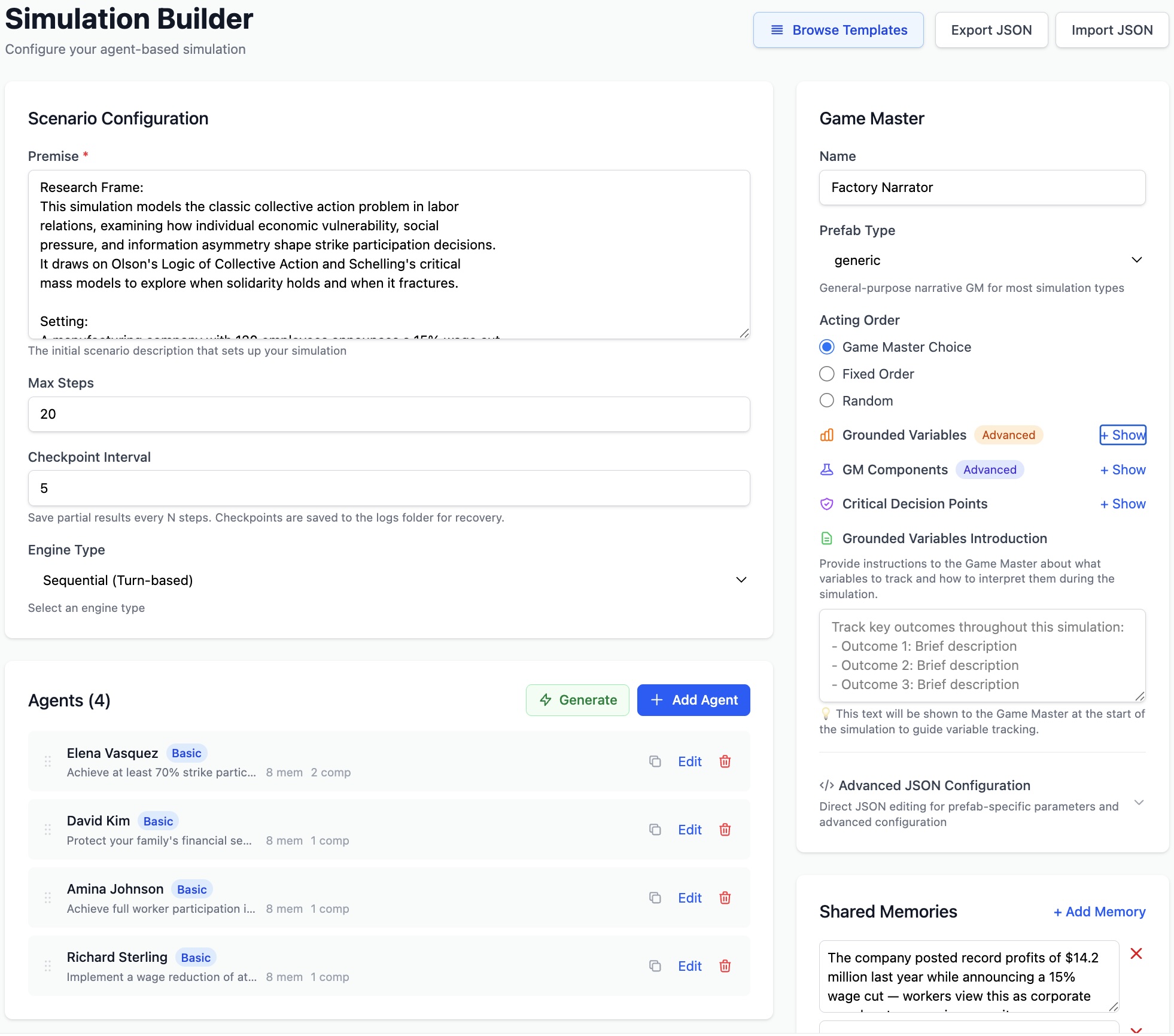
Figure 2: Labor Strike scenario configuration showing premise, 4 agents with distinct goals, Game Master settings, grounded variables, and shared memories.
Setting the Premise
The premise describes the scenario and setting. Be specific about the context, time, and place.
A high-stakes business negotiation between two companies.

One wants to acquire the other's technology, but the target

company is hesitant about losing independence.
Adding Agents
Each agent needs:
- Name: A unique identifier
- Goal: What the agent wants to achieve
- Memories: Initial context that shapes behavior
- Prefab: The behavioral blueprint that controls how the agent thinks and acts — whether it plans ahead, follows a script, adapts to context, reasons about utility, or holds a natural conversation. Different prefabs produce fundamentally different agent behaviors from the same goal and memories. See Prefab Reference for the full list.
Adding Psychological Components
Agents can have optional psychological components that shape their behavior:
- Personality Traits: Big Five (Openness, Conscientiousness, Extraversion, Agreeableness, Neuroticism)
- Cognitive Bias: Confirmation, availability, anchoring, sunk cost, overconfidence
- Social Identity: Group membership and identification strength
- Emotions: Joy, trust, fear, surprise, sadness, disgust, anger, anticipation
- Values: Core moral framework guiding decisions
- Theory of Planned Behavior: Attitude, subjective norms, perceived behavioral control
Configuring the Game Master
The Game Master controls the narrative flow. Key settings:
- Prefab: The behavioral blueprint for the narrator — controls dialogue flow, turn-taking, game mechanics, or interview structure (15 types available)
- Acting Order: "fixed", "random", or "game_master_choice"
- Name: The narrator's identifier
- Early Termination: Allow or prevent LLM-driven early termination. When disabled, a
NeverTerminatecomponent is injected into the GM so the simulation always runs tomax_stepsregardless of GM prefab. - Grounded Variables: Track numerical, categorical, boolean, or percentage metrics
- Critical Decision Points: Trigger events at specific steps
- Contrib Components: Add-on modules (Death, GM Working Memory, NPC Events, etc.)
Clock Configuration
The simulation clock is configured independently from engine type using config.clock.
Use this to control how simulated time advances per step.
| Clock Type | Fields | Use Case |
|---|---|---|
| fixed_increment | start_time, increment_minutes | Regular time cadence (hourly/daily steps) |
| multi_interval | start_time, increment_minutes, optional variable_increment_rules | Different increments by time period (e.g., day vs night) |
| generative | optional clock_description | LLM-managed temporal progression for open-ended scenarios |
Field notes: increment_minutes supports values from 1 to 1440;
variable_increment_rules maps hour to minutes;
clock_description is a prompt-style instruction for generative clocks.
Async Social Activity Parameters
For async_social_media__GameMaster, configure posting frequency via
game_master.parameters.
| Parameter | Type | Definition |
|---|---|---|
| default_activity_rate | number | Baseline activity for agents without overrides. Values <= 1.0 act as probabilities; values > 1.0 are relative intensity weights. |
| per_agent_activity_rates | object map | Per-agent overrides in the format {agent_name: rate}. |
| activity_seed | integer | Seed for reproducible stochastic activity sampling across runs. |
| forum_name | string | Forum label/context used by the Game Master. |
Shared Memories & Player-Specific Context
Shared Memories are context that all agents know from the start, establishing "world knowledge." Player-Specific Context is private information known only to individual agents, creating hidden asymmetries and secret knowledge dynamics.
Available Templates (38)
38 ready-to-run templates across 7 categories. Select any template to auto-populate all fields — premise, agents, components, engine, and Game Master — then customize or run immediately. All templates are searchable by name, agent, topic, or keyword.
Template coverage continues to expand as the project advances, with additional scenarios added over time.
Quick Start
| Template | Description | Agents | Steps | Engine |
|---|---|---|---|---|
| Coffee Shop Demo | Quick demo with two agents chatting | 2 | 5 | Sequential |
| Peace Negotiation | Russia-Ukraine diplomatic talks with UN mediator | 2 | 20 | Sequential |
Prefab Demos
Prefabs are behavioral blueprints that control how an agent thinks and acts — whether it plans ahead, follows a script verbatim, adapts scripted prompts to conversation context, reasons about utility to maximize payoffs, or holds a free-form conversation. Choosing a different prefab for the same agent (same name, goal, and memories) produces fundamentally different behavior. Each template below showcases a specific prefab in a realistic scenario so you can see how it behaves before using it in your own simulations. The Key Prefab / GM column shows which prefab or Game Master type the template is designed to demonstrate.
| Template | Description | Agents | Steps | Key Prefab / GM |
|---|---|---|---|---|
| Planning Agent | Product launch with strategic planning | 3 | 15 | basic_with_plan__Entity |
| Scripted Entity | Focus group with exact scripted moderator | 5 | 10 | basic_scripted__Entity |
| Context-Aware Moderator | Support group with adaptive scripted counselor | 4 | 12 | context_aware_scripted__Entity |
| Dialogic Conversation | CBT therapy session with natural dialogue | 2 | 12 | dialogic__GameMaster |
| Strategic Game | Prisoner's Dilemma with COOPERATE/DEFECT choices | 2 | 4 | game_theoretic__GM |
| Marketplace | Farmers market trading with BUY/SELL/HOLD | 3 | 10 | game_theoretic__GM |
| Interviewer | Structured employee satisfaction survey | 1 | 5 | interviewer__GameMaster |
| Formative Memories | High school reunion with character backstories | 3 | 20 | formative_memories |
General Scenarios
| Template | Description | Agents | Steps | Engine |
|---|---|---|---|---|
| Rational Negotiators | Budget negotiation with utility-maximizing agents | 2 | 8 | Sequential |
| Philosophy Roundtable | AI ethics debate with conversational prefab | 3 | 12 | Sequential |
| Social Media Debate | Policy debate with asynchronous posting | 4 | 12 | Asynchronous |
| Sealed-Bid Auction | Art auction with simultaneous bidding | 4 | 6 | Simultaneous |
| Wizard-of-Oz CS Training | Human-in-the-loop with puppet prefab | 3 | 10 | Simultaneous |
| Spaceship Crisis | Ship emergency with contrib GM components | 3 | 15 | Sequential |
Research
| Template | Description | Agents | Steps | Key Feature |
|---|---|---|---|---|
| Vaccine Hesitancy Study | Psychological components: Big Five, cognitive bias, TPB | 5 | 20 | Psych components |
| Phishing Attack Simulation | Cybersecurity tabletop with nested attack-chain sims | 4 | 25 | Nested sims |
| Urban Gentrification | Housing policy debate tracking 11 indicators | 6 | 30 | Grounded vars |
| AI Policy Red Team | Devil's advocate stress-tests AI regulation draft | 3 | 15 | Adversarial debate |
| Music Career Crossroads | Career deliberation tracking 7 grounded variables | 5 | 20 | Critical decisions |
Advanced Scenarios
| Template | Description | Agents | Steps | Demonstrates |
|---|---|---|---|---|
| Nested Simulation Demo | Agents run mini-sims to plan ahead | 2 | 15 | Nested sims |
| Grounded Variables Demo | Track metrics during software project sim | 3 | 20 | Grounded vars |
| Hostage Negotiation | Play/pause/step through crisis one action at a time | 3 | 20 | Step controller |
| Colony Survival | All 5 contrib GM components in one scenario | 4 | 20 | Contrib GM |
| Bookstore Reunion | Generate backstories with Generate Backstory button | 3 | 15 | Formative memories |
| Ethics Board | Component-level logging in Component Logs tab | 4 | 15 | Measurements |
| Diplomatic Crisis | Back-channel mini-sim before formal UN session | 3 | 15 | Nested sims |
SDG Scenarios
| Template | Description | Agents | Steps | SDG |
|---|---|---|---|---|
| State Formation | Building governance institutions and social contract | 4 | 25 | 16: Peace & Justice |
| Labor Strike | Collective bargaining during wage cuts | 4 | 20 | 8: Decent Work |
| Fishery Management | Commons dilemma: prevent resource collapse | 4 | 20 | 14: Life Below Water |
| Flood Evacuation | Emergency response with varying trust levels | 5 | 15 | 11/13: Cities & Climate |
| Educational Opportunity | Social mobility and educational access | 4 | 25 | 10: Reduced Inequality |
Upstream Examples (adapted from Google DeepMind's Concordia)
| Template | Description | Agents | Steps | Engine / GM |
|---|---|---|---|---|
| Robot Alchemy Forum | Eccentric robot-alchemy enthusiasts debate on forum | 4 | 8 | Async / social media GM |
| Philosophy Exam Prep | Gen Z student + AI tutor cramming Confucian ethics | 2 | 20 | Sequential / dialogic GM |
| Romantic Trig Tutor | AI math tutor subtly upselling pro version | 2 | 20 | Sequential / dialogic GM |
| General Store: Crime & Punishment | 7-agent workplace drama with detective and theft | 7 | 40 | Simultaneous / GameMasterSimultaneous |
| Pub Coordination: London | Friends coordinate which pub via game-theoretic choices | 4 | 10 | Sequential / game-theoretic GM |
Prefab Reference
A prefab (pre-fabricated behavior) is a blueprint that determines how an entity or Game Master operates internally. For agents, the prefab controls the cognitive pipeline — how observations are processed, how decisions are made, and how actions are generated. For Game Masters, it controls the narrative structure — turn-taking rules, scene progression, termination logic, and how agent actions are woven into the shared story. The same scenario with different prefabs can produce dramatically different dynamics: swap a basic__Entity for a rational__Entity and agents shift from conversational to utility-maximizing behavior.
Entity Prefabs (Agents)
| Prefab | Description | Best For |
|---|---|---|
| basic__Entity | "Three key questions" decision framework | Most scenarios |
| basic_with_plan__Entity | Adds strategic planning with time horizons | Complex coordination |
| basic_scripted__Entity | Follows scripts exactly, goes silent when exhausted | Testing, demonstrations |
| context_aware_scripted__Entity | Adapts script to context, auto-closes gracefully | Natural moderators |
| conversational__Entity | Dialogue-focused, natural conversation flow | Debates, roundtables |
| rational__Entity | Utility-maximizing game-theoretic decisions | Negotiations, strategic games |
| puppet__Entity | Human-controlled agent | Wizard of Oz studies |
| minimal__Entity | Simplified decision-making with emotional stance | Lightweight sims |
| fake_assistant_with_configurable_system_prompt__Entity | AI assistant with custom system prompt | AI companion sims |
Game Master Prefabs (15)
| Prefab | Description | Best For |
|---|---|---|
| generic__GameMaster | Standard narrative control, flexible acting order | Most simulations |
| dialogic__GameMaster | Conversation-focused with auto-termination | Dialogue-heavy scenarios |
| dialogic_and_dramaturgic__GameMaster | Enhanced dialogue + dramatic narrative arc | Story-driven conversations |
| game_theoretic_and_dramaturgic__GameMaster | Matrix games with payoffs and action choices | Strategic games, auctions |
| interviewer__GameMaster | Structured questionnaires | Surveys, interviews |
| open_ended_interviewer__GameMaster | Free-form interview with adaptive follow-ups | Qualitative research |
| marketplace__GameMaster | Economic trading with vendor-customer negotiation | Market simulations |
| psychology_experiment__GameMaster | Experimental protocol, controlled conditions | Behavioral experiments |
| scripted__GameMaster | Predetermined events at specific steps | Controlled scenarios |
| situated__GameMaster | Location-aware narrative with spatial reasoning | Spatial simulations |
| situated_in_time_and_place__GameMaster | Temporal + spatial awareness | Historical/geographic sims |
| physically_situated_and_dramaturgic__GameMaster | Physical environment + dramatic arc | Immersive world sims |
| async_social_media__GameMaster | Asynchronous social media platform dynamics | Social media research |
| space_ship__GameMaster | System health tracking, probabilistic failures (contrib) | Crisis management |
| simultaneous_resolution_gm__GameMasterSimultaneous | Simultaneous events, locations, NPC events, working memory (contrib) | Multi-agent town/workplace |
| formative_memories_initializer__GameMaster | Generates backstory episodes before sim starts | Rich character backgrounds |
Quantitative Research Features
Four features designed for data-driven social science research: structured data export, census-based agent generation, action constraints, and batch runs with parameter sweeps.
Structured Data Export (CSV/JSON)
Export simulation results as structured tabular data instead of narrative HTML logs. After a simulation completes, the Export CSV and Export JSON buttons appear in the results header.
Agent Actions CSV
One row per agent per step:
step, agent_name, action, observation
Grounded Variables CSV
One row per variable per step:
step, variable_name, variable_type, value
The combined CSV includes a data_type column to distinguish action vs. variable rows. The JSON export combines both datasets with summary metadata.
Census/Distribution-Based Agent Generation
Generate agents whose demographics follow a specified statistical distribution. Access it from the Generate Personas button in the agent list, then select the Census / Distribution tab.
Independent Marginals
Each dimension sampled independently. Specify categories and proportions per dimension.
{"age": {"18-25": 0.3, "26-40": 0.4, "41-60": 0.2, "60+": 0.1}}Joint Profiles
Pre-defined correlated attribute bundles with explicit weights.
[{"weight": 0.3, "age": "18-25", "occupation": "student"}]Supports CSV/JSON file upload, deterministic seeding for reproducibility, and optional LLM enrichment to convert demographics into natural-language backstories.
Structured Action Constraints
Define a set of allowed actions that agents must choose from, replacing open-ended free-text responses with structured choices. The Available Actions editor appears in the simulation builder below the agent list.
Per-Action Configuration
- Name — Short identifier (e.g., COOPERATE, VOTE_YES, INVEST)
- Description — What this action means in context
- Condition — When the action is available (e.g., "only after round 3")
Actions are injected into the simulation premise as an AVAILABLE ACTIONS section visible to all agents. Individual agents can be restricted to a subset of global actions via the agent editor.
Batch Runs with Parameter Sweeps
Run the same simulation multiple times with optional parameter variations. Click the Batch button next to "Run Simulation" to open the batch runner.
Configure
Set runs per combination (1-50), add parameter sweeps over temperature or max steps with comma-separated values.
Monitor
Live progress bar and results table showing run index, parameters, status, and elapsed time. Cancel anytime.
Export
Aggregated CSV with all run results. Individual run logs saved with batch prefix for detailed analysis.
Example: Temperature sweep [0.3, 0.5, 0.7] × 5 runs = 15 total runs. Each run executes sequentially using the same engine as single runs.
Statistical Reliability (ICC3,1)
For stochastic experiments, run repeated trials and compute reliability on questionnaire outcomes using ICC(3,1).
What is ICC? The Intraclass Correlation Coefficient (ICC) is a consistency score: values closer to 1.0 mean responses are stable across repeated runs, while values closer to 0 indicate high run-to-run noise.
- Run a batch with repeated trials of the same base configuration.
- Use questionnaire-enabled designs (for example
interviewer__GameMaster) so response metadata is captured per run. - Query
/api/simulations/batch/{id}/reliabilityfor per-dimension ICC(3,1) and overall mean ICC. - Use ICC values to evaluate whether behaviors are stable enough across runs for your analysis goals.
The batch CSV export endpoint also appends an ICC section when questionnaire metadata is available.
API Reference
Core
| Endpoint | Description | |
|---|---|---|
| /health | GET | Health check |
| /api/simulations/prefabs | GET | List entity/GM prefabs |
| /api/simulations/providers | GET | List LLM providers |
| /api/simulations/models/{provider} | GET | List models for a provider |
| /api/simulations/validate | POST | Validate configuration |
| /api/simulations/execute | POST | Run simulation (SSE streaming) |
| /api/simulations/execute-simple | POST | Run simulation (non-streaming) |
| /api/simulations/export-template | GET | Blank configuration template |
| /api/simulations/import | POST | Import configuration from JSON |
Simulation Management & Step Controller
| Endpoint | Description | |
|---|---|---|
| /api/simulations/status | GET | All running simulations |
| /api/simulations/status/{task_id} | GET | Specific simulation status |
| /api/simulations/cancel/{task_id} | POST | Cancel running simulation |
| /api/simulations/control/{task_id}/play | POST | Resume continuous execution |
| /api/simulations/control/{task_id}/pause | POST | Pause after current step |
| /api/simulations/control/{task_id}/step | POST | Execute one step then pause |
| /api/simulations/control/{task_id}/stop | POST | Stop and terminate |
Logs, Analytics & Export
| Endpoint | Description | |
|---|---|---|
| /api/simulations/recent | GET | List recent simulation logs |
| /api/simulations/logs/{filename} | GET | Get simulation log HTML |
| /api/simulations/logs/{filename}/analytics | GET | Get analytics for log |
| /api/simulations/logs/{filename}/export-csv | GET | Export actions/variables as CSV |
| /api/simulations/logs/{filename}/export-json | GET | Export structured JSON |
| /api/simulations/logs/config | GET | Logging flags |
| /api/simulations/logs/stream | GET | SSE live log stream |
| /api/simulations/logs/checkpoints | GET | List checkpoint files |
| /api/simulations/logs/checkpoints | DEL | Delete checkpoint files |
| /api/simulations/logs/{filename} | DEL | Delete specific simulation log |
Generation, Analysis & Components
| Endpoint | Description | |
|---|---|---|
| /api/simulations/generate-formative-memories | POST | Generate backstory memories |
| /api/simulations/generate-personas | POST | Generate diverse personas |
| /api/simulations/generate-personas-census | POST | Generate from statistical distribution |
| /api/simulations/parse-distribution | POST | Parse CSV/JSON into distribution |
| /api/simulations/analyze-simulation | POST | LLM-powered content analysis |
| /api/simulations/grounded-variables/extract | POST | Extract variable history via AI |
| /api/simulations/grounded-variables/{id} | GET | Get grounded variables data |
| /api/simulations/contrib-components | GET | List contrib GM components |
| /api/simulations/components/templates | GET | List psychological components |
| /api/simulations/components/validate | POST | Validate component params |
Templates (38 endpoints)
Each template is a GET endpoint at
/api/simulations/templates/{slug}.
Slugs match the template IDs in the builder (e.g., coffee-shop,
upstream-general-store,
music-career-crossroads).
See Available Templates for the full list.
Batch Runs
| Endpoint | Description | |
|---|---|---|
| /api/simulations/batch/execute | POST | Execute batch run (SSE progress) |
| /api/simulations/batch/list | GET | List all batch runs |
| /api/simulations/batch/{id}/status | GET | Batch status and results |
| /api/simulations/batch/{id}/reliability | GET | ICC(3,1) reliability report for questionnaire outcomes |
| /api/simulations/batch/{id}/cancel | POST | Cancel remaining runs |
| /api/simulations/batch/{id}/export-csv | GET | Aggregated CSV export |
Live Log Streaming
Stream all backend terminal output to the browser in real time. The Live Logs panel mirrors exactly what appears in the server terminal, including Concordia engine output, runner operations, debug messages, and LLM API call traces.
How It Works
A transparent stdout interceptor
captures all print() output —
including Concordia's internal engine messages — strips ANSI terminal colors, categorizes
each line, and broadcasts it to connected browsers via Server-Sent Events (SSE).
Terminal output is unchanged. The interceptor writes to the original stdout first, then broadcasts to subscribers.
Log Categories
| Category | Source | Panel |
|---|---|---|
| SYSTEM | Runner operations, Concordia engine observations & actions, analyzer | Main Log |
| DEBUG | Configuration details, parsing internals (gated by DEBUG_ENABLED) |
Main Log |
| LLM | API call traces, timeouts, response times (gated by LLM_LOGGING_ENABLED) |
LLM Log (separate panel) |
Color Coding
Messages are color-coded by type for quick visual scanning. A toggleable Legend button in the log panel header provides the same reference inline.
| Color | Category | Message Patterns |
|---|---|---|
| Cyan | Entity observations | Entity X observed: ... |
| Emerald | Entity actions & turn selection | Entity X chose action: ..., Entity X is next to act |
| Rose | GM narration, events, payoffs, inventory, NPC, working memory | The resolved event was, Terminate?, Game master:, Contributions:, Would they do it?, STEP 1/2/3:, Player plans:, GM Working Memory:, NpcEventGenerator:, Joint action is complete, Stage N is complete, narrative generation, putative events, inventory tracking |
| Yellow | Warnings & info notices | [WARNING], [INFO] |
| Orange | Watchdog alerts | [WATCHDOG] — hang detection, emergency checkpoints |
| Purple | Analyzer output | [Analyzer] — post-simulation analysis |
| Indigo | LLM API calls | [LLM] — request/response traces (separate panel) |
| Amber | Progress, startup & config | Provider:, Model:, Max Steps:, Agents:, [GM LLM], Size:, === banners, initialization messages |
| Bright green | Completion | ✓ prefixed messages, Completed |
| Sky blue | Checkpoints & heartbeat | [CHECKPOINT], [HEARTBEAT] — partial saves, liveness pings |
| Red | Errors, cancel & critical | [ERROR], [CANCEL], CRITICAL: |
| Gray | Debug messages | [DEBUG] — only shown when debug panel is enabled |
| White | Other system messages | Any line not matching a specific pattern above |
Usage
- Click "Show Live Logs" in the Simulation Runner to open the log panels
- The Main Log panel always appears, showing system and debug messages
- The LLM Log panel appears below only when
LLM_LOGGING_ENABLED=true - Auto-scroll keeps the view at the bottom; scroll up to pause, click the toggle to resume
- Panels display up to 500 lines; older lines are trimmed automatically
- The SSE connection is established on toggle-on and closed on toggle-off
Further Reading
AI-Powered Agent-Based Simulation Platform with Applications to the UN Sustainable Development Goals
Learn how the Concordia Simulation Builder can be used to advance the United Nations Sustainable Development Goals (SDGs) through agent-based modeling of peace negotiations, labor strikes, resource management, and more.
Read the full articleCitation
If you use this software in your research, please cite the SIMULTECH 2026 paper (accepted manuscript archived on Zenodo: 10.5281/zenodo.18417283):
@inproceedings{concordia_sim_builder,
  title={Democratizing AI Social Simulation: A No-Code Web Interface for the Concordia Framework},
  author={Chong, Ng S. T.},
  booktitle={Proceedings of the 16th International Conference on Simulation and Modeling
             Methodologies, Technologies and Applications (SIMULTECH 2026)},
  year={2026},
  organization={INSTICC},
  url={https://github.com/ngstcf/concordia-sim-builder},
  institution={United Nations University}
}
Disclaimer: All agent names, personas, scenarios, and narrative content in the templates and examples are entirely fictional. They are designed for research and educational purposes and do not represent real individuals, organizations, events, or policies. Any resemblance to actual persons, living or dead, or actual events is purely coincidental.