
Turning a 363,000-star single-user AI agent into a secure multi-user platform, without changing a line of its code.
The Problem
In March 2026, we published “The Lobster in the Machine”, documenting OpenClaw’s emergence as the practical threshold where autonomous AI became useful, accessible, and open. A persistent daemon that checks files, browses the web, sends messages, writes code, and runs on a schedule while you sleep. Not theoretical AGI but applied capability that changed how work actually happens. 363,000 GitHub stars as of April 2026, more than React accumulated in a decade.
But OpenClaw was designed for exactly one user.
That single-user architecture is correct for a personal AI assistant on your own machine. It becomes a security failure at organizational scale. In early 2026, 135,000 OpenClaw instances were found exposed to the internet. A critical RCE vulnerability was disclosed. A WebSocket hijack attack could take over entire agent instances. 12% of community skills on the ClawHub marketplace contained malicious code. The pattern is clear: powerful agentic tools, deployed without isolation infrastructure, become attack surfaces.
The most direct risk: OpenClaw’s default session mode collapses all conversations into a single shared context. In a shared deployment, User A’s conversation history, files, and API keys become visible to User B.
What was missing was not a better OpenClaw. It was an infrastructure layer.
The Business Case
Organizations face a concrete bottleneck: how do you evaluate an AI agent framework when it requires local installation, CLI familiarity, and developer time to set up? Non-technical stakeholders (the people who approve budgets and set strategy) cannot try it. The gap between “I heard about this” and “I’m using it” kills adoption. Proof-of-concept projects stall because the setup cost exceeds the evaluation budget.
The sandbox eliminates that barrier entirely. Sign in with your corporate identity, get a workspace in 60 seconds, start using an AI agent. No Docker. No CLI. No local GPU. No setup guide. No IT ticket.
The result: decision-makers who would never install a CLI tool can evaluate autonomous AI capabilities firsthand. Teams that would spend weeks on infrastructure get a production-grade environment on day one. Organizations that need controlled access get SSO, audit trails, and network isolation out of the box.
Who needs this:
- Enterprise IT evaluating AI tooling on approved infrastructure with corporate SSO, audit trails, and network controls
- Hackathon organizers provisioning 200 isolated workspaces for a weekend event with zero per-participant configuration
- University instructors providing per-student AI agent environments with hardened security
- Product teams offering “try it in 60 seconds” experiences for internal or external stakeholders
- Platform teams integrating self-service AI workspaces into internal developer portals
What We Built
The sandbox is not a restricted demo. It is a complete platform that gives every user a real workspace with real capabilities. Some of these are OpenClaw features running inside a hardened container. Others are entirely new systems we built around it.
The Platform (our code)
Sign in with your corporate identity. OpenClaw has no authentication. We built a complete sign-in layer: GitHub, Google, Microsoft, and enterprise SSO (SAML 2.0), with multiple providers active simultaneously. Users authenticate once and a workspace is provisioned automatically. Optional invite codes allow controlled rollouts.
Manage files in the browser. We built a file manager with upload, folder upload, drag-and-drop, automatic archive extraction, single-file and directory download, and one-click Git clone. All files persist across sessions, even when idle workspaces are scaled down to save resources.
Use a full terminal. We built a browser-based terminal connected to the workspace shell. The environment includes Python, Node.js, git, and common developer tools. Users can install packages, run scripts, and work exactly as they would on a local machine.
Preview live applications. We built an authenticated reverse proxy that maps each user’s dev server to a public URL. The agent builds a web application, starts the server, and returns a clickable link. Hot reload works through the proxy, so changes appear instantly.
Browse the web from the sandbox. We built an isolated Chromium browser into every workspace. It runs in its own contained environment and streams directly to the user’s browser tab. Users browse interactively without exposing their local machine to malicious sites, tracking, or browser exploits. The agent can programmatically control a browser for research, scraping, and form-filling, with a two-agent safety layer that blocks prompt injection from accessing API keys or workspace secrets, on top of OpenClaw’s sanitization.
Bring your own API keys. We built a self-service portal where users add keys for 19 providers: AI models (Anthropic, OpenAI, Gemini, and 8 others), web search (Brave, Tavily, Perplexity, SearXNG), and messaging (Slack, Telegram). Keys are stored securely and never shown after submission. Capabilities activate the moment a key is added, no restart required for model keys.
Monitor from the admin dashboard. We built a management console where administrators see all active workspaces, their status, resource usage, and health. Users can be suspended and workspaces managed from a central view.
Agent Capabilities (OpenClaw, running in the sandbox)
These are OpenClaw features that work out of the box, with no API keys required:
Chat with an AI model. Every workspace connects to a shared model server configured by the admin. Users can start a conversation without any additional setup.
Schedule automated tasks. Users create recurring jobs through the chat interface: daily reports, data checks, automated workflows. The system detects each user’s timezone on login, so “every day at 9am” means 9am in the user’s local time, not UTC. Scheduled workspaces stay alive so jobs run even when the user is disconnected.
Install 700+ skills. OpenClaw’s community skills from ClawHub can be installed and configured. Skill settings survive restarts. Users can also write custom skills that the agent loads on demand.
Delegate coding tasks. Three coding agents are pre-installed: OpenCode, Claude Code, and Codex. All three work against the local models from day one. No API keys needed. Users can run any of them interactively in the terminal for pair-programming, or select a preferred one on the BYOK page for automatic delegation.
As users add their own API keys, more capabilities unlock:
Message the agent from Slack, Telegram, or WhatsApp. Users connect their existing channels by adding tokens on the BYOK page. All channels share the same workspace and files. Channel configuration persists across restarts automatically.
Switch to premium models for coding and chat. Adding a provider key on the BYOK page lets the coding agents and the main chat use cloud models from 19 providers instead of the local ones.
Search the web, query GitHub, use premium models. Each capability activates when the user adds the corresponding key. No admin intervention required.
Use Cases
Autonomous Scheduled Operations
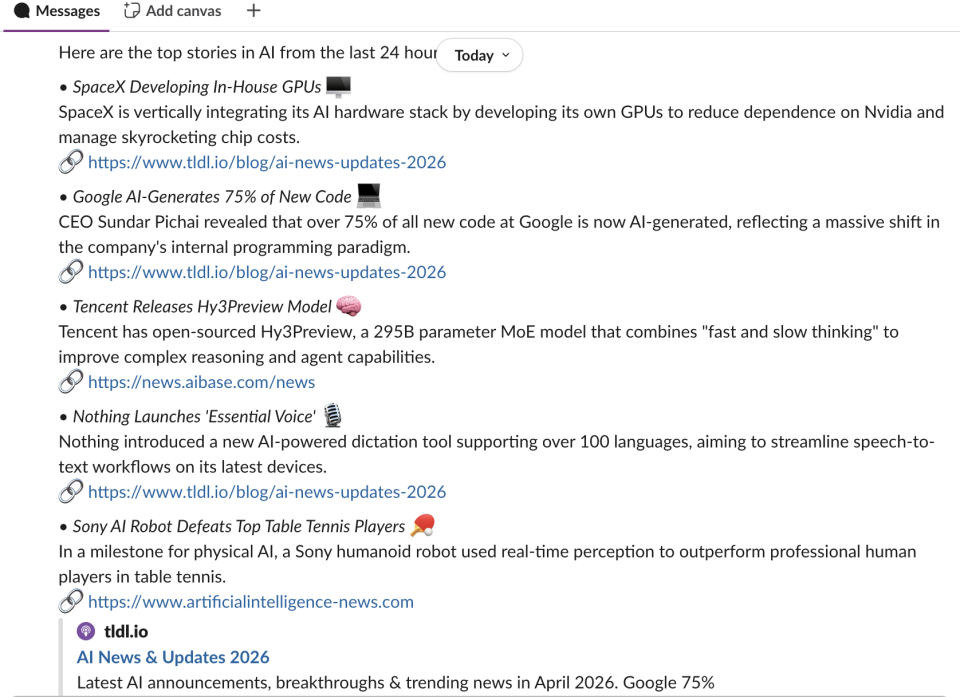
A user configures a daily AI news digest: “Every day at 11:00 AM, gather the latest AI news from the past 24 hours. Summarize the top 3–5 stories with a headline, a 1–2 sentence summary, and a source link. Format it for Slack with bullet points. Post it to #ai-news.” The agent runs autonomously on schedule, searches the web, compiles the digest, and posts it to the real Slack channel. The team arrives to a compiled report, not generated text about what they could check, but an actual digest from real sources. Cron jobs persist across restarts, with per-user timezone detection so schedules run at the right local time.
Multi-Channel Messaging
A user texts the agent on Telegram from their phone: “Check if the data pipeline finished.” The agent reads the workspace, checks the output, runs a script, and replies: “14,231 rows. Report saved.” A colleague @mentions the same agent in Slack: “What were the top errors in yesterday’s report?” Same workspace, same files, different surfaces. Conversation history stays isolated per channel so neither user sees the other’s chat.
Coding Agent Delegation
A developer says: “Clone our API repo. The /users endpoint returns 500 on unicode emails. ”Find the bug, fix it, add a regression test, run the suite, show me the diff.” OpenClaw delegates to the configured coding agent (OpenCode by default, upgradable to Claude Code or Codex via the BYOK page). The sub-agent clones, searches, fixes, tests, and returns a clean diff. Or the developer opens the terminal and runs claude, codex, or opencode interactively for pair-programming in a browser tab.
Full-Stack App in a Conversation
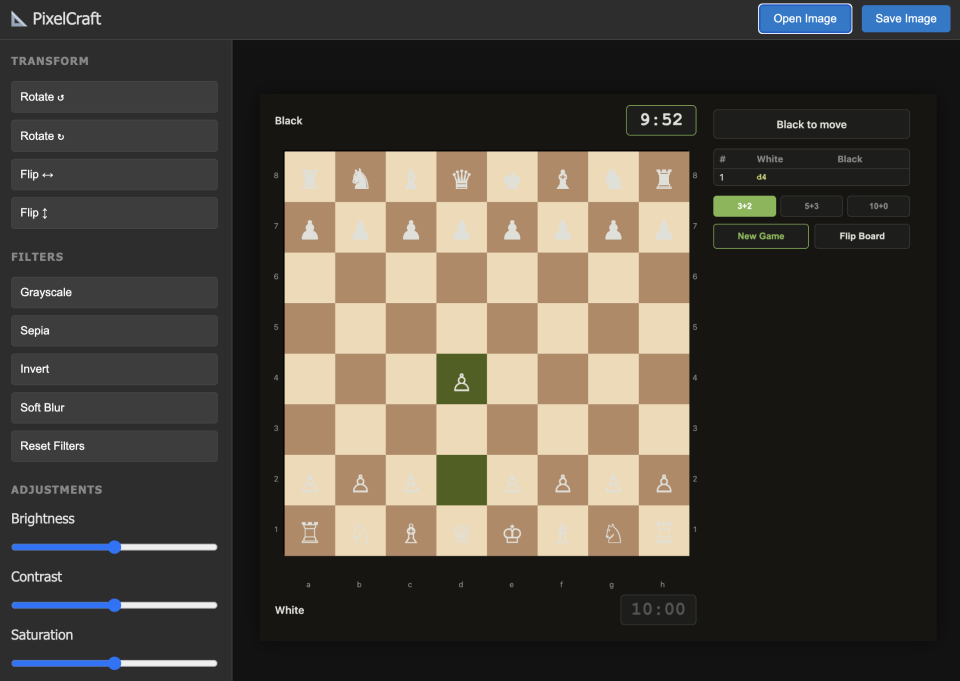
A user asks: “Design and implement a competitive chess game with move validation, animated pieces, check/checkmate indication, and a blitz timer.” The coding agent writes the full application (Flask backend, Canvas-based frontend with piece animation, legal move highlighting, and tournament time controls), starts the server, and returns a live URL. The user clicks and is playing chess in the browser.
Task Delegation from Messaging
A manager messages the agent on Slack: “Pull last quarter’s sales data from the shared drive, calculate month-over-month growth, and put together a summary with charts.” The agent reads the files in the workspace, runs a Python script, generates the visualizations, and posts the result back to the Slack thread. A field researcher sends a photo to the agent on Telegram: “Translate the text in this image and add it to the research notes.” Same workspace, same agent, different surface. The user never opens a browser. The agent becomes a persistent assistant reachable from wherever the user already works.
Enterprise Security Audit
An engineer signs in via corporate SAML, adds a GitHub token, and asks: “Search our infrastructure repo for all Terraform modules that create IAM roles. List each role, its permissions, and flag any with AdministratorAccess.” The agent queries GitHub, reads each module, and produces a structured audit. All within the cluster. Corporate data never leaves the VPC.
The 200-Workspace Weekend
A hackathon organizer deploys on Friday. Saturday morning, 200 participants sign in with Google. Each gets an isolated workspace within a minute. At 3am, idle workspaces shut down quietly. Sunday morning, participants return to find everything exactly as they left it. The infrastructure is invisible. The agent is the interface.
Security Model
The single most important difference between running OpenClaw locally and running it in the sandbox: the user’s real filesystem is never exposed.
On a laptop, the agent operates directly on your machine. Your files, credentials, and source code are all within reach. If something goes wrong (a bad prompt, a malicious plugin) the damage hits your real data. In the sandbox, the workspace is a disposable cloud volume with nothing of value except what the user explicitly put there. The worst case is bad files that can be deleted and re-provisioned in 60 seconds.
This makes the sandbox more permissive than a local install while being more secure in practice.
Every user is isolated. Each user gets their own workspace with separate compute, separate storage, and separate secrets. User A’s conversations, files, and API keys are never visible to User B. 93 automated tests verify this isolation continuously.
Locked-down containers. Workspaces run without admin privileges, on a read-only system, with no access to other services in the cluster. Users can only write to their own workspace folder.
Controlled network access. Workspaces cannot reach the open internet. Outbound connections are restricted to an explicit list of approved services: the AI model server, specific API providers, and nothing else.
Tamper-proof configuration. The security settings for each workspace are generated by the platform and protected by a cryptographic hash. If anyone modifies them (accidentally or deliberately) the system detects the change and restores the original settings automatically.
Tested, not just documented. The security rules are defined in code and verified by 93 automated tests. The test suite header reads: “Any regression here means user data can leak across workspaces.” Security claims are enforced by tests, not by trust.
Honest scope. The sandbox is designed for organizational use: employees evaluating a tool on trusted infrastructure. For hosting mutually untrusted users on the public internet, you would want stronger isolation. The platform includes options for that, but the default is tuned for internal deployment.
Technical Contributions
1. Making Single-User Software Work for Many Users Without Modifying It
This is the most generalizable idea in the project. Many open-source AI tools are built for a single user: one person, one machine, no concept of accounts or boundaries between users. The usual path to deploying them for a team is to fork the codebase and add authentication, user isolation, and access controls by hand. That creates a maintenance burden that grows with every upstream release.
The sandbox takes a different approach. Rather than modifying the software, it wraps it. A configuration file is generated automatically for each user and injected into their workspace. OpenClaw reads it normally, unaware it is running inside a shared environment. Every security control, every user boundary, every capability restriction is enforced without changing a single line of OpenClaw’s source code. When OpenClaw releases an update, you change one version number and redeploy. No custom patches, no merge conflicts, no compatibility work.
What makes this repeatable is a set of patterns that apply to any tool with a flexible configuration: automated workspace setup, per-user credentials, tamper detection, and authenticated routing. The rules live in one place and are enforced automatically, so the protections are maintained by the system rather than by documentation or convention.
The constraints of running at scale surface a less obvious contribution. Features like webhooks, scheduled tasks, and multi-channel messaging can’t be bolted on after the fact. They require the platform itself to handle routing, authentication, and lifecycle management on each user’s behalf. Building that infrastructure exercises the system under conditions that single-user installations never encounter, and proves that the configuration is expressive enough for organizational deployment without touching the source.
2. Progressive Capability Unlock via BYOK
The sandbox starts useful and becomes more powerful as trust grows. Out of the box, every user gets a chat interface, AI models served from UNU C3’s Apple Studio, terminal access, file management, scheduled tasks, and 700+ community skills. Both Claude Code, OpenCode, and Codex work against those models with no setup required. As users add their own API keys, capabilities unlock incrementally: web search, Slack and Telegram integration, GitHub access, and premium models from 19 providers. Each key simply opens the door to that service. There’s no admin approval, no restarts for model keys, and no all-or-nothing setup.
3. Automated Workspace Lifecycle
Workspaces provision on sign-in, scale to zero after 30 minutes of inactivity, and wake on return with all files, skills, and conversation history intact. Per-user timezone detection ensures scheduled tasks run at the right local time. The lifecycle is fully automated: sign in, use, walk away, come back. Everything is where you left it.
The infrastructure scales with demand, not with peak capacity. When a user signs in and no node has room, the Cluster Autoscaler launches a new spot instance; the workspace is ready in under two minutes. When the idle scaler evicts a pod after 30 minutes of inactivity and the node empties, the autoscaler terminates it within five minutes. Workspaces with scheduled tasks also scale to zero when idle. A wake scheduler monitors cached cron schedules and automatically provisions the pod three minutes before the next job is due, so cron jobs execute on time without keeping pods alive 24/7. At cluster scale with 300-400 registered users, most are idle at any given moment, so the workload pool stays at 5-7 nodes and infrastructure costs remain under $450/month.
4. Enterprise Authentication for a Tool That Has None
OpenClaw is a single-user tool that trusts whoever connects. The sandbox adds a complete sign-in layer: GitHub OAuth, Google OAuth, Microsoft OIDC, and corporate SSO (SAML 2.0), with multiple providers active simultaneously. Users sign in with their existing work identity and get a workspace provisioned automatically. Optional invite codes allow gated access for controlled rollouts. This is the layer that makes organizational deployment possible.
5. Connecting the Outside World to a Workspace That Isn’t Always On
User workspaces shut down when idle and only wake when needed. That creates a gap: how do external events (an incoming email, a form submission, an automated alert) reach the agent when it isn’t running?
The answer is a lightweight layer that runs independently of any individual workspace. As a concrete example: a small cloud function monitors a Gmail inbox and forwards matching emails to Slack in real time. The forwarding rules are managed conversationally. A user says “only forward emails related to AI research,” and the agent configures the filter. No settings page required.
The agent doesn’t need to be running to receive emails. It only needs to wake up to change what gets forwarded.
The pattern generalizes cleanly. Routine, predictable work (forwarding, filtering, notifying) runs in the always-on layer. When something requires judgment (summarizing a submission, triaging an alert, deciding where to route a message) the workspace wakes up and the agent takes over. Deterministic work stays lightweight; anything requiring intelligence goes through the agent.
What Comes Next
AI agents can already write code, search the web, send messages, and run on a schedule. The capability is here. What is missing, for most organizations, is the infrastructure to put that capability in people’s hands safely and at scale.
That is what the sandbox provides: sign in, get a workspace, start working. No local setup, no security compromises, no fork to maintain. The entire platform wraps an unmodified upstream project, so every OpenClaw update is one version number change away.
The teams that figure out this infrastructure layer will be the ones that actually deploy agentic AI across their organizations. We hope the patterns here (zero-fork multi-user deployment, bring-your-own-key progressive unlock, automated workspace lifecycle, testable security posture) are useful starting points, whether you are deploying OpenClaw or something else entirely.