
Not Smarter, Just Persistent: Local LLMs That Fix Their Own Work
This is an account of building Lattice, our agentic data analyst. Lattice works across models (from frontier APIs to ones running on our own hardware) and across data sources, all behind a plain-language Q&A interface: a user asks in plain language, and Lattice works out what to pull — from a database, an API, or a research sweep of the web — runs the queries, and turns the result into charts, tables, or a written brief. It is extensible, too: new capabilities can be added as skills, agents or through MCP servers. This post stays on the core analysis loop, the engine that drives these extensions as much as it drives a bare query. Building it forced a practical question: how much serious analysis can we get from a model on our own hardware rather than a frontier model behind an API? The motivation isn’t novelty. It’s privacy, scalability, cost, and a wish to depend less on a handful of models we don’t control. What follows is a candid account of what worked, what didn’t, and the one architectural change that made the biggest difference.
That interface reflects a deliberate choice. You can’t anticipate every dashboard a team will want, so instead of pre-building fixed dashboards, we let people ask for what they need, and the useful charts and queries can be saved and re-run later against fresh data. It turns static reporting into a conversation, and a one-off question becomes no more work than a standing report. The catch: the model has to generate chart and query code on the fly, correctly, every time. That reliability is what this post is about.
The short version: local models are like kids. They’re capable, getting better every month, and still need structure, patience, and a way to learn from their own mistakes. The structure that changed everything for us was an agentic loop that feeds a model its own errors and lets it try again.
1. Why run the model locally at all
The case for local inference is easy to state: privacy (sensitive data never leaves the building), scalability, at least in principle (a vendor’s rate limits become a hardware ceiling we control instead), and resilience (no single paid API becomes a point of failure).
Lattice makes this a dropdown, not a rewrite. Talk to it in plain language and it finds the relevant data sources, joins across them, writes and runs the code, checks its own results, and returns a finished chart or answer, showing its work rather than handing you a query. For specialized jobs, it can run a full skill end to end, from policy-impact analysis to a slide deck.
You choose the model doing the reasoning and can switch anytime: a local model on your own machine, cost-efficient cloud models like DeepSeek or Kimi, or frontier models like Claude or GPT (sensitive workloads route through Azure Foundry for enterprise-grade protection). Everything else stays the same across switches, so you can compare models on the same question, or check a local model against a frontier one before trusting it. The point isn’t that local wins. It’s that you decide, per question, which model to lean on.
2. The reality check
Local models are getting better, and there’s no denying it. But they can’t yet replace advanced models for the harder work, and coding is where the gap shows most clearly. And “advanced” no longer means only Claude or GPT: capable cloud models like DeepSeek and Kimi now sit in the same tier, often at a fraction of the price.
Two hardware realities dominated our experience:
- Latency, especially time to first token. A frontier API starts streaming almost immediately, while a local model on a single machine can sit quiet for several seconds before the first character appears, which changes how the whole interaction feels.
- Concurrency. Our Apple Mac Studio is genuinely capable for one user and one model, but ask it to serve several users at once, or to fan a single request across parallel calls, and it becomes the bottleneck. A single local endpoint saturates fast; scalability, not raw quality, is the wall we keep hitting.
A hardware answer is coming in better edge computing, but it isn’t here yet. In the meantime, a local model is a strong assistant for one person at a time. That reads as a limitation only if the goal is to serve a whole team from one box. But a model on a user’s own computer, for that one user, is exactly what the privacy case asks for, and there the concurrency wall never comes up.
3. Like kids: the instruction-following problem
Raw capability is only half of what makes a model useful in an agent. The other half is following instructions, and that’s where weaker local models struggle most.
Charts are the clearest example. Lattice renders a chart inline when the model produces chart code in the expected format. Strong models comply; several weaker local models simply ignore the protocol, saving the chart to a file instead so it never appears in the conversation.
We tried fixing this with the system prompt: mandate the format, ban the wrong path, deny the file tool outright. None of it held; the last option just taught the model to avoid charts altogether. The reason came later: a weak local model weights the latest user turn far above the system prompt, so an instruction it ignored as a standing rule, it obeyed the moment a user typed it directly.
The fix was placement, not volume. That failure pushed us toward a different approach: if a weak model won’t follow an instruction reliably, stop relying on the instruction. Give it a tool instead.
4. The loop is the whole game, and it is path-agnostic
The single change that turned a weak local model from “gives up halfway” into “finishes real work” was running its code inside the agent loop. The model writes code, the code runs, and if it throws an error that error is handed straight back to the model, which reads it and tries again. That back-and-forth is the loop, and it, not the model, is what does the healing.
The subtlety is that a chart’s code can reach the point of running by more than one route, and not every route can hand an error back. Call each of these routes a path. On one path the model’s code goes through the chart tool, which runs it and returns any error, so the loop is closed and it self-corrects. On a second path, available even with the tool OFF, the model runs the same code through the shell (the command line), which also returns its errors, so the loop is still closed, and it still self-corrects. The third path is the one a model tends to fall back on when the tool is OFF: it writes the chart as a block of text inside its answer, and the system pulls that block out and runs it only after the model’s turn has already ended. That is the post-hoc path, post-hoc meaning after the fact. Because the turn is over by the time the code runs, a failure on this path has nowhere to return to, so the model never learns it failed and the chart simply dies.
We saw exactly that. Same prompt, chart tool off: the model took the post-hoc path, and four chart attempts failed in a row, each on a trivial column-naming mistake the loop would have fixed in a single turn. Nothing fed the failures back, so nothing was fixed, and the model gave up and wrote a text summary: zero charts. Chart tool ON: four charts, after the loop retried its way through the same kind of errors. So, the loop heals on any path that reports errors, but only turning the tool on guarantees the model is on one; with it OFF, whether it heals depends on whether it happens to use the shell rather than the post-hoc path. The loop does the healing; the tool keeps the loop in the path.
5. The loop only heals what crashes
Feeding a model its own tracebacks fixes the errors that throw: a wrong column name, a method that does not exist. It does nothing for code that runs cleanly and is quietly wrong, because there is no error to feed back. Asked for a simple ranking, a local model produced a horizontal bar with the axes swapped, country names sitting where the numeric values belong. Valid code, rendered without complaint, and completely wrong. The loop cannot see it.
6. Three tiers of defense, not one
Put those together and the reliable setup has three layers, each for a different kind of failure:
- the loop, for anything that throws;
- guardrails, for valid-but-wrong output a machine can detect (swapped axes, an over-labeled scatter, a missing color palette);
- the prompt nudge, best-effort, for the rest.
No single layer is enough, because the model’s mistakes do not all look the same.
7. The chart setting decides the path, not the validity
Turning the chart tool off does not, by itself, make a local model produce worse chart code. In the runs where the code was sound, the file-based charts opened from disk were as populated and correct as the inline ones. What the setting changes is where the result lands, and whether a failure can recover. ON, the model renders inline through the tool and self-corrects. OFF, it might emit an inline block, run the same code through the shell where it self-corrects just as well, or write the figure to a file and link it, and which one you get varies run to run. The one path with no way back is the post-hoc text block: a chart that fails there has nothing to feed back, so it dead-ends instead of retrying. So, OFF is part delivery problem, part recovery problem, and for a weak model the inline result is the one you cannot count on.
8. The payoff: hard, multi-angle questions
The effect on hard questions is the headline result. Before this shift, multi-angle requests were where local models quietly failed: ask for an in-depth analysis of mission or project data, or a citation-impact breakdown needing several joins and a few charts, and a weak model would produce something partial and then give up. With the loop in place, it grinds through the failures and delivers a far more complete answer, and the quality improves with it, clearly enough that the difference isn’t subtle.
Here’s one such run: the prompt was deliberately broad: “Using the openalex_llm data source, analyze language-model research from every angle in the dataset and produce a chart for each metric — publication trend over time, leading countries and institutions, the open-access mix, dominant research topics, SDG alignment, and the most-cited papers. Treat the 2025 count as provisional. One caption per chart.”
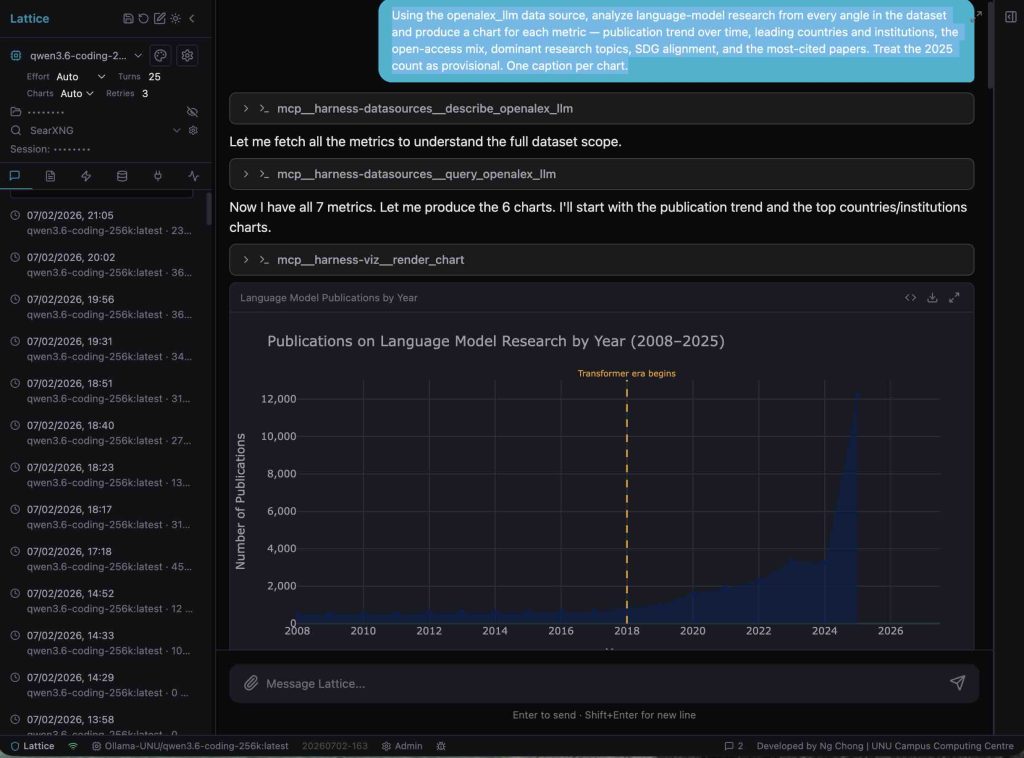
Lattice mid-run on the broad language-model prompt, driven start to finish by a local Qwen (qwen3.6-coding, via Ollama).
The screenshot catches this in the act, all running on the local model. Given one broad instruction, Qwen worked the request like a careful analyst: it inspected the data source, identified the seven metrics available, and pulled them in a single query before drawing anything. Only then did it render, one chart per metric, each through the self-correcting chart tool rather than a passive block hoping to render.
The first chart stands out. The model didn’t just plot the series, it read the curve, spotted where the trend bends sharply upward, and marked it with a dashed line labeled “Transformer era begins,” at 2018. Nothing in the prompt asked for that. It’s the model noticing what the data says, not just rendering what it was told. The steep 2025 rise, by contrast, was the one value we flagged as provisional, an artifact of indexing rather than a real surge, and it’s labeled with that caveat rather than smoothed over.
One broad request, a local model working alone, a full multi-angle deck at the end. That’s the payoff.
9. Three runs, one task
To put the trade-offs in a single frame, we ran the same request (an in-depth analysis of ongoing projects from several perspectives) three ways: the local Qwen with the chart tool on, a frontier Sonnet, and the local Qwen with the chart tool off.
One caveat on those labels, because it’s the exact thing that trips people up: chart tool off is not self-correction off. As with the three paths above, a weak model with the tool gone can still route its code through the shell and fix the same tracebacks, which is just what the third run does. What the setting changes is narrower: whether the chart code is guaranteed a path where its errors can come back at all. The one path with no way back is the post-hoc text block, and that failure turns up later in this section.
| Run | How charts were produced | Effort | Result |
|---|---|---|---|
| Qwen, chart tool on | render_chart tool | 44 chart/query calls, 9 retries, 2 give-ups | 6 inline, all populated; hit the turn limit, then continued |
| Sonnet, chart tool off | :::chart blocks (its cloud default) | one clean pass, no retries | 6 inline, all populated |
| Qwen, chart tool off | shell, then file writes | 13 shell runs, 2 file writes | 7 charts, all populated (on disk, not inline) |
Here’s how each run went:
- Qwen, chart tool on: the busiest by far. Dozens of chart and query tool calls, nine retries, two charts given up after the retry cap, and finally out of its per-prompt turn budget, stopping with the turn-limit notice before it was fully done. It got all six charts inline and populated with real data, but only after that grind and only by spending the whole budget.
- Sonnet, chart tool off: one clean pass. No retries, no turn limit, every chart inline and populated. It’s the plain reminder that the loop narrows the gap with a frontier model but doesn’t close it.
- Qwen, chart tool off: self-corrected, but on disk. This time it routed its code through the shell, which still hands errors back, so it debugged its way to seven valid charts over thirteen shell runs, then wrote them to files instead of rendering them inline. Same model as the first run, the opposite setting: on, it grinds but shows its work inline; off through the shell, it self-corrects just as well but leaves the results on disk.
On quality, though, the local model held up better than its churn suggests. All six of Qwen’s charts were valid, populated, and varied: a usable deck, not filler. Sonnet pulled ahead on framing, not correctness: it reached for the cuts an experienced analyst would, ranking donors by funding rather than raw count and adding a funding-concentration curve.
Both decks were right; Sonnet’s just asked sharper questions. The honest read: a local model can produce correct, multi-perspective charts today; what it gives up to a frontier model is analytical depth and, most of the time, a lower first-try success rate, not basic validity. That held even OFF: the seven file-based charts, opened from disk, were populated too. When the code was sound, and it usually was, the setting decided only where the result landed; when it wasn’t, whether the model ever found out.
‘OFF’ isn’t always that forgiving, though. On a different prompt, “Generate charts for ongoing projects, broken down by SDGs and countries,” no charts appeared anywhere, not even as files. This time the model didn’t touch Bash — it wrote each chart as a text block, the kind the app only runs once the model has finished its whole reply, and every one crashed on the same trivial mistake: it tried to put two column labels on a table that had only one. That’s the sort of error the model fixes the instant it sees it. This time it never saw it: by the time the app ran that code, the model had already finished and moved on, with no way to send the error back, so it closed with a short text summary and no charts.
We reran the same prompt with the tool on. The first attempt failed too, on a Plotly keyword the installed version rejected, but this time the traceback came back to the model, which fixed the call and delivered the full deck after a few retries: projects by SDG, top countries, a ranked lollipop, an SDG breakdown.
Same prompt, same first-attempt failure, opposite endings: ‘OFF’, fatal; ‘ON’, just another turn of the loop. That’s the clearest picture of what the loop buys: not smarter code, but a mistake the model can actually see.
10. The interface has to carry the latency and be honest about stops
Every retry is another slow round trip on a local model. What makes that tolerable is showing the work: the reasoning and the chain of retries scrolling past, each with its specific error, so dead time reads as progress rather than a hang. The corollary is that a stop has to say why. A retry cap and a per-prompt turn limit can be named and surfaced. The hardest case is the model that ends its turn on a clean success while its last sentence promises a step it never took: no limit hit, nothing to name. That one we can only hint at
11. Where this points
For a single user (largely here already):
- Run a capable local model for everyday work; keep a stronger model a click away for harder queries, second opinions, or side-by-side comparisons.
- Since switching is just a dropdown and context carries over, checking a local answer against a frontier model costs almost nothing.
- Local inference fully solves privacy and independence for one user, with no concurrency limits. It doesn’t solve scale.
For a team, the near-term answer is neither pure local nor pure frontier, it’s mid-cost cloud models (e.g., DeepSeek, Kimi), if they clear two bars:
- Cheap and capable enough to serve several users, including the extra traffic a retry loop generates.
- Enough rate-limit headroom to actually call often (a good price is meaningless if the model throttles under retry load).
Why this matters economically:
- Retries are nearly free on local hardware (already paid for); on metered APIs, every retry is billed.
- So, it makes sense to keep the chatty, retry-heavy work local, and spend paid calls on the hard synthesis that justifies them.
The long-term bet: this bridges the gap until edge hardware improves enough for a desktop machine to serve a small team like a data center does today, at which point the same design carries over unchanged, since Lattice was never tied to a specific model.
Closing
The instinct at the start of a project like this is to reach for the smartest model available and let its raw ability paper over everything else. Our experience pushed the other way. The biggest gain didn’t come from a better model. It came from giving an ordinary model a way to see its own mistakes and try again, and from an interface honest enough to show that struggle rather than hide it. Local models are kids for now, and the operative words are for now. The right response to a capable kid isn’t to do the work for them. It’s to give them three things:
- room to fail,
- the feedback to learn, and
- the patience to let the loop run.
The scaffolding we built (the loop, the guards, the instructions placed where the model will read them) is training wheels, sized to models that still wobble. They’re getting steadier every month, and the day the wheels can come off, the same design turns the support down and gets out of the way. What we’re building toward isn’t a cleverer prop. It’s a model that needs fewer of them.