
The humble slide deck hasn’t changed much since the 1990s. We still treat presentation design like a digital overhead transparency, rigid rectangles with fixed dimensions. A compelling alternative is quietly gaining traction.
As the demand for dynamic data storytelling and interactive content grows, a modern alternative is gaining serious traction: web-first presentations built from HTML, CSS, and JavaScript. Constructing a presentation entirely in a browser unlocks immense design and functional capabilities, but it also introduces real-world workflow friction that no amount of clever CSS can fully resolve.
The question for most teams is not whether the web stack is technically superior. It largely is. The question is whether that superiority translates into practical, daily value for people who need to edit a slide five minutes before a board meeting. The answer depends entirely on who is asking.
One factor is accelerating this shift significantly: AI-assisted coding. Tools that generate and refine HTML, CSS, and JavaScript from plain-language instructions have meaningfully lowered the barrier to entry. A designer or strategist who would never have opened a code editor can now describe a layout, a data visualization, or an animation in plain English and iterate toward a working result in minutes. The web stack’s historical gatekeeping. You needed a developer to build anything serious — is eroding fast. For many teams, this changes the calculus entirely.
Part I — The HTML Advantage
An Infinite Canvas, Total Control
Shifting from a presentation application to a browser is like moving from a sandbox to an open landscape. Because HTML pages leverage the full rendering power of modern web engines, they unlock capabilities that standard presentation software simply cannot match — not as workarounds, but as native, first-class features.
Superior Layout & Fluid Styling
PowerPoint constrains you to a fixed aspect ratio, typically 16:9. HTML presentations use advanced CSS systems like Grid and Flexbox, allowing content to scale, wrap, and flow flawlessly across any display surface, from a 4K auditorium projector to a smartphone screen. You also gain pixel-perfect typography bound not by system-installed fonts but by the full breadth of the web font ecosystem.
Nonlinear & Enhanced Navigation
Traditional slides are strictly linear: Slide 4 must follow Slide 3, always. Web-first decks can implement custom routing, dynamic indexing, and even tree-structured navigation. You can build presentations where the audience can “zoom out” to a topic overview map or “drill down” into sub-sections based on live discussion, a fundamentally different relationship between presenter and content.
Living, Breathing Interactivity
This is the ultimate competitive edge. HTML allows embedding live data visualizations, interactive calculators, 3D WebGL models, real-time API feeds, and clickable dashboards directly into the slide flow. A financial presentation where investors can adjust assumptions and see outcomes update instantly is not a fantasy.
Rich, Generative Visuals
SVG, Canvas, WebGL, and CSS animation open a visual vocabulary that simply has no equivalent in PowerPoint. Animated data charts that sequence as you speak, particle effects, morphing infographics, and generative art, all are achievable as lightweight, scalable vector graphics rather than embedded raster images that pixelate on a high-DPI projector.
Part II — The PPTX Advantage
Standardized, Scalable, Simple
While HTML sounds categorically superior, PowerPoint remains the corporate standard for compelling reasons that go beyond nostalgia. Ignoring its genuine strengths leads to operational friction that can undermine even the most beautifully rendered web deck.
Frictionless Collaboration
Almost everyone in a business context knows how to edit a .pptx file. When a marketing lead needs to fix a typo or a nervous executive wants to swap a chart five minutes before a pitch, they can do it instantly, without help. An HTML pipeline typically requires developer intervention, a local server environment, or a complex content management setup that most non-technical colleagues cannot navigate independently.
Zero-Configuration Portability
A.pptx file is entirely self-contained. It packages fonts, images, and media together in a single archive and runs reliably in a dedicated application without a network connection, a running local server, or any concern about browser version compatibility. Web decks can fail silently due to broken asset paths, missing servers, CORS restrictions, or reliance on a CDN that happens to be unreachable in a hotel conference room.
Institutional Familiarity
Templates, slide masters, presenter notes, speaker view, and the .pptx format itself are woven into the fabric of how organizations share, store, and review presentation content. Procurement, legal, and compliance teams know how to handle them. Version control via SharePoint or Google Drive integrations is mature and widely understood. The web stack offers no equivalent out of the box.
At a Glance: HTML vs. PowerPoint
| Capability | HTML / Web | PowerPoint (.pptx) |
|---|---|---|
| Layout flexibility | Unlimited, responsive Edge | Fixed aspect ratio |
| Typography control | Full web font ecosystem Edge | System & embedded fonts |
| Interactivity | Native, unlimited Edge | Macros, limited |
| Data visualization | D3, WebGL, Canvas Edge | Built-in chart types |
| Offline portability | Requires server / setup | Fully self-contained Edge |
| Non-technical editing | Requires code knowledge | Universally familiar Edge |
| Version control | Git-based Depends | SharePoint / Drive |
| Visual fidelity at output | Pixel-perfect, vector Edge | Good, raster images |
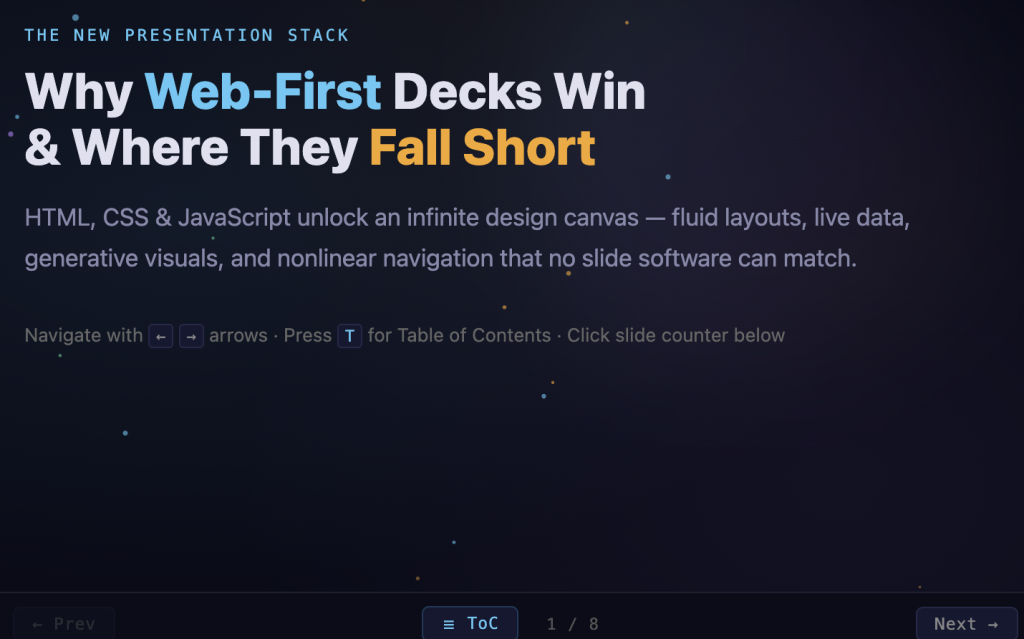
See an interactive demo here: HTMLasPPT
Part III — The Hybrid Blueprint
The Best of Both Worlds
Here is the insight that dissolves the apparent dilemma: you do not have to choose between the raw power of the web and the universal compatibility of PowerPoint. The modern hybrid workflow threads the needle by using browser-based automation as a compilation step.
The principle is straightforward: design in the medium that gives you the most creative control, then export into the medium that gives you the most distribution reach. Build in HTML. Distribute in .pptx.
The hybrid workflow pipeline
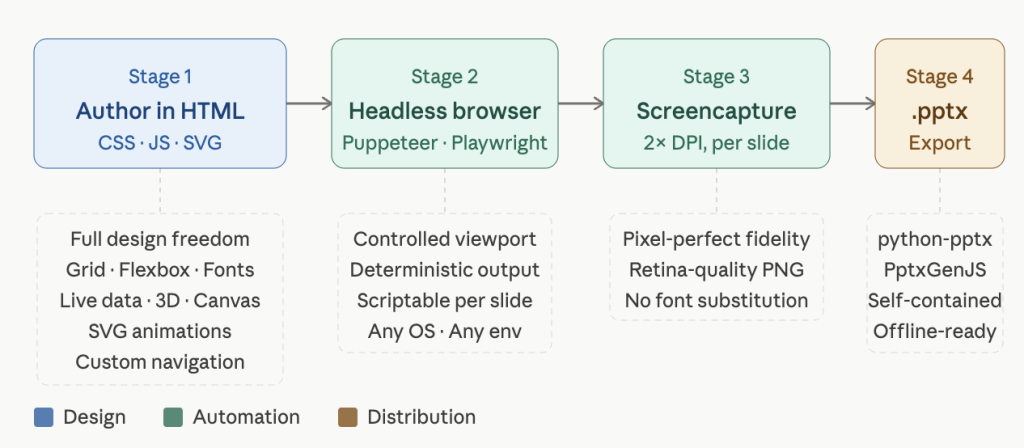
Step 1 — Build Fluidly in the Browser
Author your presentation using modern web tools — Reveal.js, Marp, or a custom HTML template. You have access to the full CSS and JavaScript ecosystem: perfect grid layouts, SVG animations, custom fonts, live data. This is your master design environment. Every pixel is yours to control.
Step 2 — Automated High-Fidelity Capture
Once the master design is finalized, a headless browser (Puppeteer, Playwright, or similar) programmatically navigates each slide or view state and takes a full-resolution screenshot. Because the capture runs in a controlled environment at a specified viewport size, every export is deterministic — the same input always produces the same pixel-perfect output, regardless of operating system or screen density.
Step 3 — Compile to Native PPTX
Those ultra-crisp screenshots are then assembled into a standard PowerPoint file using a library such as python-pptx or PptxGenJS. The resulting deck opens natively in PowerPoint or Keynote without any special software, server, or browser. Your custom typography, grid layout, and rich visuals are preserved faithfully as high-resolution slide images.
The Result: Impeccable Design, Frictionless Distribution
The final deck carries the design DNA of a custom web build, precise typography that won’t reflow, pixel-aligned layouts that won’t shift, and visual richness far beyond the native PowerPoint toolkit, all wrapped in a self-contained .pptx that anyone in the organization can open, share, and present from any machine.
The web stack and the office suite are no longer opponents. One designs. The other distributes. Used together, they represent the current ceiling of what presentation craft can achieve in a standard corporate pipeline.
The traditional slide deck hasn’t changed much since the 1990s. With a hybrid approach, it doesn’t have to and neither do the workflows built around it.
Key Points
Fixed canvas: PowerPoint locks you to one aspect ratio. HTML adapts to any screen.
Retina capture: Headless browsers screenshot at 2× DPI, preserving every detail.
Zero friction: The exported .pptx needs no server, browser, or special software to open.